
ddlgficaecdmmddmjmnhcmlidjokcijd

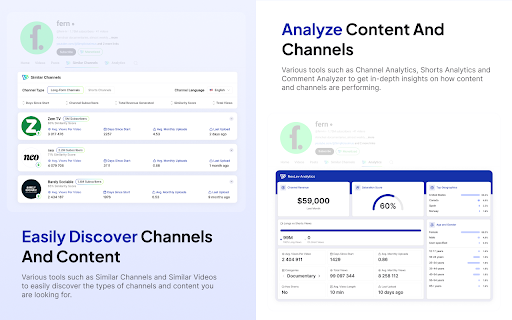


An extension that turns your YouTube into a tool for creators. Its packed with features that can speed up your content creation process significantly. As well as help you come up with better video ideas, and manage your channels better. + Find similar channels in a niche & see their statistics + See shorts channel analytics in the shorts feed + Combine multiple channels' analytics into one overview & dashboard + View advanced metrics like average views, subscriber counts, outliers, views per hour, & more + Preview thumbnails + Take beautiful screenshots of videos to share online + Advanced filter tools for search, home page, and subscription feed (e.g., filter search by dates, view counts, channel subscriber counts & more) + Take screenshots of frames inside videos + Download thumbnails + Easily copy and paste transcriptions + Analyze comment section sentiments with a single click + Calculate your net profit inside your channel's dashboard + See channel's average views & audience demographic data + Check monetization status for channels + & many more! Note: Monetization status checks and audience saturation scores are estimations and, although very accurate, are not 100% precise. There are some cases and channels where they might not function as expected. If you think it gives wrong results for particular channels, please reach contact@nexlev.io for feedback. We are happy to improve accuracy for particular cases!

YouTube Transcript Generator
Use this YouTube Transcript Generator tool as your transcriber and youtube to text converter. Transcribe video to transcript. 🔥 Step into the realm of transcription with our Youtube transcript generator chrome extension, your indispensable tool for effortlessly convert youtube to text! 🎬 💡 Are you scouring the internet for a reliable and free Youtube video transcript generator? Look no further! Our youtube transcript generator is here to revolutionize your watching and studying experience, offering free and fast service. 1. Get started by installing the YouTube Transcript Generator to streamline your transcription workflow. 2. With just a few clicks, generate transcripts from videos effortlessly, saving you time and effort. 3. Need to access transcripts later? Simply convert youtube video to text and then copy youtube transcript for future use. 1️⃣ Click the "Add to Chrome" button to install the extension seamlessly into your browser. 2️⃣ Navigate to the video you wish to transcribe to text. 3️⃣ Initiate the transcription process by clicking on the extension icon. 4️⃣ Sit back and relax as our tool works its magic, delivering accurate transcripts in record time. - Get text from youtube transcriber effortlessly: Immerse yourself in the world of seamless education as you easily convert spoken content into written text with our lightning-fast transcription technology. - YouTube Transcriber: feel the productivity as you get youtube to text results, allowing you to extract key insights and create concise summaries for streamlined content consumption. - Download YouTube Transcripts for Free: save your transcriptions for future reference, analysis, or sharing - all at the convenience of a simple download. - Convert YouTube to Text easily: experience the magic as any video is transformed into text with just a click. Harnessing the power of cutting-edge algorithms, our youtube transcript generator transcribe youtube video quickly and accurately with just a few simple steps. Install the Youtube transcript generator, choose a desired video, and let our tool do the rest. Our youtube transcript generator boasts an array of functionalities, including the ability to transcribe YouTube videos, download transcripts in various formats, and more. Whether you're a content creator, researcher, or student, our instrument caters to your transcription needs with precision and efficiency. ➤ Seamless Integration: Effortlessly transcribe videosdirectly from your browser with our extension's seamless integration. ➤ User-Friendly Interface: Enjoy a smooth process with our extension's user-friendly interface, designed for maximum convenience. ➤ Accurate Transcriptions: Trust our tool with unparalleled accuracy, ensuring every word is captured with precision. ➤ Time-Saving Automation: Boost your productivity with our youtube transcript generator's automation features, eliminating the need for manual transcription and saving you valuable time. ➤ Free Usage: Access our product's full range of features at no cost, ensuring accessibility for all users regardless of budget constraints. 📌 How accurate are the transcriptions made by the it? 1️⃣ Our product prides itself on delivering transcripts with unparalleled accuracy, leveraging advanced algorithms for precise results. 📌 Can I download youtube transcript generated by the app? 2️⃣ Absolutely! Our instrument allows users to download transcripts by copy youtube text for convenient access and sharing. 📌 What browsers does YouTube Transcript Generator support? 3️⃣ Currently, the tool is compatible with Chrome browsers, with plans to expand support to additional browsers in the future. 📌 Are you looking for a reliable online Youtube transcript generator? 4️⃣ Look no further! Try it today for fast, accurate, and hassle-free transcription from any video!

Creator Dashboard
A customizable dashboard and analysis tools for YouTubers. Your YouTube command center. Plan content, track competitors, analyze thumbnails, and stay productive, all from your new tab. Creator Dashboard is a customizable YouTube dashboard and toolkit. It replaces your new tab with a creator-focused workspace and adds powerful YouTube analysis tools directly into your browser. Whether you're growing a YouTube channel from scratch or managing an established one, Creator Dashboard gives you the YouTube productivity tools you need without leaving your browser. ⚡ Free to use: Simply connect a YouTube API key (guided tutorial displays after installation...it sounds complicated but it's easy to setup). Set it once and you're done. 🔥 Customizable YouTube Dashboard: Choose light or dark mode, set image or color backgrounds, and make it yours. Upload your own wallpapers or browse the built-in gallery. Sort or disable widgets to create the perfect layout for your YouTube workflow. 🔥 YouTube Content Planner & Pipeline: See your upcoming YouTube content at a glance and track your progress from idea to published video. Know exactly what to work on next without opening another app. 🔥 YouTube Channel Stats Widget: View your YouTube subscriber count, video count, and total views at a glance. Quickly jump to YouTube Studio, your analytics dashboard, live stream dashboard, or community tab. 🔥 YouTube Competitor Tracker: Monitor up to 18 YouTube channels and see when they publish new content. Study upload patterns and stay ahead of competitors in your niche. 🔥 Quick Links Dock: Jump to your favorite social platforms, YouTube creator tools, and resources in one click. Includes color-coded visual categorization for fast navigation. 🔥 Creator To-Do List: Track your YouTube tasks and mark them off as you go. Stay focused on what moves your channel forward. 🔥 Pomodoro Timer for Creators: Use timed focus sessions and short breaks to power through video editing, scripting, and thumbnail design without burning out. 🔥 YouTube News & Education: Stay current with official YouTube creator news and educational resources.. 🔥 Daily Quotes: Get daily motivational quotes to keep you motivated and focused. 🔥 NEW FEATURE: Embed your thumbnails into YouTube home pages and suggested videos to make sure they stand out before publishing. 🔥 90-Day YouTube Upload Analysis: Analyze any YouTube channel's last 90 days of uploads and see their top 10 performing videos. Understand upload cadence, content strategy, and what's resonating with their audience. 🔥 YouTube Comment Screenshots: Capture any YouTube comment with one click and edit it in the built-in comment editor. Perfect for collecting testimonials, creating social media content, or saving viewer feedback. Hover over any comment to see the camera icon. 🔥 YouTube Video Screenshots: Capture any frame of a YouTube video with one click using the button built into the YouTube player. Screenshots match your player resolution for crisp, high-quality images. 🔥 YouTube Thumbnail Comparison Tool: Compare your YouTube thumbnails against top performers in your niche. Every thumbnail on YouTube gets an A|B button so you can see how yours stack up and learn what grabs viewer attention. 🔥 YouTube Video Analytics Sidebar: See view-to-like ratio, view-to-comment ratio, video tags, title character count, and a thumbnail preview in the sidebar of every YouTube video. Understand what's working at a glance. 🔥 Opus Clip Integration: Send any of your YouTube videos to Opus Clip for AI-powered short-form clipping with one click. Who Creator Dashboard Is For: ✅ YouTubers looking for YouTube thumbnail analysis and competitor tracking tools ✅ Anyone growing a YouTube channel who wants analytics, planning, and productivity in one place 📌 Note from the developer: Thanks for taking the time to check out this extension. I'm a YouTuber like you so I built this originally for myself and it ended up turning out nice so I wanted to make it available for others. I'm open to feedback so if there is anything I can do to make it better for you let me know. (4/7/26) Creator Dashboard 1.7.2 Update - NEW FEATURE: Embed thumbnails into YouTube. - Minor bug fix for the channel connection in the dashboard. (3/24/26) Creator Dashboard 1.7 Updates - NEW FEATUE: Video screenshots. - Added option to mute colors in icons in the Quick Launch Dock. - Added optional colored dots/dashes to Quick Launch Dock for visual categorization. - Fixed thumbnails using screenshots not being fetched properly in the thumbnail comparison tool. - Fixed bug that wasn’t allowing light mode to work properly in the dashboard - Added light mode to the video info box on YouTube watch pages - Added Velio and CreativeFuel to the Link Dock options list - Added widget background opacity to allow for deeper customization - Added option to turn dates off in the Content Pipeline settings - Redesigned the settings panel to make it more intuitive (and less ugly…lol). - Fixed minor bug in RSS feed (Creator News & Education area) - Added drag and drop sorting to Widget Settings in the settings panel. - Added drag and drop sorting for the link order in Dock Settings. - Added drag and drop sorting to Channel Monitor. (1/24/26) Creator Dashboard 1.6 updates: - Minor bug fixes - Added title copy button to 90 day analysis - Added large thumbnail hover to 90 day analysis - Added title character count to watch page sidebar panel - Colored border option added to comment screenshots (11/27/25) Creator Dashboard 1.4 updates: - Added comment screenshot feature. - Added button to dashboard to quickly jump to comment section in YouTube Studio. - Added Syllaby and Vubli to the creator tool list. - Added export/import feature to backup or share settings. - Minor bug fixes and design updates.

TubeX.Chat: YouTube Summary and Chat with AI
Integrate the power ofClaude and Google Translate into your YouTube, making it a great tool for learning foreign languages This is an open-source YouTube plugin based on Claude, you can have the ability to process videos with AI. This will greatly enhance your learning and work efficiency on YouTube. Its powerful translation capabilities will help you overcome language barriers between different videos. The built-in word translation feature will make it easy for you to learn a foreign language. In general, it can help you with the following tasks: 1. Export video subtitles ✅ 2. Real-time translation of subtitles ✅ 3. Command AI to generate the content about videos ✅

Youtube Highlighter & AI Summary - Web Highlights
Highlight & annotate YouTube transcripts. Create AI summaries and transform videos into organized, searchable notes & annotations. Transform YouTube into your study, research, and learning workspace. Extract transcripts, sync with playback, jump by timestamps, organize with tags, and generate AI summaries of key insights — all in one tool. 🎥 YouTube Transcript Highlighter — One‑click button in the player or extension icon ⏱️ Time‑Synced Playback — Click transcript lines to jump to exact moments 📌 Video Pinning — Keep the player visible while reviewing the transcript 📝 Notes & Tags — Add notes to highlights and organize by custom tags 🤖 AI Summary — Short, medium, or long summaries of any video 💬 AI Chat - Our AI understands the full context of the video, so you can chat with it and ask any question. 🎨 Multiple Highlight Colors — Color‑code concepts, quotes, and action items 🔄 Auto‑Scroll — Transcript follows video; toggle on/off anytime 🌍 Multi‑Language — Detects available captions and lets you switch languages 🌓 Reader Mode — Distraction‑free interface with light, dark, sepia, high‑contrast 🔍 Powerful Search — Find highlights and notes instantly across videos 📤 Export Options — Copy Markdown/HTML or export to Notion, Obsidian, Capacities, and other popular note-taking tools ☁️ Optional Sync — Use offline for free; enable sync via the web app 1) Open any YouTube video with captions 2) Click the highlight button in the player or the extension icon 3) The transcript opens in reader mode — start highlighting and taking notes 4) Click timestamps to jump to exact moments in the video 5) Generate an AI summary to capture the key takeaways 💡 WHY THIS EXTENSION? ✅ Purpose‑built for YouTube — Smooth transcript extraction and video synchronization ✅ Persistent highlights — Reopen videos and your highlights are still there ✅ Works offline — No account needed for core highlighting ✅ Unlimited AI summaries — No artificial limits ✅ Privacy‑first — Your data stays yours, always ✅ Help children learn - We proudly support the Save the Children charity and other great causes. 💡 PRO TIPS & GOOD TO KNOW 💡 ➡️ Toggle auto‑scroll to keep the current sentence in view ➡️ Click timestamps in your highlights to replay exact moments ➡️ Tag highlights (e.g., “TED Talk”, “Exam Prep”, “Marketing”) for fast filtering ➡️ Customize typography: font size, width, and line spacing ➡️ Switch themes: light, dark, sepia, or high‑contrast for long study sessions ➡️ Use the player button for the fastest launch into reader mode ➡️ Some videos may not have captions; captions are required for transcript features 🔐 YOUR PRIVACY MATTERS We believe your data belongs to you. ✔️ Your highlights, notes, and bookmarks are private by default ✔️ Nothing is ever sold or used to profile you ✔️ Secure sync and export, only accessible with your account We never use your data for advertising, lending, or unrelated purposes. By installing the extension or signing up with an account, you agree to Web Highlights Terms of Service and Privacy Policy which you can find here: https://web-highlights.com/legal/terms-of-service ❤️ This is a one-person project I’m building with love and late nights. I hope you enjoy using this tool as much as I do. Feel free to share your feedback with me:
