
cfgfeldkicaaialoekhhkehfgonjlcki


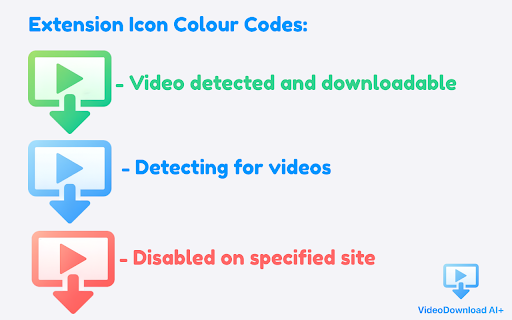
VideoDownload AI+ the next-generation smart video detector and downloader. VideoDownload AI+ is a smart, high-performance video detector and video downloader for Chrome. It automatically finds and captures HLS, M3U8, MP4, TS, blob URLs, and dynamically generated video streams — even on complex modern websites. 🔍 Smart Video Detection Uses an advanced auto-detection engine to identify video streams, segmented playlists, one-time URLs, and dynamic media requests in real time. Allowing you to download videos from your desired website. ⚙️ Automatic Stream Organization All detected video sources are automatically grouped into clean, easy-to-read lists. This makes it simple to preview videos, choose the correct quality, and start your video download without confusion. 🎛 Live, Adaptive Interface The interface updates instantly as you browse, providing real-time previews, hover tips, and guided stream selection that adapts to each site’s playback behavior. 🧠 Lightweight & Privacy-Focused Runs entirely locally — no cloud processing, no analytics, no tracking. Designed for speed, accuracy, and user privacy. Everything is handled locally for maximum speed, reliability, and privacy. Optimized for stability, efficiency, and uninterrupted video downloading. 🚀 Fast & Reliable Downloads Supports HLS playlists, segmented streams, MP4 files, and real-time capture, optimized for stability and efficiency. Ideal for users who want a powerful, clean, and reliable video downloader — without ads, clutter, or misleading claims. Note: Disabled on YouTube to comply with Google policies.

Video (M3U8/MP4/HLS) Downloader Assistant
Detect M3U8/HLS/MP4 links on any page, copy or open them in M3U8Player for instant playback/download Detect M3U8/HLS/MP4 links on any site, copy them or open in M3U8Player’s online tools for instant playback and downloads. Find, copy, and download video resources faster with Video (M3U8/MP4/HLS) Downloader Assistant — the official companion extension for m3u8-player.net. 🎬 Key Features • Multi-format detection – M3U8/HLS playlists plus MP4, WebM, TS, MOV, MKV direct links • One-click actions – open links in Online Video Downloader, HLS Player, or format converters • Auto-fill support – detected URLs are prefilled on the website’s tools for immediate playback/download • Real-time status – badge counter shows how many resources were captured on the current tab • Quick copy – copy any detected URL to share or process with other apps • Privacy-first – all sniffing happens locally; we don’t log, track, or send browsing data 🚀 How It Works Install the extension and browse to any page with video. The badge lights up when MP4, HLS, or other supported links are detected. Click the toolbar icon to see every resource with format labels. Use “Open Video Downloader” for direct links or “Open HLS Player” for M3U8 streams. The website opens with the URL already filled in so you can download or play instantly. ✨ Perfect For • Capturing M3U8/HLS live streams • Downloading MP4/WebM assets from developer tools • Testing or debugging streaming endpoints • Quickly sending links to M3U8 Player’s free online toolkit • Teams who need a lightweight sniffer without extra permissions 🔒 Privacy & Security • No analytics, tracking, or remote logging • Minimal permissions (webRequest, storage, alarms) • All detection logic runs in the browser’s service worker • Open documentation and clear privacy policy

StreamFab Video Downloader
Download videos effortlessly from your favorite websites StreamFab Video Downloader, a powerful browser extension, focuses on providing users with easy, professional online video downloading capabilities to ensure a stable and reliable download experience. It supports downloading up to 4K UHD videos in mainstream MP4 and MKV formats for smooth playback on all devices. Key Features: 1. Covers major video platforms like Dailymotion, Bilibili, TikTok, Twitter/X, Vimeo, plus various online courses and news sites 2. Supports up to 4K resolution video downloads 3. Supports audio tracks up to 320kbps 4. Download videos in MP4/MKV formats 5. Supports multiple audio tracks and subtitles; users can select languages, save subtitles as separate SRT files or remux them into the video 6. Automatically detects video streams and captures download tasks in real-time 7. Utilizes acceleration and multi-thread transmission to greatly speed up downloads 8. Built-in breakpoint resume and retry mechanisms to ensure success for large files and unstable networks 9. Supports bulk downloads of series/playlists and multiple parallel tasks to save time Technology and Privacy Commitment The extension uses a local secure component (Coapp) for stable parsing and downloading. All downloads and processing occur locally with no user data collected. Please follow the prompts to complete component installation after adding the extension. Important Notice: - Due to YouTube's privacy policy and Chrome Developer Program policies, videos from YouTube cannot be downloaded. You can freely use this extension on other websites. - Supports only videos compliant with standard streaming technologies; encrypted or non-standard streams are not supported. - Intended for authorized downloadable content only. Users must comply with site terms; developers assume no copyright liability.

Media Downloader
Brotwurst is your all-in-one solution for downloading media content from the web. This powerful Chrome extension makes it easy to detect and download videos, audio files, and other media content while browsing. Key Features: ✨ Smart Media Detection - Automatically detects media elements on any webpage - Supports various media formats including video and audio files - Works with streaming content (HLS support) 🚀 Advanced Capabilities - Shows file sizes before downloading - Supports multiple quality variants for streaming content - Fast and efficient downloads 💎 User-Friendly Interface - Clean, modern design - Responsive and intuitive controls - Smooth animations for better user experience 🛠️ Technical Features - Supports various media formats - HLS manifest parsing for streaming content - Efficient size detection using HEAD requests - Works across all websites How to Use: 1. Click the Brotwurst icon while on any webpage 2. View detected media files 3. Select your desired file 4. Click to download Privacy & Security: - No data collection - No ads or tracking - Open source for transparency Brotwurst is perfect for: - Saving educational content - Downloading permitted media files - Archiving your own content - Backing up media files Note: Please ensure you have the right to download any media content and comply with the website's terms of service and copyright laws. Support: For issues or feature requests, visit our GitHub repository or contact our support team. Make media downloading simple and efficient with Brotwurst!

Video Downloader for all websites Plus
Download videos easily from Facebook, TikTok, Instagram, Vimeo, Twitch, and more. Looking for a quick way to save videos from your favorite websites and social media platforms? This all-in-one Video Downloader lets you download video content—including clips, reels, and live streams—directly from popular sites like Facebook, Instagram, TikTok, and many others. Save your favorite moments in MP4 or WEBM formats for offline viewing anytime. ✔ Download from anywhere – Works with hundreds of websites and social networks ✔ Save in multiple formats – MP4 and WEBM supported ✔ Capture live streams – Record and download ongoing broadcasts ✔ Fast and simple – One-click download, no extra setup required ✔ Universal compatibility – Works across major platforms Facebook – Download videos from posts, pages, and even live streams Instagram – Save reels, stories, and video posts TikTok – Capture videos directly from feeds and profiles Twitch – Record and store live streams for later Vimeo – Save HD and full-quality videos from creators 💡 Many other websites are also supported—just try it and see! Add the extension to your Chrome browser Watch for the red download icon to appear when a video is detected Click the icon to start downloading or recording All videos are automatically saved to your browser’s default download folder. ✔ Simple and intuitive – Just click and save ✔ No sign-up or account needed ✔ Supports multiple formats and platforms ✔ Fast, secure, and free to use Whether you want to save tutorials, music videos, or live moments, this extension gives you a quick and reliable way to download and keep them forever. Start saving your favorite videos today – add the Video Downloader now!
