
cepnbdbhabaljgecaddglhhcgajphbcf

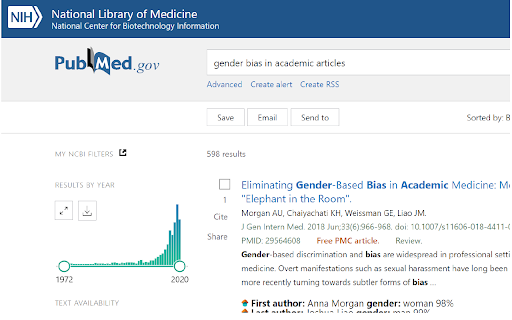
Adds probabilistic gender info to Google Scholar and PubMed searches In many fields, men and women are not cited at the level that one would expect given their prevalence in the field. One way we can help mitigate this bias is by making the perceived genders of first and last authors of papers more transparent in the search for references. Towards this goal, this extension adds probabilistic gender information to paper searches on Google Scholar and PubMed.

Mark Google Scholar Papers as Read
This extension allows you to mark Google Scholar papers as "read." It also provides the capability to export all read articles into a text file with a single click on the extension's icon.

Citation Saver
Extension that highlights what you had previously highlighted on a page. Citation Saver allows you to link directly back to content you highlight on a page–that way you can cite text on a page and return to it later. If you follow a Citation Saver link in another browser (or if you decide to uninstall Citation Saver), your link will still be valid and will take you to the same page; your browser just won’t automatically highlight the citation. This is not a link shortening service. We’re not logging any of your page visits; the experience takes place entirely in your browser.

CoCites [Beta]
CoCites is an entirely new method for searching scientific literature. The method finds and ranks articles that are frequently cited together with a selected article. Articles that are frequently cited together tend to be of similar topics. CoCites finds co-cited articles and presents a ranking of most frequently co-cited articles. CoCites is ideal for students, as well as for scientists interested in topics outside their field of expertise—it helps them find relevant literature without the struggle of finding or even knowing the right keywords. This browser extension adds CoCites buttons to articles in PubMed and Google Scholar. One click shows the articles that are frequently cited together with the selected article. No registration is needed unless you want to export the search results. Read below about the permission that CoCites needs to install the extension. After you install the browser extension, the tool is ready for use. Go to PubMed or Google Scholar and CoCites is already working for you. For more information about the method and download, visit www.cocites.com. Further information: If you have any questions, email us at info@cocites.com. Why we need the permission? We ask permission to: Read and change all your data on the websites you visit We need to read your data to find out: - when you visit the PubMed and Google Scholar webpages. Many users visit PubMed within their university environments. The URLs of PubMed vary. We need to read your browser activity to recognize the URL of your PubMed. - for which articles you want a CoCites search button. We need to read the data on the PubMed or Google Scholar page to find out for which articles you want a CoCites search button. We don’t store any of your information or browser history. The university-specific URL of PubMed is temporarily stored in a session cookie, which is deleted after you close the browser.

Scholar Highlights
Highlights first, co-first, and last author publications on Google Scholar. Note: Uses the Scholar author list, with asterisk (*) denoting co-authorship. Last author may not be visible for long author lists.
