
cenimbaoagkjlfhbpikfkkjapbopoefe
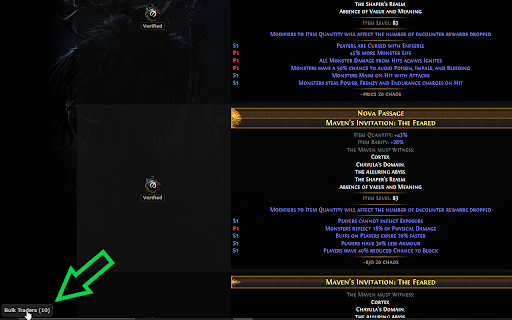

Find traders that have listed multiple offers for currently searched item This extension lists traders that have multiple offers for the same item.

EasyExile Trade Extension
PoE trading helper: View dust values, find bulk sellers, highlight items by modifiers, and search with keywords. Enhance your Path of Exile trading experience with powerful search and organization tools (now also for PoE 2!): 💰 BULK SELLERS • Automatically finds sellers with multiple items in your search • Shows all items from each seller in one place • Quick "Find" and "Buy" buttons for each item ✨ DUST VALUES (Only PoE 1) • Shows disenchant dust values for unique items • Accurate calculations based on item level, quality, influences, and corrupted implicits • Shows dust ratio per chaos and gold 🔍 MODIFIER SEARCH • Highlight items and modifiers by modifier names (e.g., "merciless", "dictator") • Color-coded keyword system with customizable colors • ANY/ALL match modes for flexible searching ⚙️ SMART FEATURES • Auto-detects and fixes "Collapse listings" setting • Persistent settings across sessions • Clean, professional dark theme • Seamless integration with pathofexile.com/trade Perfect for currency trading, map bulk buying, and finding specific modifiers!

Path of Exile Trade - Fuzzy Search
Automatically inserts ~ for fuzzy searches on patheofexile.com/trade When searching on pathofexile.com/trade, this addon inserts the tilde(~) before your search query. This enables fuzzy search, so you can be more lenient with your search. Start you search with a space (" ") to not use fuzzy search for this query. For example, when searching for "#% to Fire and Cold Resistance" it's enought to just write "cold fire res". Without fuzzy search, this would not find the modifier.

PoE Trade Extension
An extension which provides safer and easier trading in Path of Exile Enhance your trading experience for Path of Exile 1 and Path of Exile 2! - **Every single feature of the extension is opt out - meaning you can disable whatever bothers you** - **Every feature works for both game versions** * Bookmark Menu - Create folders and subfolders, which can be managed with drag and drop functionality - Infinite possibilities of organizing folders - they can be nested - Different icons for the folders - Create bookmarks which can be dragged across folders - Each bookmark can be opened in current/new tab as search or live search - Bookmarks can be assigned a specific league, or rely on auto league detection - Bookmarks can be marked "done" - Auto bookmark name detection based on search query - Highlight currently active bookmark * Multi Live Search - Multiple live searches in a single browser window - Enable/disable started multi live searches with the native live search button - Dynamically add multi live searches to current live search - Highlight multi live searches present on current page * Watchers - Mechanism to mark and watch status of selected items - Automatic watching with status desktop notifications - Inspect watched items directly in a search - Drag and drop to reorder watchers - Watch only selected items - Select the update interval * Item Results - Item results get applied a bunch of enhancements - Mark users blacklisted on Discord - Price conversion - converts prices to chaos/divine/chaos+divine - Always show player IGN - Highlight searched stats - Automatic Fuzzy search for both search and stat filters - Warning for items which cannot be 6-socketed with jewelers - Wiki links - links to Craft of Exile, poedb and poewiki for each item * Hotkeys - Hotkeys which allow users to move around the website quicker - each hotkey can be customized - Open and close extension menu - Focus search bar - Open up new stat filter - Clear search and focus search bar - Focus min stat filter - Focus max stat filter * Price menu - Displays poe.ninja prices in the extension + divine to chaos conversion * History - shows history of visited searches * Custom native browser sidebar which allows user to open the bookmark menu anywhere, not only on the trade website

Poe Trade QoL
Using the chest structure to trade consumables Updated for new scarabs pack 3.24. The standard interface for buying consumables https://www.pathofexile.com/trade/exchange/Standard is catastrophically annoying. Here are the steps you need to follow to continue enjoying the game: 1. Find the tab where the item can (!) be located, and there are dozens of them. 2. From dozens of elements, choose the one you need, but you still need to find it. 2.1. And if you need to buy fossils or essences, but you don’t know what they are called, then you have to google by property to get the name. 2.2. Or you have to peer into pixels to find the item you need. 3. Even knowing the name, property and photo of the item, we still have to search! There is no sorting on the site. Each attempt to buy something turns into a detective horror, where the main character will be tormented until he reaches his goal. The extension solves this problem in a very nice way. We take the structure of the chest from the game and throw it into the browser. As players, we always know where to find the item we are looking for in the chest. Therefore, the extension emulates the structure of the chest in the game, so that any player can buy the necessary items for himself in 3 clicks instead of hundreds of others. Is it buff?
