
ljdhhcfchhfikcdeamifmbbckojjkkmb
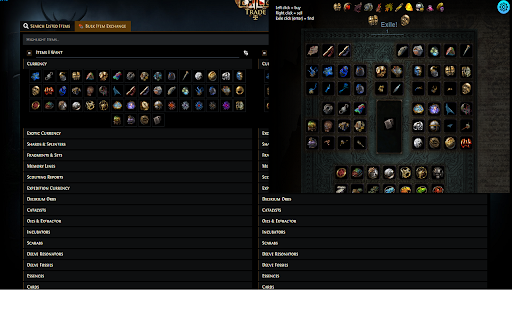

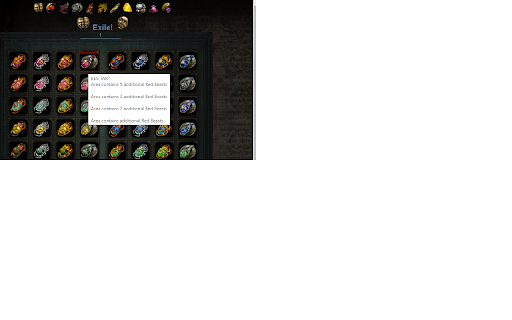
Using the chest structure to trade consumables Updated for new scarabs pack 3.24. The standard interface for buying consumables https://www.pathofexile.com/trade/exchange/Standard is catastrophically annoying. Here are the steps you need to follow to continue enjoying the game: 1. Find the tab where the item can (!) be located, and there are dozens of them. 2. From dozens of elements, choose the one you need, but you still need to find it. 2.1. And if you need to buy fossils or essences, but you don’t know what they are called, then you have to google by property to get the name. 2.2. Or you have to peer into pixels to find the item you need. 3. Even knowing the name, property and photo of the item, we still have to search! There is no sorting on the site. Each attempt to buy something turns into a detective horror, where the main character will be tormented until he reaches his goal. The extension solves this problem in a very nice way. We take the structure of the chest from the game and throw it into the browser. As players, we always know where to find the item we are looking for in the chest. Therefore, the extension emulates the structure of the chest in the game, so that any player can buy the necessary items for himself in 3 clicks instead of hundreds of others. Is it buff?

PoE Trade Extension
An extension which provides safer and easier trading in Path of Exile Enhance your trading experience for Path of Exile 1 and Path of Exile 2! - **Every single feature of the extension is opt out - meaning you can disable whatever bothers you** - **Every feature works for both game versions** * Bookmark Menu - Create folders and subfolders, which can be managed with drag and drop functionality - Infinite possibilities of organizing folders - they can be nested - Different icons for the folders - Create bookmarks which can be dragged across folders - Each bookmark can be opened in current/new tab as search or live search - Bookmarks can be assigned a specific league, or rely on auto league detection - Bookmarks can be marked "done" - Auto bookmark name detection based on search query - Highlight currently active bookmark * Multi Live Search - Multiple live searches in a single browser window - Enable/disable started multi live searches with the native live search button - Dynamically add multi live searches to current live search - Highlight multi live searches present on current page * Watchers - Mechanism to mark and watch status of selected items - Automatic watching with status desktop notifications - Inspect watched items directly in a search - Drag and drop to reorder watchers - Watch only selected items - Select the update interval * Item Results - Item results get applied a bunch of enhancements - Mark users blacklisted on Discord - Price conversion - converts prices to chaos/divine/chaos+divine - Always show player IGN - Highlight searched stats - Automatic Fuzzy search for both search and stat filters - Warning for items which cannot be 6-socketed with jewelers - Wiki links - links to Craft of Exile, poedb and poewiki for each item * Hotkeys - Hotkeys which allow users to move around the website quicker - each hotkey can be customized - Open and close extension menu - Focus search bar - Open up new stat filter - Clear search and focus search bar - Focus min stat filter - Focus max stat filter * Price menu - Displays poe.ninja prices in the extension + divine to chaos conversion * History - shows history of visited searches * Custom native browser sidebar which allows user to open the bookmark menu anywhere, not only on the trade website

poe-market-tool
PoE Market Tool: The Ultimate Trading Companion Elevate your trading experience in Path of Exile 1 & 2. Whether you are playing on Global or specialized regional servers, this powerful browser extension streamlines the market, helping you find the best deals and manage your searches like a pro. Core Features Multi-Game & Region Support: Full compatibility with PoE 1 and PoE 2 official trade sites across Global and regional servers. In-Game Price Check: Quickly evaluate your loot with one-click price fetching. Advanced Search Management: * Save and organize your search queries automatically. Folder System: Categorize your searches into multiple folders for different builds or league starts. Import/Export: Easily back up your configurations or share them with the community. Smart Collapse: Automatically hide items that fall outside your desired tier range due to quality or hybrid affixes. Fuzzy Search: Find exactly what you need without memorizing every keyword. Clear Prefix/Suffix labeling and Tier displays. T1 Highlight: Instantly spot top-tier affixes with high-contrast highlighting. Watchlist & Find Similar: Save favorite items and find similar gear with a single click. Fully Customizable: Every feature can be toggled on or off to suit your personal UI preference. Why Choose This Tool? Designed by exiles, for exiles. We prioritize performance and a clean UI, ensuring that your trade site remains responsive even with heavy automation and complex filtering. Join thousands of players and transform the way you trade today!

PoE Ninja to Chronicles PoB Sharer
Adds a Share PoB button on poe.ninja for Path of Exile 1 & 2. Uploads PoB code to Chronicles and copies the share link to clipboard. Adds a Share PoB button on poe.ninja character pages for Path of Exile 1 and Path of Exile 2. One click reads the Path of Building (PoB) code, uploads it to the Chronicles database (poe2db.tw for PoE 2, poedb.tw for PoE 1), opens the Chinese PoB page in a new tab, and copies the share link to your clipboard. No personal data is collected.

POE Trade zh
讓國際版 POE Trade 網頁支援中文裝備、詞綴搜尋的工具 Translate Path of Exile's trading website so that it can support the Chinese language.
