
cemphncflepgmgfhcdegkbkekifodacd
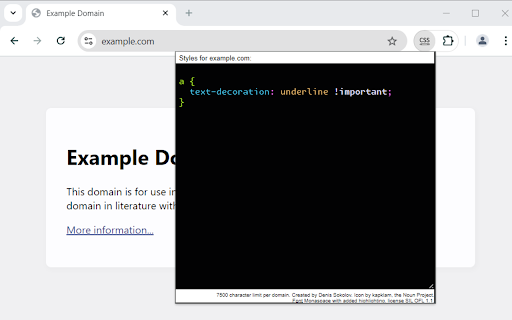

Minimal and secure way to add custom CSS per-domain The extension does not require permissions to access all data on all websites all the time. Once you start editing CSS on a page, you get a permission prompt specific to that domain. Later, if the CSS for a domain is not used, the permission will be dropped. There is no UI clutter of any kind. The entire extension consists of a big editable area for CSS code for the current domain.

Custom CSS Per Domain
Inject custom CSS per domain each time a page loads Tired of websites that don’t look quite right? With Custom CSS Per Domain, you can redefine any page’s appearance to suit your taste—no more squinting at tiny text or enduring clashing color palettes. Plus, it’s not just for casual browsing: developers can leverage it to quickly test out new site styles on the fly, without touching live code. Why You’ll Love It 1. Personalize Every Site Alter fonts, colors, layouts—whatever you need to make a site more readable or aesthetically pleasing. 2. Perfect for Quick Styling Experiments Thinking of refreshing your website’s design? Use this extension as a sandbox to instantly inject and test your CSS changes—before you commit them to production. 3. Multiple Styles per Domain Group your style tweaks under different tags (e.g., “dark-mode,” “banner-removal”). Easily enable or disable them as needed. 5. Enable/Disable On Demand Keep certain CSS rules off while you experiment, then flip them on to see the magic happen. Custom CSS Per Domain brings the best of both worlds—instant website makeovers for power users and a convenient testing tool for developers. Try it now and take control of how every site looks—whether it’s for polished personal browsing or a developer’s styling sandbox!

CSS inject
Very simple chrome extension to inject CSS into websites

Live editor for CSS, Less & Sass - Magic CSS
Run this extension and start writing your CSS/Less/Sass code which gets applied immediately. The code you write will be saved in the browser extension's storage space or the site's local storage. ✓ Live editor for CSS/Less/Sass code - Preview changes as you write code ✓ Autocomplete ✓ Live edit CSS files and auto-save on file system ✓ Open code editor in external window ✓ CSS reloader ✓ Option to reapply styles automatically ✓ Syntax Highlighting ✓ Auto-generate CSS selectors with point-and-click ✓ Emmet support ✓ Color picker ✓ Convert code from Less/Sass to CSS ✓ Beautify / Format code ✓ Minify code ✓ Highlight DOM elements matching the CSS selectors ✓ Option to load this extension in iframes as well ✓ Get SVG icons ✓ Lint CSS code This extension is available for: You might want to use it for: ➤ No need to refresh pages to test your CSS/Less/Sass code ➤ Auto-save your changes to filesystem as you write the code ➤ Reload CSS resources without refreshing the page ➤ Speed-up development by writing code directly on your page ➤ Develop and test your code before finalizing your changes ➤ Apply some temporary styles (like hiding some components) ➤ Do CSS changes on any website ➤ The CSS/Less/Sass code you write gets applied as you write it ➤ The CSS reloader watches CSS files and live updates them immediately ➤ You can develop the code and see the output at the same time ➤ The code is saved in file/browser as soon as you write it ➤ The code editor is draggable and resizable ➤ Use code editor in external window for developing responsive pages ➤ The code you write is auto-saved for the site ➤ You can use "TAB" key to indent your code ➤ Running Magic CSS again, while it is already loaded, disables the code ➤ Press "Esc" or click on close to hide it ➤ The code is added at the bottom of the tag ➤ It includes CSS/Less/Sass beautifier ➤ It includes CSS minifier ➤ It highlights the DOM elements matching the CSS selectors ➤ Use it along with Chrome/Edge/Firefox/Opera Developer tools ➤ You might find it useful in creating your custom themes for websites based on Stylish / Stylist ➤ This extension was previously known as "MagiCSS - Live CSS Editor" Security and privacy: ⓘ No permissions approval is required for installing the extension ⓘ For advanced features, like "Apply styles automatically", permissions are requested on-demand ⓘ Mixpanel is used to get anonymized stats for improving UX ⓘ Browser extension's storage, localStorage etc are utilized for the extension's core features. Visit https://webextensions.org/ for further details. Connect with us:

Stylebot
Change the appearance of the web instantly You pick an element and choose any changes you want to make from the editor. You can change the font, color, margins, visibility and a lot more. You can also code CSS manually. ★ Easy to use: Pick and style elements using UI actions ★ Simple & Quick: Changes are saved instantly ★ Code editor - Write your own CSS ★ Readability Mode - Make articles on any site readable by hiding non-essential page elements like sidebars, footers and ads. ★ Grayscale Mode - Turn on grayscale to reduce strain from websites Homepage: https://stylebot.dev/ Twitter: http://twitter.com/ahujaankit Bug reports and feature requests: https://github.com/ankit/stylebot/issues Stylebot has never collected and will never collect any personal data, browsing history etc. The permission to access websites is to only let you customize the CSS for any webpage and automatically apply your CSS when you visit the webpage in the future. In the future, Stylebot may collect browser version, platform name, user's settings (except website list or any other data which can help identify user). This information is needed for decision on implementing new features, removing unused features or suggesting default settings for new users. It will happen only with your permission.
