
cejnjlflfkolnkhlghjafbmloppoedok


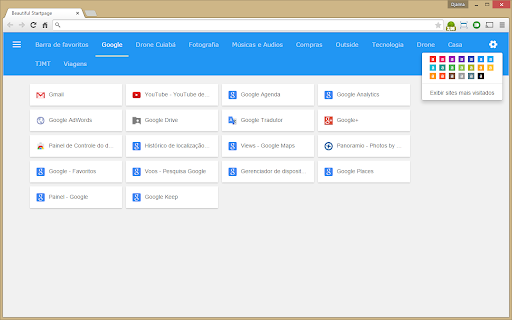

The most beautiful and simple Startpage! Display your favorite to open a new tab in Chrome. This Chrome extension was used material designer by Google. This extension replaces the home page and displays your bookmarks, tabs organizing in folders within the Favorites Bar. Note: I will improve it over time! Wait for more news and send me suggestions!

Quick Startpage
Advanced Newtab with your bookmarks, apps, tabs and search Quick Startpage is Chrome's advanced newtab with Search, based on your bookmarks. Quick Startpage allows you to quickly access your Tabs, Visited pages, Apps and Search. Also, you can easy save tabs and windows to bookmarks and restore them later.

Humble New Tab Page
Redesigned new tab page featuring your bookmarks, apps, most visited, and recently closed in a custom layout. Features: • Simple, clean design • Highly customizable • Fast loading and lightweight This extension replaces the default new tab page. Drag and drop folders to create new columns or reorder them. The font, colors, spacing, and more can be customized from the options menu. The source code is available under the MIT license github.com/ibillingsley/HumbleNewTabPage Version 1.26 - July 2, 2023 • Added font-weight option • Replaced Apps folder with a link to chrome://apps Version 1.23 - December 2, 2018 • Added tooltips for truncated text • Added option to remember open folders Version 1.14 - May 11, 2014 • Reduced memory usage • Added option to set number of items for recently closed, recent bookmarks, and most visited • Added option for background image size • Added link to bookmark manager in folder context menu Version 1.12 - August 18, 2013 • Reorder apps via drag and drop Version 1.11 - August 3, 2013 • Fixed launching packaged apps (Google Keep) • Fixed launching file:/// and chrome:// URLs • Fixed Mobile Bookmarks folder not being removable • Disable weather if geolocation is denied • Default layout changed to 2 columns • Uninstall apps from the context menu • Hide Google Wallet Service from apps Version 1.9 - December 30, 2012 • Uses geolocation for weather by default • Fixed bug with drag and drop • Added Chrome Web Store to apps Version 1.8 - November 9, 2012 • Redesigned options panel • Added several new settings • Performance tweaks • Source code released under the MIT license Version 1.7 - September 8, 2012 • Added custom CSS field for advanced users • Added option to hide Bookmarks bar and Other bookmarks • Added option to open links in new tabs • Support local file for background image • Weather errors fixed Version 1.4 - August 10, 2012 • Added option to disable the weather and other special folders • Minor bug fixes Version 1.2 - August 8, 2012 • Added apps, most visited, recently closed, and weather • More flexible layout with unlimited columns • Open all links in folder from context menu • Color themes and new default style • Added smooth animation and highlight shadow • Drag and drop to reorder folders and columns • Background image support • Bug fixes • New name (formerly New Tab + Bookmark Tree)

New Tab & Toolbox
Unleash your Web Browser's potential! A multi purpose Chrome extension that does all this & more: - Set your Custom "Home Page" under Options, in this extension. - Open that Custom Page in "New Tab" instead of the Home Page. - Toolbar icon for easy access to Downloads, History, Bookmarks. - Automatically force YouTube videos to play at high definition. - Right click on an Image to perform a Reverse Image search. - Right click after selecting a plain text URL to open as link. - Double click on a plain text link to open URL in a new tab. - Click icon (next to Menu) for a Cached version or Translation. - Select some Website text, click Ctrl+Alt (Opt) for Translation. - Ability to change/spoof the browser 'User Agent' when needed. - Right-Click while holding Ctrl+Alt to remove a page element. - History Navigation: Hold Right Mouse button, swipe left/right. - Customize where new tabs open, and tab order when they close. - Basic cookie management allows for export, import and wipes. - Don't forget to check the Help section inside the Options page. Security permissions that are optional but required for all the features: "Allow access to file URLs" is required if opening local files as new tabs. "Allow in private mode" has to be checked in order to work in incognito. "Allow access to search pages" needed for search engine result pages. For Chrome, Brave, Opera, Vivaldi, and Edge (Chromium) browsers.

Newt - A Better New Tab
A replacement for Google Chrome's 'new tab' page that lets you easily access your favorite bookmarks, apps, and more. Newt was designed to be a simple, lightweight replacement for Google Chrome's New Tab page. It gives you easy access to your favorite websites without any of that other clutter or special effects. Your installed Chrome apps are just a tap away. Newt uses your a special bookmarks folder to populate your new tab page. This makes it very easy to set up. Another benefit to this method is that your categories and websites will be synced to your Google Account*! This means that you only need to set up Newt once and it will be the same on all your other computers. You'll also be able to easily access these sites from Chrome on your mobile devices. In addition to bookmarks, Newt also displays your installed apps, Most Visited sites, Recently Added bookmarks, Recently Closed tabs, and tabs from Chrome on your other devices. Newt uses a custom in-app theme builder that let's you customize all of the colors. To access it, click on the '+' icon next to the theme list in Settings. This will bring up the theme builder on the right side of your screen. You'll see some values already filled in to give you an idea of what to do. You can use any method of defining a color: predefined color words, hex, rgb, rgba. When you enter a color, the respective parts of the app will update. Yes, there is instant feedback with every change. Once you're happy, click 'Save' and it will be added to your list of themes. You can build and add as many as you'd like. With this freedom, it's possible to create a theme that interferes with your use of the app. If this happens, go to the Newt options page from Chrome's Extensions page and click the reset button. This will change the active theme to the very safe Light theme. You may have noticed that the old Newt app was renamed 'Newt Classic'. Since this new version is so different from the old, I thought it would be best to not just overwrite the original. Some people may prefer that style to the new one. If you want to import your existing Newt data, just go in to Chrome's Bookmark Manager and rename your 'Newt' folder to 'NewtData'. 5.7.1 - Added: You can now delete cards by right clicking in their title bar. - Fixed: Sites in the Other Devices tab are now displayed properly. - Modified: Improved the favicon service. - Modified: Upgraded to manifest v3 to ensure extension continues to work in future versions of Chrome. - Recent Tabs and Other Devices tabs now require the 'tabs' permission, but it's optional. - Transferred ownership to my company, Nothing Special. Don't worry, it's still just me! 5.6.8 - Improve accuracy and image quality of favicons 5.6.0 - Added: About card. You can access it from the popup menu. - Added: Settings sync! Newt now stores your preferences and custom themes using Chrome's storage sync. This means that if you change someting here, it'll be reflected on your other computers running Newt and signed into the same Google account. Please visit the Settings page for more information. 5.5.3 - Better temporary fix for favicon issue that should work for all sites. 5.5.2 - Temporary, partial fix for broken website icons until I can write proper fix. 5.5.1 - Fixed: Device cards were being displayed with a header color. 5.5.0 - Added: You can now rename cards - Added: New theme options! You can set a background color for each card header, making it easier to organize them. You can set five different color styles for each custom theme. Visit the Theme Builder to define these styles. Right-click a card header to choose a color and/or rename the card. - Modified: When creating a new theme, the currently selected theme is used as the base. This makes it very easy to make tweaks to existing themes without having to start from scratch. - Added: New default theme, Basic. - Fixed: Some style issues, bugs. 5.4.0 - Added: New menu when you right-click a site on the main page with actions like Rename and Delete. - Added: Rename sites. Right-click a site and then click Rename. Enter the new name and press Enter. The Escape key will cancel this action. - Added: Delete sites. There is now another way to delete sites from cards. Right-click a site and then click Delete. There is no confirmation prompt, so be sure you want to delete it. - Added: Middle-click on a site to open it as a new tab in the background. Alt (Option on Mac) + middle-click to open as a new tab and switch to it. 5.3.3 - Added: Drag cards on the main page to reorder them. - Added: Drag cards or sites to the top right of the screen to delete them. When deleting a card, you'll get a confirmation prompt before it is actually deleted. - Modified: Changed some curor styles to better represent the action taken when clicking on things. 5.3.2 - Fixes to prevent the app from breaking in a future Chrome update. - Performance improvements. 5.3.1 - You can now edit themes that you've built. - Added two new stock themes, Slate and Mocha. - Improved styling on some elements. - Bug fixes. 5.3.0 - Added: Theme builder. This update's big feature is a brand new theme builder. Yes, it's back! It works very similarly to the old one, with some nice improvements. In short, better customization and you can build as many as you'd like. Please see above for more information. - Added: 'Add New Card' button. In the overflow menu, you'll find a new option that will let you add new cards right from the app. No more having to go all the way to Chrome Bookmark Manager. - Of course, there are a handful of tweaks and fixes behind the scenes to improve your experience. 5.2.5 - Keyboard navigation! You can now use a keyboard to navigate around Newt. Switching tabs, moving within and in between different cards, it's all there. Just use the arrow keys after enabling it in the settings. - Fixed drag-and-drop so you can drag sites to an empty card. - General optimization and code cleanup. 5.2.1 - Optimization! Making things smaller and faster. 5.2.0 - Complete rewrite using only vanilla Javascript and some goodies from ES2015 - Smaller and faster - Dark theme! This was a popular request. Thanks to all who wrote me about it.
