
ceiephhhfaockiigbdgihcngnaamdcll
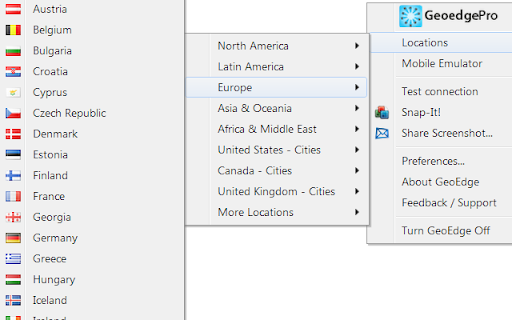

View and validate your geo-targeted content and ads from any device, in any location, using a premium proxy and geo-testing solution GeoEdge, the world’s largest, fastest and most reliable premium proxy solution. One click and you’re global! GeoEdgePro proxy toolbar is the fastest and easiest way to view, monitor and analyze geo-targeted content and ads in over 210 geo-locations and mobile carriers in real-time. It includes functionality to see the foreign content as it would appear on mobile devices in that geo-location or mobile carrier. • See content as it is displayed locally from 160+ global locations and over 45 mobile operators • View geo-targeted ads, campaigns and search results • QA your geo-targeted site and banners (locations, cookies, catches, user agent behavior etc.) • Largest Premium Proxy Network - over 160 global locations, including 59 major US DMAs and European cities • High-Performance Servers - fast, reliable, instant and secure access to web content globally • Quality Service - unmasked servers that are physically located all over the world • Quick and Easy To Use - select a location from drop-down menu and view local content instantly • Committed to Your Privacy - advanced encryption technology and protected servers

Professor Prebid
Extension to validate your prebid.js setup, list AdUnits and bids, visualise latencies and timings of your webpages header-bidding… Extension to validate your prebid.js setup, list AdUnits and bids, visualise latencies and timings of your webpages header-bidding partners, override CPMs and filter bidders for troubleshooting.

ModHeader - Modify HTTP headers
Modify HTTP request headers, response headers, and redirect URLs The most popular Chrome extension to modify headers and monitor page statistics simultaneously. ** What can ModHeader do?** - Add, modify, and remove request and response headers - Use ModHeader to set X-Forwarded-For, Authorization, Access-Control-Allow-Origin, Content-Security-Policy, and your custom headers! - Modify cookies in request / response header - Advanced Content-Security-Policy editor - Redirect URL to another - Enable header modification by URLs - Advanced filtering by tab, tab group, or window ** Why ModHeader ** - ModHeader is fast, efficient, and light-weight. You can quickly enable/disable header modification with just 1-2 clicks. - ModHeader provides you with many convenient features that will help you increase your development velocity with the least amount of frictions. Check out the big list the features below! - ModHeader is free to use, with a paid option to unlock even more features. - ModHeader works on Chrome, Firefox, Edge, and Opera. - ModHeader is used by over 800,000+ users on Chrome Web Store! ** ModHeader features ** - Add comments to header - One-click "undo" if you made a mistake - Support having multiple profiles with quick switching between profiles - Export and import profile - Easily share your profiles with others - Customize autocomplete names and values - Support for dynamic variables - Dark mode support - Sorting headers and name, value, or comments - Append value to existing request or response header - Customizable profile badge - Clone profile - Cloud backup ...and more!!! ** What is new in 4.4.0 ** - Enable ad-supported plan where users can get pro for allowing affiliated ads in extension. Users can opt-out of ads by selecting ... -> Opt out of ads (will revert back to having limited profiles and rules). ** What is new in 4.3.7 ** - Support iso_date and utc_date variable ** What is new in 4.3.6 ** - Suggest when advanced header editor is available - Suggest when a response header is incorrectly entered in request header field and vice versa - Suggest using tab domain filter, tab group filter, window filter, etc. ** What is new in 4.3.5 ** - Revise the add dialog to give more description ** What is new in 4.3.2 ** - Support query parameter as dynamic value - Support matching HTTP methods in request URL filter and exclude request URL filter ** What is new in 4.3.1 ** - Make import with auto-sync available for free - Gather feedbacks on uninstallation ** What is new in 4.3.0 ** - Allow free users access to all mods and filters, but limit number of rules to 10. ** What is new in 4.2.4 ** - Fix a minor bug with time filters ** What is new in 4.2.3 ** - Fix a minor bug with tab domain filters ** What is new in 4.1.0 ** - Update login, logout, and license checking logics ** What is new in 4.0.21 ** - Add support for advanced Content-Security-Policy modification ** What is new in 4.0.20 ** - Fix ModHeader not showing up for new users. - Add {{ip_v4}} dynamic value ** What is new in 4.0.18 ** - Support for simple dynamic value: {{uuid}}, {{url}}, {{url_origin}}, {{url_hostname}}, {{url_path}}, {{existing_value}}, {{timestamp}} ** What is new in 4.0.17 ** - Allow ModHeader to read from managed storage (for enterprise) - Fix CSS not loading correctly ** What is new in 4.0.16 ** - Add regex cookie matching and ability to retain cookie value while modifying its attributes ** What is new in 4.0.15 ** - Add support for Time filter ** What is new in 4.0.14 ** - Dependency upgrades and some minor bug fixes ** What is new in 4.0.12 ** - Support auto-sync profile import: https://docs.modheader.com/profiles/auto-sync-profile - Remove support for dynamic value as Firefox addon policy and Manifest V3 both disallow it. If you need this feature, please email support@modheader.com and we will try to figure out how to support your use-case. ** What is new in 4.0.8 ** - Support reordering profile, headers, and filters. ** What is new in 4.0.0 ** - Support enhanced cookie modification - Replace tab lock with tab filter, along with tab group and window filter - Support autocomplete customization - Dark mode support - Keyboard commands mapping - Give users more controls over share profile URLs - Paid subscription required for some of the newly introduced features. Most existing features should continue to work for free users. "webRequest" and "webRequestBlocking" are required in order for request headers modification to work. Because ModHeader doesn't know ahead of time which website the modification should apply to, it needs to request permissions for all URLs (3). "storage" permission is needed to save settings to the cloud. "contextMenus" is used to enable quick pause/unpause by right-clicking on the icon. "alarm" is used to periodically auto-sync profiles (if auto-sync is setup). ** Automation ** For Selenium WebDriver users, please try: https://github.com/modheader/modheader_selenium

Edit Taboola Widget
Use this tool to make quick mockups for potential advertisers. Notes: - You can change a recommendation's item title, branding… Use this tool to make quick mockups for potential advertisers. Notes: - You can change a recommendation's item title, branding text, and widget header. - To change a thumbnail photo, click on the photo and you'll be prompted to enter a URL for the new image. Enter the entire link, including the http:// part. - Or, shift-click to place an image that's already on your clipboard. - For best results changing the text, place your cursor in the text and hit Command-A (or control-A on PC). It will highlight all of the text. Then just start typing. 1.3.5 Fixed issue where typing a capital letter in a text box created a semi transparent overlay that blocked editing 1.3.4 Fixed issue with pasting that preventing pasting text in other non-edited elements 1.3.3 New icon for dark mode, fixes issue of reinjecting script on multiple uses on the same page. 1.3.2 Fixes issue with carousel on MSN Home Page 1.3.1 Minor changes to accommodate change in Feed structure. 1.3 Added new features for feed mocks - now change card logos at will! 1.2.2 Fixed issue with image URL also being copied when pasting image from clipboard; added support for editing .video-description elements (feed) 1.2.1 Fixed attribution popup issue; now works with Dec 2016 update to MSN home page. 1.2 Works for iFramed widgets now. Requires Chrome 50. New presentation for "wait" state while preparing page. 1.1.3 Removed debugger statement that stopped execution when DevTools are open; better duplicate load detection. 1.1.2 Fixed issue with spotlight icons; overrides default behavior on MSN.com to allow editing titles. 1.1.1 Fixed issue with pasting text into item title and branding fields. 1.1: Now copy images from the clipboard! Copy an image via Chrome's "Copy Image", or via Ctrl/Command-C from any application and then shift-click a thumbnail to place that image in the widget. 1.0.4: new 'ON' light on page confirms that editing is now possible and prevents multiple injections.

Redirect Path
The HTTP Header & Redirect Checker for SEO Redirect Path flags up 301, 302, 404 and 500 HTTP Status Codes as well as client side redirects like Meta and Javascript redirects, bringing potential issues that may not otherwise be seen to your attention immediately. As well as flagging up redirects and errors, the plugin also displays other HTTP Headers (such as server types and caching headers) and the server IP Address at the click of a button. All the magic happens on your computer, so it doesn’t “phone home” to anyone (except when auto-updating itself) and is instantaneous. The redirect path logo is from the "Iconic" icon set, which can be found here: http://somerandomdude.com/work/iconic/ Please note, by using this extension you agree to our End User Licence Agreement: https://www.ayima.com/browser-extensions-eula 4.0: Fixed runtime bugs and potential security flaws, plus added support for Ayima AI 3.0: Updated the extension to support Googles Manifest V3 roll out, no other major changes 2.0.0.6: Major rewrite - a lot of logic has been changed under the hood allowing us to display Meta and Javascript redirects for the first time.
