
cechonbcopffiimhnkgghckbgipciedg


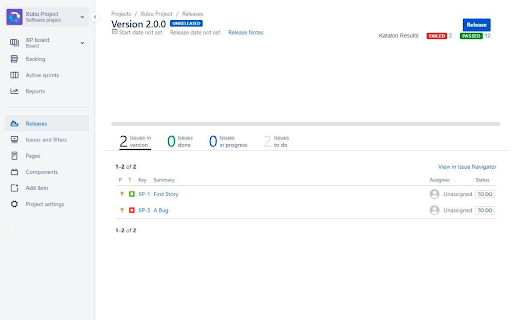
This plugin enhances the defect submission process to JIRA. Katalon Integration provides a seamless defect submission process to JIRA directly from Katalon TestOps with just one click. ★ The plugin requires no settings and will work immediately upon installation. 1. Enter Organization ID. 2. Click Save. 3. Navigate to Jira Settings located in the toolbar of the project page. 4. Enter Jira URL, Username, and Password. Jira Cloud a. Jira URL must be in the form of Https://.atlassian.net. b. Enter the email registered for your Jira Cloud account in Username. c. Enter an Atlassian Cloud's API token in Password. See the instructions here. Jira Server a. Jira URL must be in the form of Http(s)://domain without any trailing parts e.g., /secure. b. Use your username instead of an email in Username. c. Enter Password. 5. Click Test Connection to see if the connection is successful. 6. Click Save. Please refer to these documents for detailed instructions: - Jira configurations (https://docs.katalon.com/katalon-analytics/docs/kt-jira-config.html) - Working with Jira issues (https://docs.katalon.com/katalon-analytics/docs/kt-jira-issue.html) - Working with Jira releases (https://docs.katalon.com/katalon-analytics/docs/kt-jira-release.html)

Exploratory Testing Extension
Chrome extension for exploratory testing A Chrome extension designed for making web exploratory testing easier Features: - 🐛 Quickly create and track bugs, notes, ideas and questions - 📸 Capture full page or custom cropped screenshots - 🔗 Automatically track URLs for each annotation created - 🔍 Advanced filtering of annotations by type in reports - 📊 Visualize testing data through interactive charts - 👁️ View screenshot previews instantly on hover - 💾 Export testing sessions to JSON, CSV or HTML formats - 🤝 Share and collaborate by importing/exporting sessions

Ranorex Selocity
Auto-generate robust XPath, link text, RanoreXPath, and CSS selectors for use with Selenium. * Rapidly generate selectors with one click directly in the DevTools sidebar panel. The smart selector generator automatically detects and ignores dynamically generated IDs. * Manual selection: Ranorex Selocity generates XPath, link text, RanoreXPath, and CSS selectors. Because only you know which selector fits your needs the best. * Instantly generate selectors for elements within iframes, both same-origin and cross-origin. * Exploratory selector creation: If you choose to modify a selector yourself, Ranorex Selocity provides instant feedback to ensure the selector is useful. * Automatic escaping of selectors: If desired, quotes and escape characters are automatically added to your selector, ready for instant use in locators in Selenium tests. * Unique RanoreXPath selector: The generated RanoreXPath (RxPath) simplifies the XPath and provides additional attributes and operators, making the resulting selector shorter and more robust against changes. * Dark theme and light theme

xPath Finder
Click on any element to get the xPath Plugin to get the elements xPath. Usage: 1. Click on the plugin icon, cursor will be changed to the crosshair 2. Hover over the desired element (elements are highlighted on hover) 3. Click on the element and his xPath will display in the panel at the bottom of the page

Page Modeller (Selenium, Robot Framework etc)
Browser DevTools extension for modelling web pages for automation. The Page Modeller extension enables developers to scan a web page and generate page object style code for various tools, languages and frameworks and test the UI locators in the browser. Currently supported tools and languages are: Feel free to propose new functionality and additional frameworks here: https://github.com/danhumphrey/page-modeller/issues This extension is being actively developed and is considered a beta release.
