
ceaaomihllbckdndacmplkneclfebmgn

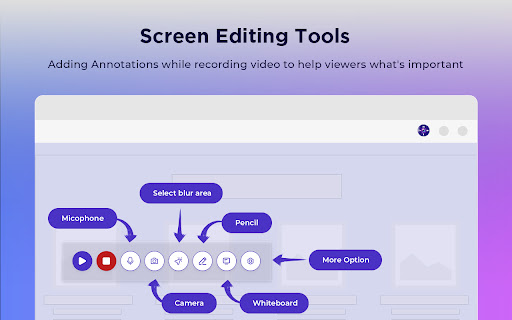
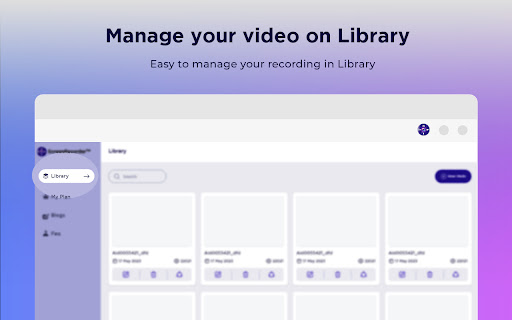
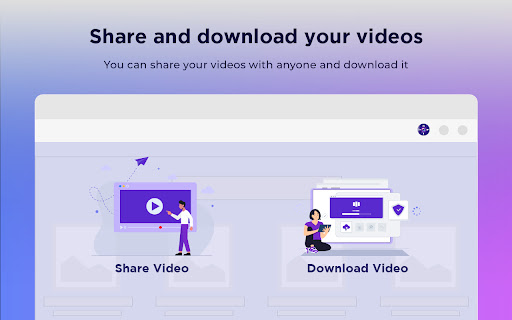

Screen recorder & desktop capture tool. Record a video, presentation, open a front camera, or a window. Edit, download, and share. Screen recorder chrome extension & desktop capture tool. Record a video, presentation, open front camera, or a window. Edit, download, and share. Effortlessly capture, edit, annotate, and share high-quality screen recordings with our robust Chrome Video Recorder Tool. Free screen recorder software for video recordings, screen capture, and screenshots. Record Google Meet, webcam, or your screen with ease. The perfect screenshot tool and video cam recorder – all in one Chrome extension! Record your screen, tab, or window with narration using your integrated webcam and microphone. Enjoy seamless audio integration with our complimentary free Chrome screen recorder extension. Key features of Screen Recorder extension Chrome:** 📸🖥️ Effortlessly capture your desktop, application windows, or browser tabs 📽️🖥️ Record your screen, camera, microphone, and internal audio 💻🌐 Compatible with all Laptop & PC devices browsers ✏️🎥 Edit recordings with ease, trim sections, add annotations, captions, and more 📤👥 Seamlessly share your videos with colleagues, clients, or friends 🎓🕹️ Suitable for tutorials, software demos, gaming, and more 🎥Record and download in different formats as required Experience the seamless functionality of our user-friendly Window screen recorder tool, compatible with laptops, macOS, and PC browsers. Effortlessly capture any portion of your screen, tailored to your unique requirements. Whether it's recording video meetings, PowerPoint & keynote presentations, Zoom calls, educational tutorials, or troubleshooting online website issues and errors, our versatile tool ensures crystal-clear recordings. -🎤⏱️ Microphone Countdown: Prepare yourself before recording by enabling a microphone countdown. -🛠️🔓 Toolbar Accessibility: Choose to show or hide the toolbar during the recording process. -📷🔒 Camera Permission: Grant camera access to capture video alongside your screen recording. -✒️✒️ Pen Tool: Utilize the pen tool to draw and annotate your screen while recording. -📝🎨 Whiteboard: Create informative tutorials on various Whiteboards with easy-to-understand explanations using visuals and diagrams. After capturing your screen, take advantage of the integrated editing tools to refine your recordings. Trim unnecessary segments, incorporate annotations and captions, or emphasize key aspects to elevate the quality and engagement of your videos. -Record live Meetings & Webinars -Record ongoing Conversations & documentation -Marketing purpose -Record a presentation -Branding of any products -Record gameplay -Google Meet meeting recording -Capture Zoom meeting call -Record online meeting -Awesome screen capture extension for Tutorials -Capture highlighted news and stats of the stock market Effortlessly share your screen recordings using this screen capture chrome extension. Seamlessly upload your content to leading platforms or share it directly with colleagues, clients, or friends. Whether you're collaborating on projects, offering remote assistance, or presenting your portfolio, this extension streamlines the sharing experience You can also mute or unmute the microphone, control the usage of the camera, and highlight text while you're recording. These features make the Chrome Screen Recorder software a powerful tool for creating high-quality videos. **Benefits of using the Chrome Window Screen Recorder:** -High-resolution video: The extension can record videos in high resolution without compromising quality. -Multiple format availability: You can choose to record your videos in a variety of formats, making them compatible with most devices. -Editing of recorded video: You can trim or edit your recorded videos to remove any irrelevant parts. -Easy video download: You can easily download a video in any format. Get the powerful and intuitive Chrome Screen Recorder Tool for a high-quality screen recording experience. Download the Windows Chrome software to enhance productivity and communication in a variety of ways.

Loom – Screen Recorder & Screen Capture
Record your screen and camera with one click. Share that content in an instant with a link. Loom is the industry leading screen recording tool. Join more than 14 million people across 200,000 companies who use Loom to record their screen, share their thoughts visually, and provide asynchronous feedback. With Loom you can record your screen and instantly get a link to share with anyone. It’s the fastest and easiest way to screen capture and stay connected with your team. Whether you’re screen recording a product demo, giving feedback, or simply sharing your thoughts, Loom makes it simple to stay in the loop with async video. KEY FEATURES 📽️ Record your screen, camera, microphone, and internal audio 💾 Automatically save videos to the cloud and share them instantly with a link 💬 Get notified when someone views, reacts, or comments on your video 😀 Leave time-based comments and emoji reactions 📚 Manage your Loom video library on-the-go and across devices 🔒 Choose who can see your video with security and access controls ⏬ Download recordings to your camera roll 📽️ Screen Recorder 📽️ - Record your screen, camera, or both for free - iOS and Android apps to record your mobile phone - Record in 720p, 1080p, 1440p, or 4k HD - Add flair to your video with camera frames, backgrounds, and camera effects like blurring 💾 Video Hosting 💾 - Store your videos inside of Loom HQ - Upload Zoom and Google Meet recordings directly into Loom to search and find later - Create hashtags to keep track of important videos 🪄 Share With A Link 🪄 - Our recordings finish so fast that we had to file multiple patents - Anyone in the world can watch your screen recording for free - Share your videos to LinkedIn, Twitter, or publish to the Google Search index 🗣️ Drive Engagement 🗣️ - Use comments and emoji reactions to boost engagement - Respond with your own Loom in the comments to create a video message thread - Loom videos automatically display in Slack and Microsoft Teams ⏱️ Meeting Replacement ⏱️ - Send a Loom instead of having another standup meeting - Record a presentation with Loom and send it to your audience ahead of time - Screen record your next weekly update to add rich visual context and your own personal touch TRUSTED BY THE BEST Over 14 million people across 200,000 companies use Loom to record, share, and review asynchronous video. From HubSpot, to Atlassian, to Netflix, Loom is the screen recording and collaboration tool of choice for top companies. EVERYTHING YOU NEED AND MORE Using Loom, you can collaborate with your team, add time-stamped comments and reactions to those videos, and save videos you’ve recorded to your device. Now, you can spend less time crafting the perfect email between meetings, and say it with video using Loom. ABOUT LOOM Loom is the leading video communication platform for async work. Engineered for simplicity and speed, you can record, watch, and share videos to move work forward whether you're at your desk or on the move. LOOM IN THE NEWS "Why are we all trapped in enterprise chat apps if we talk 6X faster than we type, and our brain processes visual info 60,000X faster than text?...now is the time for Loom." – TechCrunch "It fills this gap between writing an email and taking the time to have a meeting or conference...it's rare to have something that's low friction and high impact, while also adding personal connection." – Forbes “Asynchronous video is catching on fast, and Loom thinks it's going to change the way we work. And maybe do everything else, too.” – Protocol

Screenshot & Screen Video Recorder
An effective screenshot and screen recording tool to quickly share screens and capture entire pages and edit. Capture, record, annotate and instantly share screenshots and videos to communicate faster. Uploads any of your captured content as a public or private shortlink URL that makes it easy to show your team, customers, or friends what you're trying to say. 🎥 Screen Recorder ᐅ Desktop Recorder You can record anything you want on your desktop, such as every video you watch, every game you play, every software you operate, or every courseware you make can be recorded and saved in HD. ᐅ Browser tab page Recorder It can accurately capture the specified window in the browser, does not affect your browsing other pages or work, to provide you with more accurate screen recording experience. ᐅ Camera Recorder It can not only record the camera alone, but also enable the camera when recording the desktop/browser window to achieve a "picture in picture" recording effect, making your video more colorful. ᐅ Voice Recorder Supports recording system sound, microphone sound, or both. You can choose freely. ᐅ Annotation video A variety of graphic annotation tools are provided to mark and annotate the recorded video at any time. ᐅ Capture Full Page No matter how long the page is, you can turn the page into a picture for easy editing and sharing. ᐅ Capture Visual Area Quickly capture the viewable area of the current browser page. ᐅ Capture Selected Area Drag and drop to capture anything you want. ᐅ Edit the screenshots Powerful annotation tools to annotate captured images, such as boxes, circles, arrows, free brushes, highlights, paint, etc. ᐅ Save screen capture Multiple save options, you can save screenshots as PDF, PNG and JPEG, or copy screenshots to clipboard Use the our extension to better and faster express your thoughts to friends and colleagues. To reduce browser load and conserve resources, the extension uses chrome.tabs.update to avoid creating new tabs every time the extension needs to open a page. Furthermore, chrome.tabs.update allows the user tab to be updated after changes to the extension—for example, when the interface needs to be refreshed or the latest data needs to be displayed. Help us make this product better - inform detailed bugs and feature requests in the Support section or email.

ScreenPal - Screen Recorder & Video Editor
Record your screen & webcam, take screenshots, edit videos & images - easy & free! Get the all-in-one tool that lets you capture any part of your screen with webcam and narration, easily edit your recordings and screenshots, and then share your content securely with a click. Say goodbye to multiple apps and extensions, and say hello to ScreenPal – making your workday easier, more efficient, and fun! Easily record your screen & webcam directly in your browser or quickly launch ScreenPal's free desktop screen recorder, screenshot tool, and video & image editor. Capture, edit, and share screencast recordings and videos with just one click. Capture your screen, add a webcam, and use drawing tools and effects to customize your video. It’s a fast, free, and easy-to-use video maker. 🚀 CAPTURE YOUR SCREEN AND WEBCAM Launch the desktop screen recorder or record through your browser. Record your screen, webcam, or both for picture-in-picture effect. Easily capture your entire desktop, single tab, or application window. Capture any area of your computer screen with the desktop recorder, or easily crop your browser recording to any area. Screen Recording Features: ▸ Recorded an unlimited number of videos for free. ▸ Annotate with easy drawing tools during your recording. ▸ Record voice narration from any microphone. Additional Desktop Recording Features: ▸ Blur, remove, or replace your background. ▸ Zoom in and out while recording. ▸ Annotate with additional highlight and drawing tools. ▸ Editable cursor highlight and mouse click tracking. ▸ Add stock music to engage your audience. ▸ Import a captions file for free or upgrade for AI speech-to-text. 📽️ RECORD VIDEO MESSAGES Save time and improve collaboration with seamless, asynchronous communication through video messaging. Quickly record video messages in your browser and share with a secure link. Click in any text field or comment box in your favorite browser-based apps, record your message, and share. ScreenPal automatically embeds your video message with an animated GIF preview! Reduce back-and-forth, communicate clearly, and build better connections—all without leaving your browser. 📸 TAKE AND EDIT SCREENSHOTS Launch the free screenshot tool to capture your full screen, active app or window, or any part of your screen, then quickly paste to share or easily annotate to communicate clearly with images. Screenshot Features: ▸ Capture full screen or single window with a click. ▸ Click and drag to capture any part of your screen. ▸ Screenshots are automatically copied to your clipboard! ▸ Open in the image editor to add easy annotations and text. ▸ Highlight any area to focus attention. ▸ Document processes with easy sequential steps. ✂️ EASY VIDEO EDITING Create engaging, accessible videos with our easy video editing software. Upgrade to any subscription to create videos with interactive storyboards, combine multiple video clips, and make any video accessible with automated speech-to-text captions. Video Editing Features: ▸ Mix and match content and import videos from multiple devices. ▸ Add video effects, including green screen. ▸ Use engaging transition effects in your video clips. ▸ Enhance any video with overlay tools and add text, images, shapes, and more! ▸ Add images and videos from the ScreenPal Stock Library. ▸ Control the speed of your video and use slow motion to tell your story. ▸ Import your own music, or add from our extensive stock music library. ▸ Type in your own captions or use speech-to-text technology to add captions to your videos. 🎬 CREATE VIDEOS FROM STORYBOARDS Start your video from an interactive storyboard, drag and drop content into your video sections from anywhere, easily rearrange to tell your story your way, polish in the video editor, add music, and share! Video Storyboard Features: ▸ Start your video from a storyboard or script mode ▸ Import Google Slides or PDFs to create easy presentation videos ▸ Drag and drop videos and images to build your video ▸ Add narration with the easy teleprompter feature ▸ Add transitions, audio, and background music ▸ Easily edit any section of your storyboard ▸ Automatically turn your script into captions ⬆️ QUICKLY SAVE AND SHARE It's easy to save and share videos and images with your audience! With just a few simple clicks, you can download your video to your device, easily publish it to YouTube, Vimeo, and Google Drive, and upload to ScreenPal to share with a link or on social media. Download images in common formats or copy to your clipboard to share. 📺 WATCH VIDEOS IN CONTEXT Hover over any ScreenPal video link or thumbnail to preview and watch the video where you are, without any need to click through. Or open the full-page video to watch, engage, and collaborate with text and video comments. ☁️ HOSTING MANAGEMENT TOOLS Hosting allows you to manage, protect, and personalize your video and image content. Hosting Features ▸ Organize videos and images into folders and channels. ▸ Share content to individuals, your team, or company-wide with easy sharing capabilities. ▸ Set the privacy of your videos and images, and use password protection for extra security. ▸ Personalize the video experience with custom links or embed codes. ▸ Customize the video player. ▸ Use custom thumbnails. ▸ Set a publish or expiration date.

Screen Capture and Screen Recorder
Screen capture and screen recorder tool to record screen. Get more out of your screen captures! Take screenshots for free. Introducing the Ultimate Screen Capture and Screen Recording Extension for Chrome! Are you tired of the limited screenshot and screen recording capabilities of your browser? Look no further! Our Chrome browser extension is here to revolutionize your online experience. With an array of powerful features designed to cater to all your screen capture and recording needs, this simple yet versatile extension is completely free, giving you the tools you need without breaking the bank. 📷 Capture Your Screen ✔ Whole Page Say goodbye to tedious scrolling and stitching! Our extension allows you to capture entire web pages in a single, seamless screenshot. Whether it's a lengthy article, a captivating webpage, or an extensive document, you can capture it all with ease. ✔ Visible Area Sometimes, you don't need the whole page. Our extension lets you snap a screenshot of just the visible area on your screen, saving you time and ensuring you get exactly what you need. ✔ Selected Area Precision matters. Select and capturing a specific area of your screen, is perfect for highlighting important information or showcasing a particular part of a webpage. 🎥 Record Your Screen Like a Pro ✔ Desktop Bring your screen to life! Record your entire desktop to create comprehensive tutorials, presentations, or demonstrations. ✔ Current Tab Focus on what matters most! Capture only the content within the current browser tab. Ideal for recording webinars, video conferences, or gameplay without distractions. ✔ Record Yourself Personalize your content! With the option to record yourself via your device's camera, you can add a personal touch to your screen recordings. Perfect for vlogs, video messages, or commentary. Our extension is not only feature-rich but also incredibly user-friendly. You'll be capturing screenshots and recording your screen like a pro in no time. Best of all, it's completely free, so there are no hidden costs or subscriptions to worry about. Whether you're a student, a professional, or just someone who loves to share content online, our Chrome browser extension is your go-to tool for all your screen capture and screen recording needs. Elevate your online presence, streamline your workflow, and unlock new possibilities today!
