
cdmclclkmmhclplcfjaglceaahcjplcd
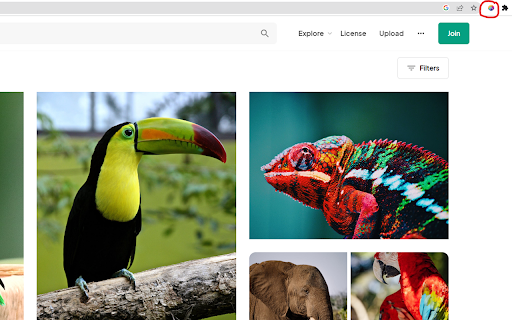
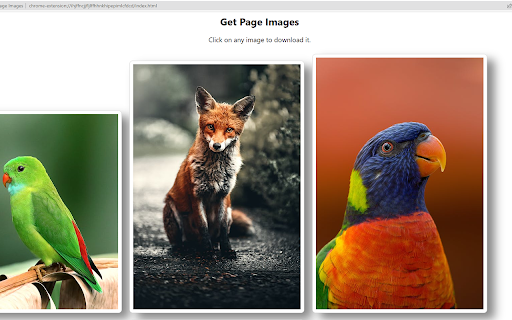
Grabs all images on a page and allows you to download any you choose. This extension will grab all images (in the html), open a new tab to display all of the images, and allow you to click and download whichever images you choose. To run the extension, simply click the icon in the extensions bar and it will run. Have any issues? Want to add new features? Checkout the GitHub here - https://github.com/ghughes13/get-page-images ===1.1.0=== -Now collects css background images for download as well -No longer displays tracking pixels (1x1 pixel) in the downloadable image set. -Resolves issue where cross origin images could not be downloaded correctly. -Small style adjustments. ===1.0.0=== -Created basic working version of the extension

Display Image List
Lists the images displayed on the page in thumbnail format. Lists the images displayed in the page you are viewing in thumbnail format. This allows you to see the image displayed on the page without scrolling to the bottom of the page. Also, by selecting from the option (Search Element), HTML tags such as. Alternatively, you can also get the image called from the attribute of the HTML tag.

Image Downloader | Suricata
Find and download all images on a web page in bulk or individually. You can filter the images based on image characteristics. You can select which image to download or download all images that pass filtering. You can choose a custom folder for the images and a custom file name sequence. Main features: • Very quick and clean group display of all images. • Download a single, multiple or all images in the web page. • Filter images by: width, height, type, orientation and aspect ratio or URL. • Custom or auto generated folders and files names. • Auto convert files to JPEG, PNG or WebP. • Side panel is supported.

Tiniest Gallery
Save and organize images, videos, and text snippets. Features: categorization, slideshow, color extraction, and zip download. 🌟🎉✨ Embark on an extraordinary creative journey with the Tiniest Gallery extension! Create your own gallery of stunning images, videos, and text snippets! - Save images, videos, and text snippets from any webpage. 💾 🖼️ 🎥 💬 - Organize your content into different categories. 📁 🗂️ - View your saved gallery in a beautiful, responsive layout. 👀 📸 - Enjoy a fullscreen slideshow of your saved items. 🖥️ 🎠 ✨ - Extract and copy dominant colors from images and videos. 🎨 🌈 - Save HEX codes of palette colors with a simple click. 🎨 💾 - Download your saved content as a zip file. ⬇️ 📦 - Filter your content by type: images, videos, or text snippets. 🔍 🏷️ - Control slideshow duration with an intuitive slider. ⏱️ 🎚️ - Quickly access your gallery through a toolbar icon. 🚀 🔧 🔒 Privacy-focused: No sign-up required, no login needed, and your data is saved only on your computer - never on any external servers! 🖥️ 🔐 The Tiniest Gallery extension is a powerful tool for artists, designers, researchers, and anyone seeking visual inspiration or an organized personal collection. 🎨✨🖌️ Unleash your creativity, organize your inspirations, and discover a world of captivating colors and images - all while maintaining complete control over your data. 🌈✨🎨 Install Tiniest Gallery now and let the magic unfold in fullscreen glory, right on your own device! 🌟🌈🎉💻

Image Drops: Downloader & Viewer for web images
Displays image details, applies filters and saves selected images as a ZIP archive or views them in an image viewer. Image Drops is a powerful tool that makes it easy to find, view and download all images from any web page. This extension provides detailed information about each found image, including size in pixels, weight in bytes, MIME type and source URL. It also simplifies the process of saving images to your computer, either individually or as a ZIP archive of selected images. Works with all types of images. It's free, easy to use and doesn't require registration. Just a few clicks and all images will be under your control. Key Features and Benefits: ✓ Image Download Tool: Select and download all images at once as a ZIP archive or individually. ✓ Flexible Settings: Customize parameters including image display, search modes, additional processing and more. ✓ Image Viewer Client: A rich tool for convenient image viewing that allows you to zoom, rotate, scroll and download selected images. ✓ Image Filter: You can filter images by size, weight, type and source URL. ✓ Base64 Encoding Converter: Select and convert any image in base64 encoding string (right-click the "Open in New Tab" button ⇨ to toggle the opening mode). ✓ Keyboard Control: Can be controlled using the keyboard (as well as the mouse). ✓ Fast and Responsive: You can expect fast response time and smooth operation. ✓ Easy to Use: Simple and intuitive interface. Install the Image Drops extension and start viewing and downloading images immediately.
