
cdhljjahkpnlcajclppdkojdomlialbj


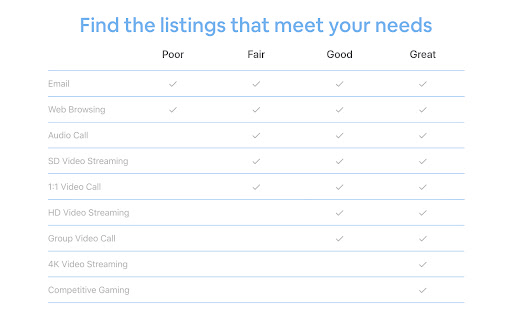
See which Airbnb listings are in neighborhoods with fast Wi-Fi Roamer appears above the pricing panel whenever you are browsing vacation rental listings on Airbnb. Geographically narrow your search - Roamer provides a simple rating scale you can use to compare neighborhood internet performance across listings worldwide. Request a speed test - With one click Roamer will pre-populate a message to the host asking them to run an internet speed test from the property. Where does the data come from? Roamer uses the raw data generated from Google's internet speed test. We have done the work to clean and translate the millions of speed tests run each day into a few trustworthy metrics. What websites does Roamer work with? Currently, Roamer is only compatible with Airbnb. What information can I see with Roamer? 1) Download Speed The speed at which information travels from the internet to your device. For example, if you are video chatting, your download speed would determine your ability to view other participants. Measured in megabits per second (Mbps). 2) Upload Speed The speed at which information travels from your device to the internet. So if you are video chatting, your upload speed would impact how other participants view your video feed. Measured in megabits per second (Mbps). 3) Latency Latency is the time required for a signal to travel from one computer to another computer on the network and back. When video chatting, high latency will cause delays in your conversation. Measured in milliseconds (MS). 4) Homes Tested The number of unique addresses tested in the neighborhood over the past year. Generally, a neighborhood covers an area of 0.25 square miles (0.6 square km). What do the ranges indicate? The lower and upper bound of the range represent the 25th and 75th percentiles of all homes speed tested in the neighborhood. Who is Roamer for? - World travelers that need to know where they can get connected. - Digital nomad's that want to travel the world and work from anywhere. - Remote workers that need a reliable WiFi connection for video calls. - People tired of working from home that want to plan a last minute vacation.

HiChee: Airbnb/Booking/Vrbo Price Comparison
See whether the viewed vacation rental listing is available at different prices when browsing Airbnb, Booking, and Vrbo. Your Digital Travel Agent 🚀 Transform your vacation rental search with our HiChee Chrome Extension! 🌟 Compare prices from Airbnb, Booking.com, Vrbo, and direct bookings - Side by side, effortlessly! Curious to learn more? Read the full USA Today article here: https://www.usatoday.com/story/travel/columnist/2024/10/18/how-to-avoid-holiday-vacation-rental-surprises/75560054007/ Why juggle between multiple tabs when you can see all your booking options in one place? Our HiChee extension for Chrome is here to streamline your search experience. SAVE TIME AND MONEY ON YOUR NEXT SHORT-TERM RENTAL ✅ 100% Free ✅ Easy Installation ✅ Reliable Price Comparisons ✅ Time-Saving Features ✅ Easily Switch Between Airbnb, Booking.com, And Vrbo Maps ✅ Compare reviews ✅ Use Our Unique ‘Magic Search’ Feature To Find Cheaper Booking Options ✅ EASILY FIND THE LOWEST PRICES Our ‘Magic Search’ tool helps you find the host and Book Direct! These deals are almost always the lowest-priced. Get the edge in finding the best deals and making informed decisions. Install the HiChee Chrome Extension now and take the first step towards smarter, hassle-free vacation planning!

OpenBnB - Book direct and save!
💰 Find direct booking websites for Airbnb listings and avoid extra fees! ✅ Book Direct, Pay Less Use Airbnb to discover rentals–but book directly with hosts to save hundreds on service fees. Just install the extension, browse as usual, and we'll highlight listings with direct booking options. :::::: How it works? :::::: 1️⃣ Install this extension 2️⃣ Browse Airbnb as you normally do 3️⃣ We highlight listings with direct booking links–so you never overpay again! 😎 🔒 Privacy First: We only access usage while you're on Airbnb, and we don't monetize your data. 🙌 Community-Powered: Support our mission by contributing.

BNB Toolbox Scraper for Airbnb
Extract & export Airbnb rental listings data with no code to a formatted CSV or Google Sheet. This extension extracts the most comprehensive data from Airbnb's listings with one click and no code. This extension is perfect for investors, Airbnb hosts and managers, data analysts, real estate agents. It helps provide information for market analysis, competitor analysis and more. You can download the data as a nicely formatted CSV file or Google Sheets file organized by price, beds, bedrooms, baths, fees, rating, number of ratings, city, latitude/longitude and more. It's a very simple extension that is easy to use and gets the job done. 🧪Core Features: ✔️Scrape unlimited Airbnb listings from the website - Search page results (https://airbnb.com/s/) - Individual listing pages (https://airbnb.com/rooms/) - Wishlists (https://www.airbnb.com/wishlists/...) ✔️Download data into a formatted CSV file or Google Sheets including: - Price - Occupancy rate data (calculated and raw data) - Rating - Number of reviews and review history - City - Latitude/Longitude - Name/title - # of beds, bedrooms, baths - Type of listing (ie entire home) - Listing URL - Search filter inputs (ie total nights, check-in/out dates, etc.) - Total charged based on search filter inputs - Early bird discounts - Discounted and original prices - "Superhost" status - "Rare find" status - Locale code - Listing ID - "About this space" description - Amenities list - Cleanliness, value, accuracy, communication, check-in, location sub-ratings - Host name, rating, number of reviews ✔️No coding or technical knowledge needed. It's super easy to use! NOTE: This extension only supports airbnb.com at this time. International versions of the website may not have full functionality. It also does not support extracting split stay listings. Please email support@proptierio.com for any feature requests. Heed help sending letters of intent in bulk to lead? Try Bulk LOI Sender for FREE: https://workspace.google.com/marketplace/app/bulk_loi_sender/313947552675 🔒Permissions: We understand there may be questions regarding the permissions needed to use the extension. We aim to be as transparent as possible hoping to inform you that we have absolutely no intent of using the access you grant to your browser maliciously. Follow the link below to read on: ⭐ How To Use: The extension popup has 3 buttons that control the entire functionality of the app. Each button is to scrape the webpage, clear the data to scrape from scratch, and download the CSV file or save to Google Sheets respectively. To extract data, follow these steps: 1. Go to Airbnb.com and choose your search inputs (ie location, dates, guests) 2. Open up the extension and click "Scrape". Don't close the app while it works. 3. Click "Download" when you're ready to download the data to CSV or Google Sheets 4. (Optional) Change settings for automation (i.e. automatically navigating the search results pages) For more info, please see the YouTube video above to learn how to use the extension. If there are any questions or other issues, please contact support@proptierio.com. Also, check the how-to page: https://proptierio.com/blog/bnb-toolbox-scraper-for-airbnb-chrome-extension or the support page: https://proptierio.com/blog/bnb-toolbox-scraper 🏷️Pricing: Upon installation of the extension, the user will be able to use the basic and free version of the extension indefinitely. This limits the scraped listings to the 50 listings per download (downloadable CSV file is available with the basic version). Upgrade to the premium version to enjoy scraping and downloading unlimited listings from Airbnb's website (and other awesome features). 📚Terms and Conditions: By using this extension, you agree to the terms here: https://proptierio.com/legal/bnb-toolbox-scraper-terms and https://proptierio.com/terms ✋Important: Read more about the extension and its usage here: https://proptierio.com/blog/bnb-toolbox-scraper-for-airbnb-chrome-extension 📘 Change log: 4/14/2026: Edge case bug fix and search results extraction 4/9/2026: Fix bugs, improve data extraction uiux with stop function 11/12/2025: Improve oauth flow, add exit survey, improve analytics 8/16/2025: Mitigate large extraction error 8/11/2025: Add host info and sub-rating extraction 8/7/2025: Fix search results extraction due to Airbnb website change 7/31/2025: Implement wishlist extraction 7/17/2025: Fix amenities extraction 7/10/2025: Update scraping function due to Airbnb website change 6/2/2025: Minor UIUX improvements 5/22/2025: Better handle download bug, improve error logging 5/19/2025: Fix minor search results extraction bug 5/12/2025: Better handle split stay results, improve UIUX, error logging 5/6/2025: Minor bug fix and update YouTube video 5/4/2025: Improve UIUX by introducing side panel 4/29/2025: Fix single page price extraction 4/25/2025: Improve purchase flow 4/21/2025: Improve extracting international formats, total nights, price 4/16/2025: Fix search results extraction for total price displays 4/11/2025: Fix search results extraction due to Airbnb website change 2/5/2025: Allow exporting of amenities list and occupancy rate raw data 1/30/2025: Fix price extraction from search results due to Airbnb website change 1/2/2025: Fix rating extraction from search results 11/20/2024: Add affiliate program link 11/07/2024: Update YouTube video 10/16/2024: Add ability to extract detailed listing description 9/16/2024: Fix data extraction bugs for various parameters, implement custom time delay functionality 2/22/2024: Fix scrape bug due to Airbnb change 1/10/2024: Save listings continuously as scrape is in progress. 12/15/2023: Improve pagination automation 10/22/2023: Fix minor scraping bug. 10/17/2023: Initial publish.

Turbo Test: Speed Test Tool, Wifi Speed Test
Fast and Accurate Speed Test – Measure Download Speed, Upload Speed, Ping, Jitter, Wifi Speed Test, and Page Load time. Fast and Accurate Speed Test - Measure Download Speed, Upload Speed, Ping, Jitter, and Page Load Time with Turbo Test. - Start from browser's popup - Quick speed test in ~20 seconds - Comprehensive metrics: download, upload, ping, jitter, and page load time. Performance Assurance: Guarantee the speeds you pay for, ensuring an online experience that's smooth, fast, and reliable. Troubleshooting Aid: Quickly identify and resolve connectivity issues with specific metrics analysis, ensuring a consistently robust connection. Informed Provider Choice: Make informed decisions about your internet service provider by comparing their performance through Turbo Test's comprehensive speed tests. Enhanced Streaming and Gaming: Optimize your entertainment experiences with a fast and stable connection, minimizing buffering and latency for seamless gaming and streaming. Remote Work Productivity: Facilitate efficient remote work by confirming your internet speed can handle the demands of video conferencing, file transfers, and other work-related tasks.
