
cddmpapdbmllaakidoaonceeipmepjmf
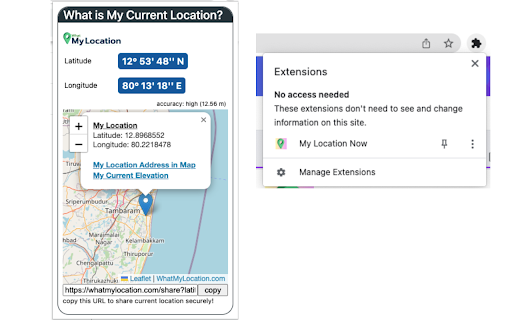
My Location Now: Find what is your current location on Map along with latitude and longitude. What is my current location? My Location Now: Whether you're a traveler, researcher, or just curious to find your current location on maps along with latitude and longitude, use this Chrome Extension to find it easy. This tool show me a map of my location now can be especially useful in a variety of situations, such as letting your loved ones know where you are, reporting whereabouts to your boss, helping someone to easily reach you, learning a new location and its surroundings, finding nearby places of interest, or booking travel tickets and accommodations. To share your current location, copy the URL and share it securely to the intended person. This tool never tracks your location in the background or stores your personal information. To know more information such as current elevation, map coordinates to location on maps, map coordinates to address on maps, latitude and longitude conversion, etc. use this mapping website https://whatmylocation.com

Change My Location
Easily change your location to see search results in an other city, state, or country! Great for marketing research. Trying to do market research in other cities or states can be a challenge. By using this extension, you can modify your search results to show those from another area! Great for SEO or ads research.

IP Geo Location
Displays your current IP and geo location data. Display the location and IP address of the connection you're currently using. No more confusion which proxy or vpn connection is active at the moment. PLEASE NOTE: The extension is using a free service to display your IP and geo location data (http://ipinfo.io/). If there seems to be a problem with a specific IP or the resulting location data I can not do anything about it since I'm not in any way affiliated with the services the extension is using. Sorry for the circumstances. I'm just happy such services exist and thus provide a stable solution for most users. Check out the source on GitHub: https://github.com/der-tkw/ipgeolocation ## CHANGELOG -- 1.7.1 Updated to Manifest V3 Updated OpenLayers -- 1.7 Fixed map display (switched to OpenLayers + OpenStreetMap) Removed map type Added dark mode Added 1min interval to auto refresh -- 1.6 Replaced ipify.org and freegeoip.com with ipinfo.io -- 1.5 Switched from jsonip.com to ipify.org Updated jQuery -- 1.4 Added silent mode Added notifications Added interval functionality New Options -- v1.3 Fixed icons Removed unnecessary permissions Improved loading/error situations -- v1.2 Added the following options: show header, show lat/long, map zoom, map type -- v1.1.1 Switched to a more reliable JSON IP provider. -- v1.1 Added map option. -- v1.0 Initial version.

Change Geolocation (Location Guard)
Easily change your geographic location (Geolocation) to a desired one and protect your privacy. Change Geolocation (Location Guard) is a browser extension that let you easily change your geographic location to the desired value and protect your privacy. Simply open the addon's options page and set the latitude and longitude for where you want the geolocation to be (the default location is Greenwich, UK). Next, reload a page and check your location (i.e. webbrowsertools.com/geolocation/). Please note that besides latitude and longitude you can set other variables in the geolocation API (see options page). Moreover, pressing on the toolbar icon will activate or deactivate the addon. Note: toolbar button serves as an ON|OFF switch to activate and deactivate the addon. The green color is for ON and the grey color is for the OFF state. To report bugs, please fill out the bug report form on the addon's homepage (https://mybrowseraddon.com/change-geolocation.html).

Google Search Location Changer
This extension allows you to search Google by specific locations and languages. This extension allows you to change your location in Google search with ease. 🌍 The Google Search Location Changer extension empowers you to easily switch your browsing location on Google. It's your go-to solution when wondering how to change your location in Google search, providing a convenient method to explore results as if you were in different countries. Perfect for SEO professionals, digital marketers, researchers, and anyone curious about how search results differ by location. 📍 Google Location Change: Instantly adjust your browsing location. Choose from a plethora of countries and regions. Ever wondered, “Can I change my Google search location?” This tool is your answer. 🌐 Language Selection: Opt for your preferred language in multi-language countries, and experience localized Google search results accurately. Supported languages abound to refine your browsing. ⚡ Quick Location Buttons: Jump to popular locations like the USA 🇺🇸, UK 🇬🇧, and more with a click. Perfect for those who often ask, "How do I search Google from a different location?" 🛠️ Versatile Utility: Tailored for diverse needs. Whether it's for SEO, content localization, market research, or language learning, if you're pondering how to search Google from a different location, this extension is your solution. 🔗 Uninterrupted Integration: It integrates flawlessly with your Google search location experience, opening results in a new tab and keeping your default settings intact. Swap between locations seamlessly. 👍 User-Friendly: The intuitive design ensures even those unfamiliar with SERP location changer tools can navigate effortlessly. 🚀 Delve into location-specific searches and uncover insights into how results differ globally. Download the Google Search Location Changer now and experience localized browsing. ⚠️ Note: This only modifies your Google search location and not your real-world location, unless used with a VPN. 1️⃣ Download the Google Search Location Changer from the Chrome Web Store. 2️⃣ Locate the extension icon on your browser toolbar. 3️⃣ Click the icon to access the SERP location changer menu. 4️⃣ Select your desired country and language if applicable. 5️⃣ The extension will then alter your Google search location. 6️⃣ Execute your Google search, and the results will reflect your chosen location and language. 7️⃣ Want a different location? Click the icon and pick from the dropdown. 🌟 SEO and Other Benefits: 🔍 Localized SEO Analysis: Enables SEO pros to scrutinize results for various countries and languages 🌍. Select precise locations and languages for insights into trends, competition, and keywords. 📝 Content Localization: Essential for content creators. View results from your audience's viewpoint, aiding content adaptation, understanding preferences, and boosting localization. 📈 Market Research: Businesses can conduct in-depth research, evaluate keyword competitiveness, study local competitors, and discern user behaviors. 🗣️ Language Learning: Engage with search results in different languages, assisting in language proficiency and cultural comprehension. 🎯 Ad Testing: Digital marketers can preview results from diverse countries, assessing ad visibility and effectiveness. 👥 User Testing: View results as users do in various locations, evaluating visibility, rankings, and engagement. 🌍 The Google Location Changer equips users in multiple fields to simulate browsing from assorted locations. Dive into global results and obtain invaluable insights into the worldwide online environment. Adopt the tool today for the ultimate Google search location experience 🚀.
