
cdapnbiifmnajacjlfiikicefmidkbdl

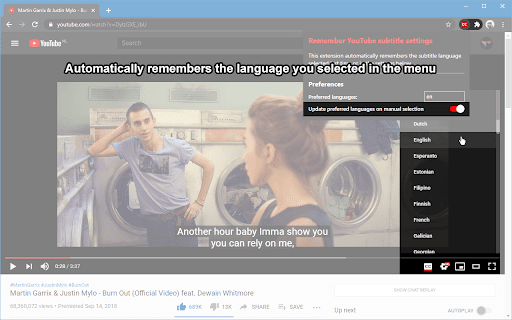
Set and forget. No need to re-select your subtitle language anymore. Auto-enable: - Except if spoken in a preferred language - Except if spoken in the languages...

Subtitles Player - Translate video Youtube
Subtitles player. Reading and translating subtitles aloud. New translator for video Subtitles player - become independent of the language of the original files in training and entertainment. If you like to watch videos, films in the original language, get acquainted with books or other cognitive literature, but do not have the necessary linguistic knowledge, subtitle dubbing is the only right solution. Simultaneous translation will allow you to fully enjoy watching foreign videos and films, without waiting for the official release of their voice acting. Such an audiobook reader is your opportunity to get quick access to the necessary information, regardless of its country of origin. Functionality: Translator for video - A subtitle player is used to implement: ➤ viewing bloggers with translation; ➤ instant translation from any foreign language; ➤ scoring subtitles when watching foreign video files; ➤ choosing your favorite voice for voice acting; ➤ viewing lectures with translation; ➤ video picture synchronization and voice track tempo. Such voice dubbing will greatly simplify: ➤ programming training using materials from foreign schools; ➤ teaching foreign languages from the source; ➤ watching movies, videos, programs and entertainment shows. After installing the application on YouTube, the best online e-reader, all foreign sites, audio books, courses and training programs will become available to you. Reading subtitles for you will no longer be a distraction, because now there is the opportunity to get a video translation, while choosing your favorite voice sound. How to use? Video dubbing is carried out automatically, as well as determining the language of the original audio track. In order for synchronous dubbing of video to be carried out without delays and problems, it is necessary to periodically update the application. Information on the release of new versions will be in the public domain for all users of the product, which will allow you to get high-quality voice translation of the video file you need. Learning Features Online learning in a foreign language has become much easier and more comfortable with the beta player subtitles application. Such a reader for YouTube will allow you to: ➤ listen to lectures at a convenient time; ➤ access information in all languages of the world; ➤ watch all existing video courses with translation. An online reader is not limited to educational videos. Voice acting is performed regardless of the direction of the selected file, its contents and size. The video lecture you need will become accessible and understandable, regardless of the language in which it was read. Such synchronization of the picture and the sound track simplifies the understanding and development of the material, making it easier to remember. New foreign films without waiting You no longer need to wait until foreign series with voice acting come out or read subtitles, straining your eyes. The synchronized voice translation, which is equipped with an audio reader, will give a pleasant viewing experience, simplify acquaintance with foreign cinema, bringing you closer to the mysterious world of art. An additional advantage is the ability to learn a language while listening to it from native speakers.

SimIntpr - Translate & Speak YouTube Subtitle
Translate YouTube video subtitles and speak out. Just like a YouTube virtual simultaneous interpreter. SimIntpr is a virtual Simultaneous Interpreter for YouTube videos. It translates YouTube video subtitles and speaks them out. If you want to watch any YouTube video and hear the voice of your own language, SimIntpr is your thumb of choice. It can translate the YouTube subtitles / captions into almost all widely used languages and read them out. Currently, to make the extension work, the YouTube video should have at least 1 official subtitle. You need to choose a YouTube official subtitle as the translation source, then select your preferred voice language, tune, speed, etc. We're working on supporting uploading your local subtitles, or links to external subtitles. Once you set up, SimIntpr speaks out your preferred language and voice, just as a virtual simultaneous interpreter. The translated voice does not conflict with the YouTube original one. So you can keep them both and adjust the volume separately as you wish. SimIntpr remembers your settings locally. Hence the translated voice comes up every time when you open a new YouTube video, needless to set up repeatedly. Features: ✅ Translated YouTube subtitle and speak out ✅ Multiple speech voice related settings Upcoming features: 🏃♂️ Support upload your local YouTube subtitle 🏃♂️ Support embed YouTube videos anywhere on the web Tips: 🔹 Pin the extension and left-click the icon to set up language, voice and other settings. Attention: ⚠️ This extension only works when the YouTube video has AT LEAST one official subtitle / caption Contact: 😜 Also feel free to contact us if you have any questions or suggestions on this extension. 📧 Email: support@simintpr.com

Video CC translator
Instantly translate video subtitles (subtitles) from platforms like Udemy, Udacity, and YouTube into your preferred language. Translate Udemy, YouTube, and Udacity video lectures into your preferred language! This extension automatically translates subtitles (Closed Captions, CC) in real-time using Google Translate and DeepL. Easily understand foreign-language courses and maximize your learning experience! 💡 Translation Features • Supports all languages provided by Google Translate. • Works in full-screen mode. • Allows subtitle position adjustment. • Customizable subtitle styles. • 🔥 DeepL translation is now available. For any questions or suggestions about this extension, please contact dev.fachory@gmail.com.

EasySubs – Learn languages by watching films and series
Customizable subtitles and a popup dictionary to master your vocabulary while watching YouTube or Netflix. Open-source and free. Improve your language skills by watching TV shows and movies with subtitles. Enjoy seamless experience – point over a word to get it translated, the video playback will be automatically paused. You can even translate the whole phrase by clicking on it. Do you have a subtitle file in your native language? Upload it and easily sync it with the video if needed. – TRANSLATION: Hover over or click on subtitles for single-word or full-sentence translations. – WORD PRONUNCIATION: Improve your listening and speaking skills with correct pronunciations. – VOCABULARY EXPORT: Export words to language learning services like Anki, LinguaLeo, and Puzzle English. – UPLOAD YOUR OWN SUBTITLES: Supports .SRT and .VTT formats. – SMART AUTO-PAUSE: Hover over a word, and the video will pause automatically. – SUBTITLE PROGRESS BAR: Navigate subtitles easily. Click to rewind the video to the desired point. – MANUAL SUBTITLE SYNC: Adjust subtitles if they’re out of sync with the video. – REWIND AND FAST-FORWARD BY SUBTITLES: Use the right arrow key to replay the last sentence. – SHOW ALL AVAILABLE SUBTITLES: Access all subtitles and audio tracks on Netflix, regardless of region. – YouTube (videos and originals) – Netflix – Coursera – KinoPub …and more coming soon. Please note that some services may not be available in your region or may require a subscription (e.g., Netflix). We are not affiliated with these services. ❤️ QUESTIONS AND FEEDBACK EasySubs is a completely free, open-source Chrome extension with no ads or hidden costs. If you like it, please leave a positive review – it helps a lot. – Send your feedback to support@easysubs.cc – Ask your question in our Telegram group: @easysubs_ext – Contribute to the project – find more details on our GitHub page: https://github.com/Nitrino/easysubs
