
ccmgfohlopphpmaepgipodpdkflmpill
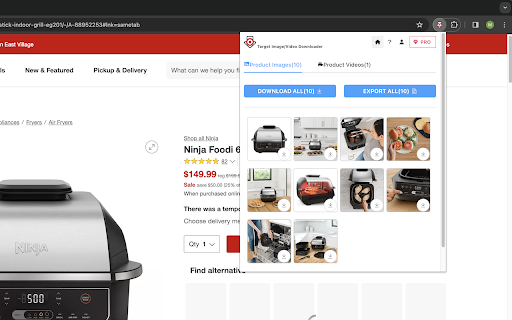


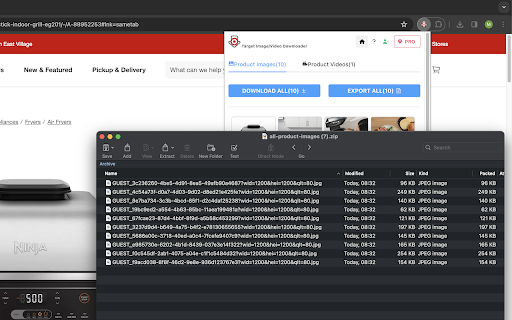
Download all Target product HD images and videos, or export iamges and videos info to csv file just by one click. 🎉🛍️ Download high-definition images or videos from product pages with a single click to zip file, export image or video infos to csv file. 📸🎥 Key Features: 1️⃣ Effortless HD Image Downloads: Download image one by one or download all high-definition images associated with a Target product to a zip file in one go. Easily curate your personal collection and find inspiration. 💫✨ 2️⃣Convenient Video Downloads: Save captivating product videos for offline viewing or analysis. Download videos with a single click and enjoy them at your convenience. 🎥🔽 3️⃣ Export Image or Video URLs and Information: Gather comprehensive data about Target products. Export image URLs and associated information with one click. Create a CSV file for analysis, research, or any other purpose. 📊📋 Enhance your work experience with our feature-rich extension. Take control of your business journey today! 🚀💻 Note: This extension is an independent creation and is not affiliated with or endorsed by Target. ❗️🔒

Instant Data Scraper
Instant Data Scraper extracts data from web pages and exports it as Excel or CSV files Instant Data Scraper is an automated data extraction tool for any website. It uses AI to predict which data is most relevant on a HTML page and allows saving it to Excel or CSV file (XLS, XLSX, CSV). This tool does not require website specific scripts, instead it uses heuristic AI analysis of HTML structure to detect data for extraction. If the prediction is not satisfactory, it lets the user customize the selections for greater accuracy. This type of scraping technology is much more convenient, because it does not require large user created libraries of scraping scripts, which often become filled with outdated and redundant versions. This means that our scraping method works just as well with small and lesser known websites, as it does with global giants like Amazon. Also, our users do not need to have any coding, json or xml skills! Instant Data Scraper FEATURES: * Detecting data for extraction with AI. * Detecting when dynamic data has loaded. * Delay and maximum wait time customization for desired crawling speed * Support for pagination on websites. * Automatic navigation to next page via buttons or links. * Support for infinite scrolling. * Extracted data preview with copy and paste support. * Data export to Excel spreadsheet or CSV file. * Extracted data column renaming and filtering. This extension is completely FREE. Instant Data Scraper works well in unison with SEO tools, CRM recruiter systems, sales leads management tools or email marketing campaigns. Web scraping and data downloading is made easy with our tool. Furthermore, you have data security and privacy as the scraped data does not leave your browser. Instant Data Scraper USE CASES: * Lead generation for companies and freelancers. * Growth hackers looking for easy ways to collect data. * Recruiters looking for job candidates. * Crawl results from search engines. * Get product pricing data from e-commerce websites. * Amazon sellers, distributors and review analysts. * Get email and addresses and phone numbers from directories. * Get contact info from professional association websites. * Scrape reviews and ratings. * Analyze posts for likes, comments, connection and contacts. * Extract emails and ID from social media profiles. Developer promise: This extension does not contain any malware or spyware beyond standard Google Analytics.

Walmart Images Downloader
#1 Walmart downloader for sellers. Bulk save HD images + videos in 1-click. Export SKU/price/brand to Excel. Fast, private, free. 🏆 The fastest Walmart image & video downloader for dropshippers and sellers. Instantly bulk download high-resolution product images and videos from any Walmart product page. Export product details (SKU, price, brand, URL) to Excel—perfect for dropshipping, market research, or catalog building. ✅ Key Features: • Download ALL product images in original HD quality • Save product videos with 1 click • Export to Excel with SKU, price, brand, product name, and URLs • 100% private—no data uploaded or tracked • Works instantly, no signup or login required • Lightning-fast bulk download 🚀 How to Use: 1. Click "Add to Chrome" to install 2. Open any Walmart product page 3. Click the extension icon 4. Bulk download images & videos instantly 5. Export product details to Excel (optional) 💼 Perfect For: • Dropshippers sourcing products from Walmart • Amazon/eBay resellers building catalogs • Market researchers analyzing products • Anyone needing high-quality Walmart images fast 🔒 Privacy & Security: Complete data privacy—nothing is stored or sent to external servers. All processing happens locally in your browser. 📊 What You Can Export to Excel: • Product brand • Product name • SKU numbers • Prices • Product URLs • Image URLs ⚠️ Disclaimer: Walmart and all related marks are trademarks of Walmart Inc. This tool is independent and not affiliated with Walmart Inc.

Zillow Images Downloader - Images and Property
Download Zillow images instantly. Bulk download listing photos and export ZIP in one click. Download Zillow listing photos, high-resolution images, and property details instantly. Built for real estate professionals who need speed, structure, and reliability. Looking for how to download Zillow images? Need to export Zillow listing photos or property data? Manually saving Zillow listing photos is slow and inefficient. This extension lets you: • Download all Zillow listing images at once • Save high-resolution Zillow photos instantly • Export structured property data for reports • Eliminate copy-paste and screenshot workflows If you work with Zillow listings daily, this tool saves hours every week. ★ FREE – Single Image Download • Download Zillow listing photos one by one • Quick-save images directly from Zillow property detail pages • No subscription required for single-image downloads ★ PRO – Bulk Zillow Image Download • Capture the full Zillow listing photo gallery • Automatically detect high-resolution Zillow images • Extract HD image variants (including original size where available) • Download all listing photos in one organized ZIP file • Perfect for listing presentations, MLS uploads, and marketing materials • Address • Price and listing status • Bedrooms and bathrooms • Square footage • Lot size • Geographic coordinates • Image URLs Ideal for: Even when Zillow limits gallery previews, the extension analyzes page data to recover available listing images and property attributes. Optimized specifically for Zillow property detail pages. 1. Install the Zillow Image Downloader extension. 2. Open any Zillow property detail page. 3. Click the extension icon. 4. Download single images for free or unlock bulk ZIP and Excel export. • Real estate agents and brokers • Property investors and flippers • Real estate analysts • Marketing teams • Transaction coordinators • Virtual assistants If Zillow listing images and property data are part of your workflow, this extension streamlines everything. This extension is an independent utility and is not affiliated with, endorsed by, or sponsored by Zillow. All processing occurs locally in your browser.

Shein Images Downloader - Download Images, Videos & Excel Export
Scrape, extract, and gather high-resolution Shein product images and videos instantly. Bulk image scraper with Excel export. The ultimate Chrome extension to scrape, extract, and gather Shein images and download product photos effortlessly. Extract images from Shein, gather high-quality product pictures, and scrape Shein videos from any product page with one click—no coding required. Perfect for sellers, designers, dropshippers, and researchers who need to extract product images and gather Shein content fast. ✓ Image Scraper & Extractor: Scrape and extract images from Shein product pages automatically ✓ High-Resolution Downloads: Download all product images in original quality ✓ Video Scraper: Scrape and download Shein product videos ✓ Bulk Image Gatherer: Gather and scrape multiple images, download as organized ZIP files ✓ Excel Export: Export scraped and extracted product data (SKU, color, name, URLs) to Excel ✓ All Image Types: Extract main images, variants, and description pictures ✓ One-Click Extraction: Simple interface to extract and scrape product images, no coding needed ✓ Batch Processing: Gather images in bulk for efficient workflow 1. Open any Shein product page 2. Click the Shein Images Extractor extension icon 3. Extract individual images or use "Gather All" for bulk download 4. Download extracted images as ZIP files or individually 5. Export gathered product data to Excel for easy organization 6. All extracted files saved directly to your computer PERFECT FOR: • Sellers & Dropshippers: Extract and scrape product images to build catalogs quickly • Designers: Gather images for inspiration and reference materials • Researchers: Extract and analyze product image data and trends • Content Creators: Scrape high-quality product visuals for content • E-commerce Stores: Bulk extract images for inventory management • Marketing Teams: Gather product photos for campaigns and analysis Get started extracting and scraping Shein images with essential features for free. Upgrade for advanced extraction functionality and bulk gathering when you need it. • Extract Product Images: Gather all product photos from Shein listings • Bulk Image Extraction: Extract multiple product images simultaneously • Image Gatherer Tool: Gather images from Shein with automated extraction • Product Photo Extractor: Extract high-quality product photography • Variant Image Gatherer: Scrape all color and style variant images • Description Image Extractor: Extract detailed product description photos • Video Content Gatherer: Extract and download product videos • Metadata Extraction: Gather image URLs, names, and product details Your data stays completely on your device—never transmitted to our servers. We prioritize your privacy and data security. Shein is a trademark of Shein Inc. This extension is an independent tool and is not affiliated with, endorsed by, or sponsored by Shein Inc. Need help? Contact us at webstarue@gmail.com for fast assistance!
