
cccbglaaelcpileeeladhmafobllkfeb
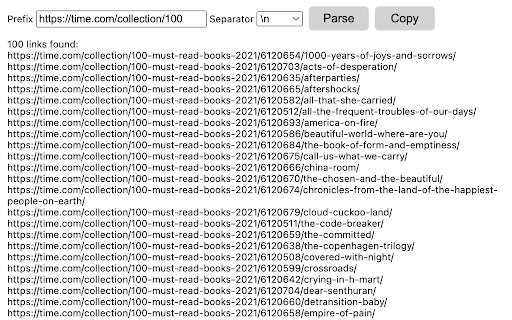
Parse href links from any web page Link parser allows extracting href links with a given prefix from any web page in one click. It helps to reduce manual work when multiple routine actions are needed.

Seerobots
SeeRobots conveniently displays the meta robots information of the website you are viewing - For more info visit www.seerobots.com SeeRobots will conveniently show you the information meta robots tag in the head section of the website your are viewing at that moment. Depending on this information colors in the browserbar will change. 1. If the SeeRobots field is all green it means that this page has "index, follow" as robots attributes. 2. If the SeeRobots field is all red it means that this page has "noindex, nofollow" as robots attributes. 3. If the SeeRobots field is green on the left and red on the right it means that this page has "index, nofollow" as robots attributes. 4. If the SeeRobots field is red on the left and green on the right it means that this page has "noindex, follow" as robots attributes.

Linkparser
LinkParser analyzes the links of the current page. It can differentiate between 9 link types & mark them in different colors. Linkpaser can differentiate the following type of links in order to count them or mark them on the webpage: internal links, internal dofollow links, internal nofollow links, subdomain links, subdomain dofollow links, subdomain nofollow links, external links, external dofollow links, extermal nofollow links. How Linkparser shows you the information it gathers is very much up to you. It is very customizable!

Sitemap Scraper
Sitemap Scraper Extension - Your go-to tool for effortlessly extracting valuable data from website sitemaps. Sitemap Scraper Extension 🌐💡 - The essential tool for efficient and effortless extraction of valuable data from website sitemaps. Become a master at website structure analysis, SEO optimization, and web data collection with this intuitive and powerful extension for Google Chrome. Take advantage of advanced capabilities to quickly and accurately navigate, analyze, and extract crucial information from any sitemap. Ideal for SEO professionals, web developers and data analysts looking to improve their workflow and obtain competitive insights!

Extract links from pages
Extract Links from Pages Discover and Organize All the Links on Any Web Page with Ease Welcome to "Extract Links from Pages," the… Extract Links from Pages Discover and Organize All the Links on Any Web Page with Ease Welcome to "Extract Links from Pages," the ultimate Chrome extension for web enthusiasts, SEO professionals, content creators, and digital marketers. Our tool offers a simple yet powerful solution to extract, analyze, and manage all the hyperlinks on any web page you visit. With just one click, you can unveil a comprehensive list of links along with their anchor texts and determine whether they are dofollow or nofollow links. Key Features: Instant Link Extraction: Extract all the links from any web page with a single click. Our extension scans the entire page and provides you with a detailed list of hyperlinks, saving you time and effort. Comprehensive Data: Get detailed information about each link, including the URL, anchor text, and link type (dofollow or nofollow). This feature is particularly useful for SEO audits, content analysis, and competitor research. Clean and Organized Interface: The extracted data is displayed in a clean, organized table format, making it easy to review and analyze. The interface is designed to be user-friendly and intuitive, ensuring a seamless experience. Professional Design: Enjoy a professionally designed interface with a soothing blue color scheme and an aesthetically pleasing layout. Our design focuses on enhancing usability and visual appeal. Enhanced Privacy Practices: We respect your privacy. Our extension only accesses the current tab to extract links, without storing or sharing your data. We have implemented strict privacy practices to ensure your information remains secure. Use Cases: SEO Professionals: Easily identify and analyze all the links on a web page, including internal and external links. Determine which links are dofollow or nofollow to optimize your link-building strategies. Content Creators: Extract and review all the hyperlinks in your content to ensure they are correctly linked and relevant. This helps in maintaining the quality and credibility of your content. Digital Marketers: Analyze competitor websites to understand their linking strategies. Extract links from landing pages, blog posts, and other content to gain insights into their SEO tactics. Web Developers: Quickly extract and review all the links on a web page to ensure proper linking and functionality. This can be especially useful during website audits and quality assurance checks. How to Use: Install the Extension: Add "Extract Links from Pages" to your Chrome browser from the Chrome Web Store. Open a Web Page: Navigate to any web page from which you want to extract links. Click the Extension Icon: Click on the "Extract Links from Pages" icon in your Chrome toolbar. View the Extracted Links: A popup window will appear, displaying a table with all the extracted links, their anchor texts, and link types. Analyze and Utilize: Review the extracted data for your analysis, SEO audits, content review, or any other purpose. Why Choose Us: User-Friendly: Our extension is designed with simplicity and ease of use in mind. You don’t need any technical expertise to extract and review links. Accurate and Reliable: We provide accurate and reliable data extraction to ensure you get the information you need without any hassle. Privacy-Focused: We prioritize your privacy and data security. Our extension does not store or share your data, ensuring complete confidentiality.
