
cbphgenehibfhdbkceombhcmmaobfnfd
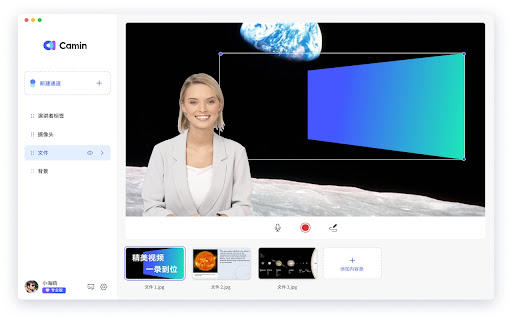
Recording video demonstrations, and enhancing your video call and conference experiences with powerful virtual camera features. CamIn allows you to create or record video presentations and to enhance your video calls and conferences with powerful virtual camera features, such as stickers, picture in picture video, background removal…Try it for free!

RecSnap - Screen Recorder with Audio & Webcam
Record your screen, voice, or webcam in sharp detail. RecSnap makes screen recording smooth, simple, and reliable. RecSnap is a smart screen recorder for browser that lets you record screen, audio, and webcam without extra setup or tools. Whether you're looking for a screen recorder with audio, a way to record screen on Windows or Mac, or a lightweight browser screen recorder, RecSnap helps you capture it all — quickly and clearly. 🖥️ What can you record: - Your full screen, browser tabs, or application windows - System sound, mic, or both - Webcam footage or voice-only narration - Screen recorder for browser with audio and webcam - Works on PC, Mac, and Chromebook - No sign-up, no watermark - Smooth visuals and sharp sound - All recordings saved directly to your device - Record tutorials, how-to videos, or demos - Screen record meetings, walkthroughs, or training - Create explainer videos or product showcases - Capture video calls with voice - Use as a Google screen recorder or for screen recording on Chromebook 🔑 Why RecSnap? It's private, fast, and easy to use — built for creators, educators, remote workers, and anyone needing a solid screen recording tool. 🚀 Try RecSnap today and start screen recording in just one click.

Captist - Screen Recorder & Auto Zoom
Captist — Create beautiful screen recordings with automatic zooms and professional mockups Create stunning, cinematic screen recordings in minutes — directly from your browser. Captist turns boring screen captures into professional visuals with intelligent auto-zoom, beautiful backgrounds, and smooth motion effects. 🎥 Intelligent Auto-Zoom Never manually keyframe again. Captist automatically tracks your mouse clicks and movements, adding smooth, cinematic zooms to highlight important actions instantly. 🎨 Beautiful Backgrounds & Layouts Wrap your recordings in sleek, studio-quality backgrounds. Choose from vibrant gradients, glassmorphism effects, or minimal wallpapers to hide messy desktops and elevate your content. 🛠️ Precision Editor Full control is in your hands. Adjust zoom timing, change focal points, trim mistakes, and customize cursor visibility with our intuitive timeline editor. 🔒 100% Private & Offline Rendering Your data never leaves your device. Captist renders pixel-perfect 4K videos directly on your computer. No cloud uploads, no waiting, and absolute security for sensitive work. ⚡ Performance Optimized Run smoothly on any device. Export in 720p, 1080p, 1440p, or full 4K resolution with lightning-fast local processing. 🎯 PERFECT FOR: - Product Demos & Walkthroughs - Bug Reports & Technical Support - Educational Tutorials - Social Media Content (YouTube Shorts, TikTok, LinkedIn) Say goodbye to boring screencasts. Install Captist today and start creating videos that people actually want to watch. ● Changelog v1.0.4: - Improved screen recording reliability on macOS with external displays - Fixed recording start issues when selecting a secondary monitor - Improved desktop capture constraints to avoid incorrect display size detection - Added fallback handling for capture frame rate compatibility - Improved validation for live video tracks before recording starts - Improved overall recording stability for multi-display setups Changelog v1.0.3: - Improved recording handoff to open the Captist editor more reliably after stopping - Improved macOS recording compatibility and editor import reliability - Added smarter handling for video format detection after recording - Saved microphone and camera selections for a faster setup experience - Improved overall stability for the recording and editing flow Changelog v1.0.2: - Added a new popup with dedicated Record and Screenshot workflows - Added screenshot modes: Selected Area, Element, Visible Part, and Full Page - Added keyboard shortcuts for capture actions - Improved screenshot annotation tools and editor flow - Fixed popup and screenshot transfer issues

Real Screen Recorder
Real Screen Recorder records the screen and webcam with audio. Screen recorder chrome extension is a screen recording tool for high quality video capturing from Tab, Particular area of the page and full Screen, with Mic, Webcam and System audio recording. Features: >>Screen & Webcam recording >>Record screen with audio >>No watermark Here are steps to use Screen Recorder Chrome Extension: >> Install real screen recorder extension for Google chrome from the store >> Open the extension and choose from the 3 options >> Select the screen or tab that you want to record and click on start button >> Stop the recording and download the the screen recording to your computer UPDATES: Version 1.0.9 >>Fixed recording upload bug >>Optimized screen recording Version 1.0.7 >> User can now record and generate a sharable link. >> Improved UI

Vimeo Record - Screen & Webcam Recorder
Record and share free video messages from your browser Record and share free video messages from your browser Did you know we speak up to 7x faster than we type? Next time you’re thinking about sending a long email or a chat message, consider whether a video recording might communicate your ideas better—and faster. Whether it's a product demo, design feedback, or a knowledge transfer session, with Vimeo’s screen recorder you can quickly record and share video messages. Choose to record your screen, voice, face or a combination. Once you’re done recording, you can instantly share your video with a private link. Every recorded video is automatically uploaded to Vimeo, which gives you a variety of tools such as organizing and replacing videos, customizing the player, sharing videos with your teams, adding chapter markers, and much more. Join over 200M users who have chosen Vimeo as the home for their videos. ***HOW TO SET UP SCREEN RECORDING*** + START RECORDING FAST: Our extension takes you directly into Vimeo so you can record from your browser in just two clicks. Screen record with audio, webcam, or both: Select the entire screen or an app. Camera on or off. + SHARE PRIVATELY OR EMBED ANYWHERE: Instantly share your recording with a private link or embed it on your website or social channels. + VIEWER ANALYTICS: Get notified when someone watches your video and get insights into your audience. + REVIEW AND COMMENT: Collect and resolve feedback from team members or clients to keep projects moving. + UPLOAD VIDEOS: You’ve got videos. We’ve got the place to host and organize them. Upgrade to do so much more with Vimeo’s online collaboration tools: + ADD CHAPTERS AND CTAS: Make it easy for your viewers to navigate your video and get the information they need with chapter markers and calls-to-action. + INVITE THE WHOLE TEAM: Add team members to keep everyone in the loop with notifications. + SECURE WITH SSO: Easily administer access to the team with single sign-on. ***WHO USES VIMEO’S SCREEN RECORDER?*** CREATIVE TEAMS, FREELANCERS, AGENCIES Record a walkthrough of your work, collect feedback, and streamline the approval process. HR MANAGERS, TRAINERS, EDUCATORS Simplify knowledge sharing by creating reusable tutorials and onboarding videos for employees and customers. PRODUCT, DESIGN & ENGINEERING Submit bug reports, review designs and code, demo products, and share feedback and ideas without scheduling another meeting. CUSTOMER SUPPORT Resolve issues fast with a visual walkthrough of what you’re seeing. EXECUTIVES Record and send company updates with a humanizing touch. ***WHY USE VIMEO’S SCREEN RECORDER*** RECORDING IS FREE Access to the Vimeo screen recorder is free, allowing you and your team to get started quickly and easily. Plus, upload any video file and use a variety of tools to organize, manage, and publish your videos. TAKE BACK CONTROL OF YOUR TIME Sending a video message can provide the context and value of a meeting in a fraction of the time. Simply record your screen and start talking to get your message across. CONNECT ON A PERSONAL LEVEL A lot gets lost in translation with text. Be understood and build strong relationships remotely by expressing yourself through your voice and face as you would in person. Convey tone, emotion and empathy. TRANSFER KNOWLEDGE INSTANTLY Spend less time training and re-training. Record reusable assets like how-to videos, demos, presentations, and walkthroughs to onboard and educate team members and customers and resolve support tickets. SIMPLIFY THE FEEDBACK PROCESS Consolidate and resolve feedback directly in your video recordings. Comment and tag your teammates to keep projects moving. SECURE ACCESS FOR THE WHOLE TEAM Organize your recordings in team folders to automatically notify anyone with access to the folder of new content. Set permissions and invite clients and stakeholders as viewers to specific folders.
