
cbbjdhekbajhhhfephklhncedhgblpnm

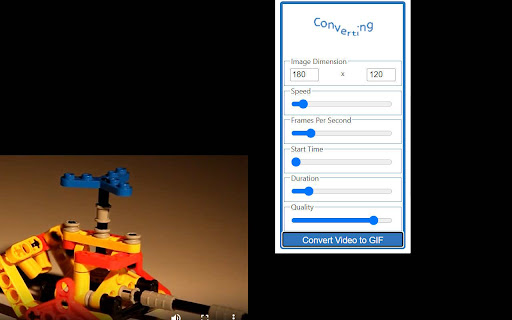
Converts the YouTube, Vimeo, webm, ogv or mp4 videos you are currently watching into an animated GIF. Automatically create short animated GIF's from YouTube, Vimeo, webm, ogv or mp4 videos from the video you are currently watching. You may have to wait a short file for the animated GIF to be created. If there is a HTML Video element on the web page the GIF will keep the same aspect ratio to avoid any distortion. Once you have installed your extension just follow the instructions in the extension popup to sign up and get converting!

Video to mp3
Try our Video to mp3 Converter! Convert avi, mp4, mov, and more to audio easily—ideal for extracting sound from videos. Meet our Video to mp3 generator! You've got a video file of one of the following types: AVI, MP4, mov, m4a, MPEG, WebM, or any other. If everything you need to acquire from your videography is the sound, choose the proposed MP3 video converter! It's a great solution for students and everyone who needs to listen to what is said in their videos. After recording their live lectures, they can share audio versions and make their learning more simplified. With this video to mp3, users can have much fun, while being involved in videoconference communication. They can better understand what the speaker says, staying on point, without spending time on watching visual material. If you need a free, open-source instrument to change your favorite video to audio files, use this video to MP3 tool! ⁉️ How to convert video to mp3? 1. Access the video to mp3 download asset! 2. Choose a digital file from your comp by clicking the relevant button! 3. Start the process by pushing the BTN with the same name! 4. Wait for the status change notification! You'll see DONE status when the conversion of mov to MP3 is completed! 5. Press to download the available high-quality audio! 💯 Key features • Easy-to-use interface: You don't have to think hard about how to convert video to audio. Thanks to the provided prompts, it's as easy as 1, 2, 3 to press the required buttons! • Great solution: Handle the video to mp3 as a useful functional to convert video to audio within a short time and without any problems. • Reliable resource: The video to mp3 transformation is important if you wish to pay special attention to the speaker's message but not to visuals. • Excellent results: Apply the mp3 converter to download the chosen file without the loss of quality! • Support for multiple formats. ⁉️ How does the video converter to mp3 operate? To convert mp4 video to mp3, or m4a to mp3, a series of steps should be implemented. The system of vid to mp3 conversion is based on the usage of a special technique. It focuses on computer video output, which is grounded in transforming a component video signal into audio. This system incorporates hardware for signal conversion and software for gaining the actual performance. When a performer accesses the Video to mp3 product and presses the proper button, the chosen file appears in the area of conversion. The mov to mp3 converter performs certain actions to provide the expected result. Once a doer has got the audio file, it's possible to download it. ☝️ Special functionalities of the video to audio converter 1️. Do not pay for the conversion of .mov to mp3! This technology if absolutely free to use. Don't waste money on format transformation! Pick the MP3 format if it suits you better! 2️. The recommended video to mp3 generator is very effective. To get the desired outcomes, don't look for any advanced settings! 3️. Make the most of the offered video to mp3! Programmers guarantee the high quality of this resource. 🏆 Cutting-edge capabilities of the Video to mp3 👍 Accessibility • Understanding how to convert video to audio, users can complete their tasks with confidence. • The video to mp3 converter is known for its smooth operation. Acquire the necessary formatting as quickly as possible! • Employ the present video to MP3 transformer any time you like! It's available online without installation on your PC. 👍 High Reliability • The video mp3 converter is regarded by lots of net-workers as a fantastic technological advancement for optimizing their virtual work. • No wonder that the public needs speedy access and immediate results. This extension helps to convert your files to mp3 with the snap of a finger. • Follow the prompts to convert video to audio with ease! It couldn't be any easier to do it! 👍 Advanced Functionality • The Video to mp3 alters popular videoformats so that users can share their content in the most suitable way for them! • With this amazing option, it's not difficult to work with diverse videofiles. • Consider that the high speed of operation makes the Video to MP3 easy-to-handle! 🤔 How to Take Advantage of the Video to mp3 ☑️ Make sure your Internet connection is quite good! ☑️ Utilize this user-friendly video to mp3 program with pleasure! ☑️ Enjoy the flexibility of its action! ☑️ Get your audios and share with your fellows! ⁉️ FAQ: - Is the Video to mp3 a free extension? Yes, you can convert the selected videos to mp3 audio assets free of charge. - Should I create an account to start using this service? No, you shouldn't do it. It is accessible with no need to install the program.

MConverter - File Converter: AVIF, JXL, WebP
Extension features: ➡Right-click on most images, videos, and audio players to extract their displayed files and convert them. For example, you can right-click on WebP images and save as JPG by quickly converting them.* ➡Click the toolbar icon to see all "from" and "to" formats ➡Start typing "Convert ..." or "Convert to ..." in the address bar and you will see a list of file formats as suggestions. Click or hit Enter on any of them to quickly convert that type of files. MConverter web app features: ✓ Convert in bulk files between most video, audio, image, e-book, office & archive formats ✓ Batch convert large files up to 10 GB** ✓ Drag and drop folders, in addition to files ✓ Use Ctrl+V to paste files from the clipboard, folders too ✓ Select files from Google Drive, Microsoft OneDrive, and Dropbox ✓ Directly choose files to convert from other apps - integrates with your device's Share menu, if installed as a PWA ✓ Save converted files to any custom folder - use the SAVE TO... button ✓ Easy to use ✓ Small app size - as MConverter is an optimized web app (PWA) ✓ All popular file formats are supported ✓ New formats are also available: AVIF, JPEG XL and WebP images ✓ Compress PDF files in bulk so that they take up less storage. Pick between basic, strong, and extreme compression: up to 90% reduction in size, depending on your file ✓ Free up space by converting images to more efficient formats like WebP, AVIF, JPEG XL (JXL) ✓ Open 7ZIP, RAR archives more easily by converting them to ZIP ✓ Convert Office files, no matter if they were created with Microsoft or LibreOffice ✓ PDF support: convert images to PDF (JPEG to PDF, PNG to PDF), but also export Word documents, Excel spreadsheets, and PowerPoint presentations to PDF ✓ Export PDF to editable Word document: if the original PDF file had text data, then you will be able to edit the converted DOC or DOCX file ✓ Export PDF to image: PDF to JPG, PDF to TIFF, and more ✓ Can convert TSV and CSV to XLSX (Excel spreadsheet) ✓ Extract music from video by converting MP4 to MP3, AVI to MP3, FLV to MP3 etc. ✓ High quality audio formats supported: FLAC, WAV and WMA; To free up space, convert to MP3 or AAC ✓ Create GIF animations from videos: up to 1 minute long GIFs ✓ Optimize GIF animations to have a smaller file size: convert GIF to MP4 video ✓ In addition to static images, MConverter also supports making animated WebP files, as well as converting WebP animations to a video format or GIF ✓ Open iPhone photos: convert HEIC to JPG, HEIC to PNG, HEIC to WebP and more ✓ Extract image frames from videos: MP4 to JPG, MP4 to PNG, AVI to PNG etc. ✓ Convert to more compatible formats: WebP to PNG, WebP to JPEG, WebM to MP4, DOCX to DOC and others ✓ Convert Minecraft game files: mcaddon, mcpack, mcworld, and mctemplate ✓ Subtitles (closed captions) converter: SRT, SMI (SAMI), SUB (MicroDVD), VTT (WebVTT) ✓ .tini to zip file converter: convert ChromeOS Crostini Linux container backups to other archive formats ✓ View .drawio diagrams: convert .drawio to PDF, PNG images ✓ Comic book converter: CBR, CBZ to PDF ✓ Raw image formats from professional cameras: convert ARW/DNG/CR3 to JPEG, PSD and more ✓ Convert Jupyter Notebooks (IPYNB) ✓ Recognize and open unknown file types: If you have a file with a missing or corrupted filename extension, MConverter will analyze the file, try to guess its real format and offer to convert it to other formats you can already use on your device. Ideal for files which trigger the "How do you want to open this file? Look for an app in the Microsoft Store." popup dialog on Windows. ✓ Supported formats: To see all supported file formats, please open the extension from the toolbar. * The MConverter extension cannot download videos from YouTube, because it is against the Terms of Use of YouTube. We cannot do anything about this. ** MConverter Plus, Pro & Max can convert files over 100 MB and in batches of up to 1000 files at once. The paid plans of the file converter remove all ads, have no daily conversion limit, and allow you to keep the original file names.

WEBP to PNG Converter
Converts images between WEBP, JPG, GIF, AVIF and PNG formats and extracts metadata from them. 🔥 This Chrome extension makes it simple to convert WEBP files directly to PNG. Just select a WEBP image from your computer — the extension takes care of the conversion and gives you the new file ready to download. ⚡️ Need a different format? You can also convert WEBP to JPEG, GIF, and even the other way around — from PNG, JPEG, or GIF back to WEBP. No complicated tools or third-party apps required — just pick a file and convert in seconds. 📊 Along with format conversion, the extension can extract detailed metadata from your images: dimensions, file size, creation date, and more. Get useful insights about your files while working. 🎯 Great for: Anyone who frequently downloads and works with images. Web developers dealing with modern image formats. ✅ Fast, lightweight, and focused: no ads, no sign-up, no data tracking — just reliable image conversion that works when you need it.

Video to GIF
🎬 Video to Gif converter. Convert and cut to make an animated gif in a seconds. Introducing the ultimate tool for transforming your videos into captivating gifs! This versatile Chrome extension is designed to simplify the process of converting video to animated gif. Whether you want to create memes, share moments, or enhance your social media presence, it has you covered. Let's dive into the features and benefits of this powerful converter. It offers an intuitive interface that makes converting video to gif effortless. With just a few clicks, you can turn the video to gif in seconds. There's no need for complex software or extensive editing skills. Our online gif converter is perfect for both beginners and professionals. Features : 1️⃣ Simple and user-friendly interface 2️⃣ High-quality gif conversion 3️⃣ Support for various video formats 4️⃣ Fast processing time 5️⃣ Customizable gif settings Creating gifs has never been easier. With this tool, you can convert video anywhere, anytime. The extension supports a wide range of video formats, ensuring compatibility with your files. Additionally, you can customize gif parameters to match your preferences, including frame rate, resolution, and duration. Advantages of using : ➤ Easy conversion process ➤ High-quality output ➤ Time and effort savings ➤ Perfect for social media content ➤ Ideal for meme and reaction creation It's not just a converter; it’s a comprehensive tool that allows you to unleash your creativity. Whether you want to convert video to animated gif for a project or simply share fun moments with friends, this extension has all the features you need. This creator enables you to select specific sections of your video, ensuring only the best parts are included in the final gif. Customization options include: Frame rate adjustment Resolution settings Duration control Looping options Transforming your video clip to gif is incredibly simple. The extension guides you through each step, making the process seamless. You can preview your gif before finalizing it to ensure it meets your expectations. With our online tool, you can quickly make edits and adjustments on the go. Reasons to choose: Ease of use High-quality results Quick conversion time Versatility and customization Compatibility with various video formats Our converter is perfect for those who want to add a dynamic element to their content. Whether you are a social media influencer, digital marketer, or just a gif enthusiast, it is the ideal tool for you. High-quality conversion ensures your gifs look professional and engaging. Using this tool is as simple as: 1️⃣ Uploading your video 2️⃣ Selecting the desired section 3️⃣ Adjusting gif settings 4️⃣ Converting and saving your gif High-quality conversion means your gifs will always look sharp and vibrant. You don’t need to worry about losing quality during the conversion process. Our video converter ensures each frame is preserved, providing smooth and clear animation. The extension is designed to handle multiple conversions with ease, making it ideal for busy creators. You can also use this tool for professional presentations, educational materials, or entertainment purposes. Benefits : ▸ Fast and easy to use ▸ High-quality output ▸ Customizable options ▸ Support for various formats ▸ Reliability and efficiency Don't settle for mediocre gifs. With us you can create high-quality animations that stand out. Our online converter is designed to deliver the best results every time. Whether you are making a gif for fun or professional use, you can trust us to provide the tools you need. In conclusion, this converter is the perfect solution. With its user-friendly interface, and customizable options, it is the ideal tool for anyone looking to create engaging and dynamic content.
