
capoedefgpeieaiddegchdmagngdhfpc
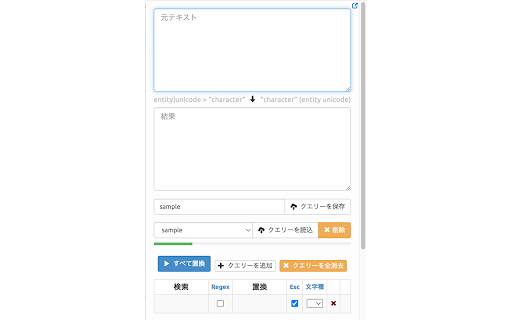

Make some queries and run them all to replace characters of entered text. This extension allows you to create some queries to find and replace characters of entered text and execute the queries at once in the popup.html. It's convenient to beautify some text by trial and error. Main functions: • Simple text replacement • Regular expression replacement • Case conversion • Save and load queries • Display of information on selected character Ver. 0.2 Added the function to open popup.html from the context menu. How to use (2 ways): 1. Open popup.html by clicking on the extension icon. 2. Open popup.html by clicking "Tiny Text Replacer" from the context menu.

Word Replacer Max
Seamlessly replace text on any web page. ⚡️ Smart Text Replacement Set up rules to automatically transform text across the web. 🌐 Domain Controls Specify which sites your rules apply to using allow or block lists. 🤝 Share & Import Exchange rule sets with friends and teammates to share useful replacements. 🎯 Pattern Matching Fine-tune rules using whole word, case sensitivity, or regular expressions for exact control. 🎨 Visual Styling Optionally highlight changes with styles such as bold, italic, underline, or background colors to make them stand out. 🌗 Dark Mode Eye comfort for all times of day. 1. Install Word Replacer Max 2. Click the extension icon in your toolbar 3. Create your first replacement rule 4. Start browsing with your personalized web experience ❯ Simple to use but powerful when you need it ❯ Full control over where replacements happen ❯ Your rules stay private on your device ❯ Open source code on GitHub: https://github.com/dan-lovelace/word-replacer-max

FindAndReplaceOnWeb
Using this tool, you can replace an "A" with a "B" or append a "B" after an "A" on a page. ### Introduction: - Using this tool, you can replace an "A" with a "B" or append a "B" after an "A" on a page. - When searching for "A", you can find a fixed value, you can find a type of value based on a regular expression, or you can find a type of value through a css path. - When replacing with "B" or adding "B", HTML code can be written, and the original content of "A" can be brought into. ### Application scenarios: - If you don't like a certain politician, you can replace his name with a nickname to reduce the frequency of seeing him; - You can change the mailbox displayed on the web page into a style that can be sent directly by clicking (add the href attribute of "mailto"); - You can change the phone number displayed on the web page into a style that can be dialed directly (after adding the href attribute of "tel", you can use Facetime dialing on Mac); - You can add translation after some unfamiliar words, especially some specific terms;

Auto Text Replacer
Automatically replace any words or texts with new texts on any website Auto Text Replacer: Transform Your Web Experience! Take control of your browsing with Auto Text Replacer, the ultimate tool for customizing text on any website. Whether you're boosting productivity, injecting fun, or tailoring your online experience, Auto Text Replacer empowers you to make the web truly yours. **Key Features:** 🪄 Effortless Text Replacement: Instantly find and replace words or phrases with anything you desire. 🔍 Always-On Filtering: Set it and forget it—your rules apply automatically across websites. ✨ Advanced Regex Support: Use powerful regular expressions for precise and complex text replacements. ⛷️ Unlimited Rules: Create as many rules as you need for a fully personalized browsing experience. ⬆️ Drag-and-Drop Rule Priority: Easily reorder rules to control their execution order. ☑️ Fine-Tuned Control: Enable case sensitivity for exact matches. 🎯 Website-Specific Rules: Activate or deactivate rules on a per-website basis for ultimate flexibility. **Why Choose Auto Text Replacer?** - Boost Productivity: Replace distracting or unclear text with actionable, concise alternatives. - Inject Fun: Add humor or personality to your favorite websites with custom nicknames and playful edits. - Empower Creativity: Customize your browsing environment to reflect your unique style and interests. - Save Time: Automate repetitive text replacements and streamline your workflow. **Premium Features:** Unlock the full potential of Auto Text Replacer with Premium: 🚀 Unlimited Replacer Groups: Organize your rules for maximum efficiency. 🎨 Customizable Replacer Names: Add meaningful names to your rules for easy management. 🔒 Enable/Disable Individual Rules: Gain granular control over your replacements. 🌐 Host-Specific Rules: Apply rules only to specific websites for tailored experiences. 🛠️ Early Access to New Features: Be the first to try out cutting-edge updates. **Who Is It For?** - Professionals: Simplify workflows and improve productivity. - Students: Make studying and research more efficient. - Creatives: Personalize your browsing experience with unique customizations. - Everyone: Whether for fun or function, Auto Text Replacer is for anyone who wants to take control of their web experience. **Get Started Today!** Install Auto Text Replacer now and start transforming the web into a space that works for you. Upgrade to Premium for even more powerful features and customization options.

Replace words
Blur the desired words to protect your personal data in the event of screen retransmission. Blur the desired words to protect your personal data in the event of screen retransmission.
