
caggnmlckgjpgpgpgjeobdcfgbkefioo
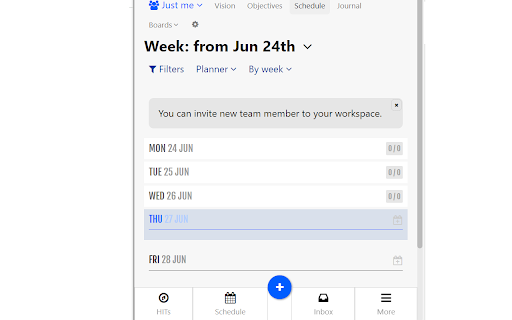
Weekly task planner inspired by `7 Habits of highly effective people`. Online task manager to become focused and organized This Chrome extension for Week Plan allows you to conveniently access your tasks directly from your browser. Week Plan – Weekly Tasks & Goals is a Task Management app that makes entrepreneurs and teams more effective in their tasks and in achieving their goals. Rather than focusing on completing all the tasks and be productive, this task tracker for work app lets you focus on essential tasks. This ensures that you put your best foot on tasks that are in line with your business objectives. Try Week Plan – Weekly Tasks & Goals Today! Inspired by the book, 7 Habits of Highly Effective People by Stephen Covey and OKR (Objective, Key Results) framework, the weekly planner is designed to make you and your team more efficient at work. Trusted by over half a million users, the weekly calendar planner app has everything you and your team need to plan and achieve your company’s objectives and goals effectively. Tons of capabilities to make you and your team more effective at work Plan and Track the progress on your week goals Add and Track your Goals: Add as many goals as you like on this goal planner and tracker for an individual member, project or your entire team. Add High Impact Tasks with Each Goal: Keep your team focused by pushing towards the goals and all the important tasks required to reach there. Add your Vision and Mission: Rather than keeping your vision and mission statements in file cabinets, make them part of where all action happens in this work management app. Prioritize using Quadrant: This goal planner and tracker app has the built-in Eisenhower Quadrant that lets you structure your week goals and tasks based on priority. Plan your high impact tasks and objectives using the revolutionary OKR (Objective, Key Results) Framework. Setup Weekly Objectives: Setup and add as many weekly objectives you want to set for each workspace. Track Key Results: Add and track key results on objectives and monitor you and your team’s progress on them. Setup OKR for each team: Add and track separate OKR’s for each team individually. Add and manage high impact tasks, subtasks and weekly to do list for you and your team. High Impact Tasks: The weekly schedule planner helps you to integrate all your high impact tasks into your schedule easily. Add Sub Tasks: Add as many subtasks as you want with their description, deadlines, priority and more. Set Repetitive Tasks: Add any recurring task like weekly meetings or reporting once and it will be automatically added to the schedule, whenever you want it to be. This weekly calendar planner is the best Team Shared Weekly Task Plan ever! Weekly Tasks Calendar: Get a birds-eye view of all the planned tasks for a week across your projects and teams. Recurring Tasks Review: This task tracker for work makes it simple to add weekly recurring tasks and automatically add it to your staff or team’s schedule. See Tasks for Team Members: Within a single glimpse, get to know the tasks of your entire team spread across the week. ** Increase Your Productivity with Time Tracking ** Setup and Track time took on each task, project, and goal of your entire team. Track your and your Team’s Time on each Task: This work management application helps you to get a complete view of each task and subtask of your team. Track Time across High Impact Tasks & Goals: Tracking the time on high impact tasks and goals helps you to focus and evaluate your time on important tasks and goals. Pomodoro Timer: Increase your productivity by achieving more in short bursts of time using the Pomodoro timer. ** Team Task Manager and Collaboration Tool ** Cultivate team collaboration and let the people do great things together. Team Task Manager: Create goals for your team and set a twelve-week plan for your projects that you can track weekly. Add as Many Team Members You Like: Add and manage all your team members even if you have 10 or 1000 employees in your team. Easily Share Progress and Deliverables with the Team.

Sortd for Gmail
All-in-one Sales, Service, Help Desk & Task Manager for Gmail teams. Visual boards right in Gmail to share, assign and track emails. Sortd for Gmail is a is a simple, lightweight add-on for Gmail that will transform your email into organized lists to help you grow your business. Close more deals, manage projects and get more done as a team - right from Gmail! Deliver an exceptional service experience for your customers - increased efficiency, no more emails slipping through the cracks, and faster turnaround times. ➜ Drag and drop email organization ➜ Trello-style Kanban Boards ➜ Contextual team chat in email threads ➜ Email open tracking ➜ Sharing ➜ Contacts ➜ Notes ➜ Follow-up flags ➜ Reminders, and more... Organize email communication with customers, follow-ups with suppliers, and plan and manage projects - with ONE simple tool in Gmail that gives you and your entire team complete visibility over the status of work, and keeps everyone aligned. Streamline processes and manage remote work with ease. You spend your time in your email – get rid of the separate systems and hacky spreadsheets you use to keep track of work and use Sortd instead! Your entire team can now easily see who's working on what, with a transparent view of both email conversations and team tasks in the same place. Everyone now has a single version of the truth and your team can be better aligned than ever. No more looking for information in multiple systems - with Sortd everything is organized, and accessible, in an app that you are already using. Sortd is great for managing anything you do a lot of in Gmail. - Build sales relationships and manage your sales pipeline without the need for a bloated CRM. - Manage your hiring process and tracking applicants through your process. - Collaborate with your team, assign tasks and manage projects. - Deal with customer support. - Account management (delight your customers by being on top of your game). - Plan events and manage registrations. - Manage email and web form leads. Ideal for teams and businesses looking for a simple, cost effective, powerful solution for crucial functions like sales, account management and customer support - right inside Gmail. ➜ Transform your Gmail interface into a powerful organizer and Workflow management tool. ➜ Share email in a collaborative workspace designed for you and your team to get stuff done. ➜ Live chat for every email conversation to discuss client needs and issues with your team. In context. In real-time! ➜ Trello-style Kanban boards with customizable list names. ➜ Email open tracking to know when your emails are read. ➜ Notes for each of your contacts so you can see a history of every interaction with customers and prospective customers (notes come up every time you open any email from a particular contact). ➜ Rename the email subject - enough said. ➜ Tasks and emails in one workspace so you can plan your day the way you want to right from your email Inbox. ➜ Set follow-up reminders for both Tasks and Emails. ➜ Snooze important emails that you don’t need to deal with right away. They will come back into your Inbox at a later time for you to deal with. ➜ Deal cards can be moved through your sales pipeline. Each deal card has its own notes, reminders and activity tracking. ➜ Sales and activity reports give you a quick and understandable insights into your sales pipeline and what needs attention. ➜ Shared team contacts to build your CRM contact database as you work your deals in Gmail. Sortd adapts to the needs of any business in any industry. Get your email, tasks, projects and teamwork all Sortd! If you have any questions, please feel free to reach out to us on team@sortd.com.

FuseBase Assistant - AI Chat and Agents
ChatGPT-like extension that answers questions and automate manual tasks. The FuseBase AI Agent is your intelligent assistant that lives in your browser and works across your tools. It’s designed to help you move faster, reduce manual work, and access the information you need — right when you need it. Unlike basic chatbots, this agent understands the screen you’re on, accesses your company’s real content, and provides guidance, notes, and workflow support in real time. 🖥️ Analyzes your current screen and delivers contextual help, tutorials, or SOPs 📂 Answers questions using your actual company docs, spreadsheets, and PDFs — not public data 📸 Captures and annotates screenshots, with tools to blur, highlight, and share quickly 📝 Takes notes automatically from meetings, calls, or written content you’re viewing 🎙️ Transcribes and summarizes video or audio files with clear action points Whether you're onboarding a new hire, supporting a customer, or just trying to find the right file, the FuseBase Agent brings the answers and support directly into your workflow — no need to switch tabs or tools. No hallucinations. No guesswork. Just smart help trained on your real work. 🌐 Works directly in your browser — no need to open a new tab 🎓 Use it for training, onboarding, support, sales, and more 🚀 Launch agents tied to specific roles, projects, or systems ⚡ Used daily by teams reducing manual work and increasing speed

Feedly Mini
Easily add content to your Feedly while browsing Feedly users rely on the Mini extension to quickly add new RSS sources to their feeds and save essential articles to their boards. This extension is the official extension from Feedly. It is created and maintained by the Feedly dev team. In version 50, if you have access to the annotation features, you will be able to add a note to the article you are saving to your boards. If you are part of the enterprise plan and have connected your account with Slack, you will be able to mention a teammate or a Slack channel directly in this extension and quickly notify your teammates. Privacy by default: We believe that you should own and control all your personal information. Feedly is a secure space where you can privately organize and research the topics and trends that matter to you. This extension is only activated when you click on the button to follow an RSS feed or save an article to a board. It does not have access to any other activity or personal information. This extension and the Feedly Web App share an authentication cookie so that they sync with the same account. You can learn more about privacy and personal information here: https://feedly.com/i/legal/privacy https://feedly.com/i/account/privacy If you need help using this extension, please contact care@feedly.com if you are a free user and pro@feedly.com if you are a Pro, Pro+ or Business user

ActiveInbox: Organize Gmail™ tasks
Overwhelmed by too many to-dos in your inbox? Turn Gmail into an effortless task manager to never forget anything. Turn Gmail into a task manager, and take control of all your conversations. Our mission is simple really... we want to give all of us the tools to achieve meaningful happiness. Our business supports this by making elegant software, infused with proven psychology, to help us all absorb the shocks of life and become truly effective. DESIGNED FOR EXECS, MANAGERS & FOUNDERS ActiveInbox has a free trial to get a taster of being in control. It's "A 'must try' if you want to easily keep yourself on track in an undoubtedly busy world" - Richard Gaspar ActiveInbox works where you already do: in Gmail and on mobile. There's no need to adopt a new tool to accomplish... Stop emails sinking into the inbox swamp by turning them into tasks with due dates and adding them to projects. Don't 'send and pray' emails you spent precious time writing. Deliver at the time they'll be read and let ActiveInbox track them to completion. Achieve inbox zero, then glide through your day, by having just one place to focus on emails and tasks, and breaking your Today list into digestible chunks. Oh, and we're the original Gmail plugin - ActiveInbox has been supporting customers since 2006.
