
cacanmllkminddbhckmepccebmhnglnj
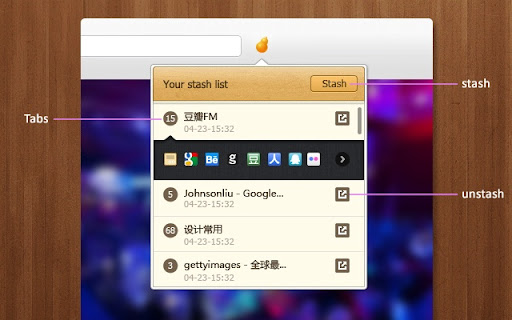
Too many tabs? With Stash, batch save, quickly stash, easily recover. Too many tabs? With Stash, batch save, quickly stash, easily recover. Stash makes it easier to save your window(tabs). And you can found them on stash list. By clicking the item, the tabs will be recovered.

Tabs aside
Save and organize your tabs for later. Pick up where you left off Stemming its roots from the original Microsoft Edge browser feature, this extension has grown much bigger than just a temporary storage for tabs. It allows you to save and manage your tabs in a convenient way, providing a range of features that make it easy to organize and access your saved tabs. ## Features - Save tabs: Save all your open tabs in a single click, and restore them later - Organize tabs: Create collections and subgroups to organize your saved tabs - Search tabs: Quickly find the tabs you need using the search feature - Sync across devices: Access your saved tabs from any device with your account - Go dark: Dark mode support for a more comfortable browsing experience - Personalize: Change the appearance and behavior of the extension to suit your needs Check out our blog post regarding all the new features and improvements in Tabs aside 3.0 at: https://at.xfox111.net/tabs-aside-3-0 ## Hey, it's an open-source software! If you know how to improve this extension you can check its GitHub Repository at: https://github.com/xfox111/TabsAsideExtension

Tab Manager v2
Search, group, move, and clean up tabs across browser windows with a keyboard-first workflow See every tab across every window, find what you need fast, move matching tabs in bulk, manage native tab groups where supported by the browser, and clean up duplicates without window hopping. - Search open tabs by title or URL, with optional browser history results in the same search box - Select matching tabs and move, group, or close them in bulk - Manage native tab groups directly where supported by the browser: rename, recolor, collapse, and ungroup them in place - Reorder tabs with drag and drop across windows from one focused view - Highlight duplicate tabs and clean them up quickly, with an option to ignore URL hashes - Stay on the keyboard with shortcuts, focus mode, and the command palette - Adjust theme, tab width, font size, toolbar visibility, URL display, and more - Support Firefox container-aware workflows when the browser exposes those APIs Free and open source. Core functionality runs locally in your browser. Open source: https://github.com/xcv58/Tab-Manager-v2 Support and issues: https://github.com/xcv58/Tab-Manager-v2/issues

TabPlus
The most feature-packed tab manager. Save & organize your tabs, sync across devices! Tab++ allows you to save your tabs for later. You can organize, categorize, and name them, then restore individual tabs or tab groups at any time. You can even sync them across devices! Tab++ is inspired by similar extensions like OneTab, only with WAY more features... Like folders, cloud-syncing, easy backup and restore, and more! # Note: Usage help can be found in the options page. # NEW IN v1.7.3 - Dark mode, woot! - Implemented more settings in the options page - Confirmation prompt before clearing all data - Don't save pinned tabs by default (configurable) - Bug fixes & improvements to automatic corruption recovery

Extension Manager
Professional Chrome extension management tool. Quickly enable/disable extensions, set favorite extension mode, and search all your… 1. Manage extensions, disable/enable your extensions with one click 2. Set common extensions, you can open the common extension mode 3. Quickly search for your extensions and configure them 4. View extensions in the chrome app store 5. Open the expanded configuration page 6. Uninstall the extension 7. Added some shortcuts If you have a better UI design and function recommendations, please leave a message yo. Test phase, welcome to comment.
