
bpgleagdakihfeingnhnknblcfgbfcdo
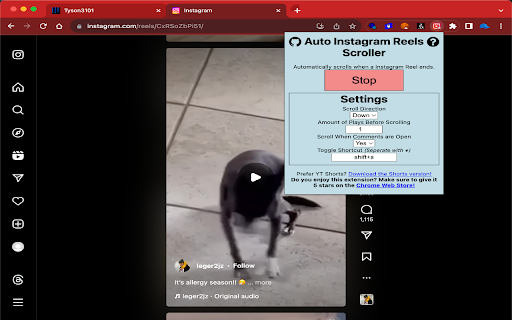
Automatically scroll to the next Instagram Reel when one ends. A Chrome Extension that adds an auto-scroll feature on Instagram Reels so you can watch Reels without the need to touch your mouse. Whenever an IG Reel ends, the extension will automatically scroll to the next one for you. Great for doing homework and watching Reels simultaneously without the need to switch tabs! It has a lot of settings for all kinds of Reels use cases, which include: - Not scrolling when comments are open - Auto-scroll Up/Down - And More! NOTES: - For ease, use the shortcut, shift + s (or change to your own), to toggle the auto scroller on and off. - Refresh any open reels tab before use. - For problems and/or suggestions, go to: https://github.com/Tyson3101/Auto-Reels-Scroller - This extension has no relationship or authorization with Instagram.

Floating Reels - IG / FB
Floating IG Reels: Your Ultimate Instagram and Facebook Reels Companion 🚀 Transform your Instagram and Facebook Reels experience with Floating IG Reels, the all-in-one extension that brings Picture-in-Picture (PIP) mode, auto-scroll, and background playback to your browser. Never miss a moment of your favorite content, even when you're multitasking! multitask like a pro! 🤓 1. Seamless Picture-in-Picture (PIP) Mode 🖼️ - Floating Video Player: Watch Instagram and Facebook Reels in a floating window that stays on top of other applications. Perfect for working, studying, or browsing while keeping an eye on your feed. - Easy Activation: A sleek, intuitive button appears on every Reel, allowing you to pop it out into PIP mode with a single click. - Automatic Video Switching: As you scroll through your feed, the PIP window automatically updates to the most visible Reel, ensuring a continuous viewing experience. 2. Smart Auto-Scroll 📜 - Hands-Free Binging: When a Reel finishes, our smart auto-scroll feature automatically navigates to the next one. Sit back, relax, and enjoy an uninterrupted stream of content. - Optimized for You: The extension intelligently detects when a video has ended and smoothly scrolls to the next, mimicking a natural user experience. 3. Uninterrupted Background Play 🎧 - Never Pause the Fun: Switch tabs without your Reels pausing. Our extension ensures that your video keeps playing in the background, so you can listen to audio or keep content rolling even when you're not on the Instagram or Facebook tab. - Session Keeper: We've built in a mechanism to keep your session active, preventing unexpected interruptions or logouts. Floating IG Reels is designed to be simple and unobtrusive. It intelligently injects a small, clean PIP button onto Instagram and Facebook Reels. When you click it, the video is instantly transferred to a movable, resizable floating window. The extension handles all the complex work behind the scenes, from overriding tab-switching restrictions to managing video states. Why You'll Love It: ❤️ - Multitask Like a Pro: Keep up with the latest trends while you work on spreadsheets, write emails, or browse the web. - Continuous Entertainment: No more manually scrolling or reopening the tab to keep the videos playing. - Lightweight and Efficient: Built with performance in mind, our extension won't slow down your browser. - Privacy-Focused: The extension runs entirely in your browser. We do not collect or store any of your data. Elevate your Instagram and Facebook Reels experience today. Install Floating IG Reels and unlock a new way to watch! 🎉

Reel and Feed Auto Scroller
Automatically scrolls through Instagram posts and reels with smart timing Tired of manually scrolling through Instagram reels and posts? With Insta Auto Scroll, enjoy a seamless hands-free experience while watching Instagram reels and posts. Customize your viewing time and video play count, and let the extension do the scrolling for you! ✨ Features: ✅ Auto-Scroll for Reels & Feed – No more manual swiping! ✅ Set Viewing Time – Choose how long each image stays on screen. ✅ Customize Video Play Count – Decide how many times a reel plays before scrolling. ✅ Smooth & Responsive UI – Simple, user-friendly interface. ✅ Works Seamlessly – No lags, just effortless scrolling.

Auto Youtube Shorts Scroller
Automatically scrolls to the next Youtube Short when one ends! A Chrome Extension that adds an auto-scroll feature on Youtube so you can watch Shorts without the need to touch your mouse. Whenever a YT Short ends, the extension will automatically scroll to the next one for you. Great for doing homework and watching Shorts at the same time without the need to switch tabs! NOTES: - For ease, use the shortcut, shift + d (or change to your own), to toggle the auto scroller on and off. - Created by Tyson3101 | Owned by Marek

Better Reels
Chrome extension for handling video/audio controls in instagram reels A powerful Chrome extension designed to enhance your Instagram experience. This innovative tool provides you with complete command over video and audio playback, giving you the freedom to enjoy Reels your way.
