
gackdoakpbamemoggkldodnbnabdhhla

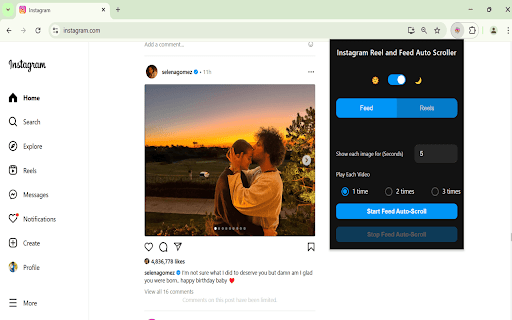


Automatically scrolls through Instagram posts and reels with smart timing Tired of manually scrolling through Instagram reels and posts? With Insta Auto Scroll, enjoy a seamless hands-free experience while watching Instagram reels and posts. Customize your viewing time and video play count, and let the extension do the scrolling for you! ✨ Features: ✅ Auto-Scroll for Reels & Feed – No more manual swiping! ✅ Set Viewing Time – Choose how long each image stays on screen. ✅ Customize Video Play Count – Decide how many times a reel plays before scrolling. ✅ Smooth & Responsive UI – Simple, user-friendly interface. ✅ Works Seamlessly – No lags, just effortless scrolling.

Reels Flow: Auto Scroll for Instagram Reels
Watch Instagram Reels hands-free! Auto-scrolls instantly. Includes an on-screen button for easy control. No more swiping. Whether you're cooking, working out, eating, or just want to sit back and relax, Reels Flow transforms your Instagram feed into a continuous, friction less viewing experience. Engineered for premium performance, it operates flawlessly in the background with zero lag, ensuring your browser stays fast and your battery lasts. • 🔄 Intelligent Auto-Scroll: Instantly detects when a Reel finishes and smoothly transitions to the next video. • 🎛️ On-Screen Controls: Pause or resume auto-scrolling instantly with a sleek, unobtrusive toggle button injected directly onto the Reels page. • 🚫 No More Endless Loops: Automatically prevents videos from looping forever so your feed keeps moving forward. • ⚡ Zero-Lag Engine: Built on a lightweight, highly optimized modern architecture that won't slow down your browser or drain your battery. • 🎨 Native Aesthetic: Meticulously designed to look and feel like a built-in Instagram feature, complete with smooth animations and dark mode support. 🔒 STRICT ZERO-TRUST PRIVACY Your privacy is non-negotiable. Reels Flow is built on a strict privacy-first foundation: - No Data Collection: We do not track your viewing habits, history, or personal data. - Minimal Permissions: We only request the exact permissions needed to run the extension locally. - 100% Local Execution: Everything runs securely offline within your browser. Stop swiping and start watching. Install Reels Flow today for the ultimate hands-free Instagram experience.

Auto Scroller Pro
Automatically scroll through web pages with adjustable speed and smooth scrolling Effortlessly scroll through web pages with customizable speed and smooth motion. How it works: - Click on the Auto Scroll Pro icon in your browser toolbar - Set your desired scrolling speed using the slider or click the "Start" button to start auto-scrolling - Click "Stop" to stop auto-scrolling. Alternatively, you can check one or both of the two checkboxes to stop scrolling based on certain events Features: - Adjustable scrolling speed to suit your reading pace - Smooth, continuous scrolling for a seamless reading experience - Works on any website - perfect for long articles, documentation, or social media feeds - Start/stop scrolling with a single click - Option to automatically stop scrolling when you manually interact with the page - Setting to cease scrolling when you close the extension popup - Lightweight and optimized - won't slow down your browsing - All functionality happens directly in your browser - no data is sent to external servers - Available in 47 languages - Compatible with both light and dark browser themes Advanced Options: - "Stop on user scroll" - Automatically stops scrolling if you manually scroll the page - "Stop on popup exit" - Halts scrolling when you close the extension popup Auto Scroll Pro is perfect for: - Reading long articles or documentation - Reviewing code repositories - Browsing social media feeds - Scanning search results - Any situation where you need hands-free scrolling No account needed, no complicated setup. Just install and start enjoying effortless scrolling across the web. Auto Scroll Pro respects your privacy - it only requests necessary permissions to function and doesn't collect any personal data.

Subscribe RSS Feeds in Feedly
Subscribe RSS and Atom Feeds in Feedly. Automatically finds feeds on the pages to let you subscribe them in Feedly. Click its toolbar button, which takes you to the Feedly.com with the option to subscribe that feed. Works only on the pages offering RSS or Atom feeds. Created by BrowserNative, Not created by or affiliated with Feedly. (Note: After installing the extension, reload your tabs before testing)

Auto Refresh & Page Monitor
Refresh pages automatically. Auto refresh and page monitor with specified time intervals. Reload all tabs. Auto Refresh is a browser extension that automatically refreshes and reloads any page or tab after a specified number of seconds. Just enter the number of seconds between page refreshes and click the "Start" button. The best thing about this page renovate extension is that there is no setup required - it is easy and simple to use, install it and let your idle pages be auto reloaded. Just choose the time you want Page refresh will do its magic. Save unlimited manual preferences per domain or web page. Default time intervals in 5 Sec, 10 Sec, 15 Sec, 5 Min, 10 Min, and 15 Min. Set auto refresh in seconds, minutes, and hours. Single click anywhere on the webpage to stop auto-reload. Display a visual timer on the webpage. Hard refresh to clear cache & cookies Advanced options for automatic page refresh: - Clear cache on every automatic page refresh - Search for text on automatically updated pages - Display notifications - Saving the selected parameters on the page - Automatic clicking on a button or link on page refresh - Display of update counter, time of last and next update Auto Refresh Page Plus comes in handy to any user who needs to perform automatic web page refresh at certain times efficiently. It also provides content detection support, which is useful when monitoring content included in a dynamic web page. Page Monitor This powerful feature allows you to monitor a webpage and look for any changes in it. You can monitor your changes in the web page's visual or source code. You can monitor website changes in three ways. Why are you need this refresh page? - In time interval, there are two types current and manual. Both types work the same. You can add multiple web pages in the manual and allow all features. - You can select the time by simply clicking the timer's checkbox and manually setting the hour, minute, or second to auto-refresh any pages. - If you want to stop the auto-refresh after X numbers like 05, 10, or 15 refreshes, you can do this with the Auto Refresh extension. - Check the visual time when your web page will refresh by setting a visual timer for any web page. - A hard refresh clears your webpage cache data. The Auto refresh list shows all webpages list you have set for the Tab Auto Refresh. Also, you can pause or start any webpage refresh directly through auto refresh list features. If what you want an extension that automatically reloads and refreshes web pages in the simplest way, this is what you need.
