
bopgppinjoofckmndocjhpkepbgifpck
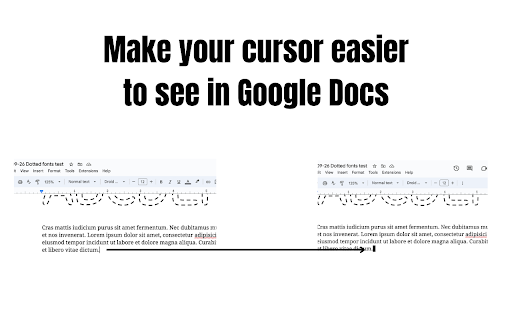
Makes your Google Docs cursor bigger This extension was written for those who struggle to locate the thin cursor in Google Docs. Once installed, the cursor is 5 times as thick, making it easier to find.

Smooth Cursorify
Apply a Microsoft Word-like smooth caret animation to multiple online editors Apply a Microsoft Word-like smooth caret animation to multiple online editors. Currently supported websites: * Google Docs (https://docs.google.com/) * Overleaf (https://www.overleaf.com/) * Typst (https://typst.app/) * Leetcode (https://leetcode.com/) Head over to GitHub to request new websites: https://github.com/gwennlbh/smooth-cursorify

Notion Cover
A Notion Cover to generator a cover for Notion note cover or the others cover. - Unlimited generation and download. - Custom background image. - Multiple fonts to choose from, custom font colors, custom font styles and sizes. - Title and subtitle position customization. - Export the synthesized image in “png/jpeg/webp” format to the local. - Click on the Chrome extension app. - Click ‘Begin to Make Your Notion Cover’ Button, open the ‘Make Your Notion Cover’ page. - Select the background image, fill in the title and subheadings, and set relevant parameters. - Click ‘Generate and Download’ button to download image. Indeed, Notion Cover is available for free. You can access the basic features and choose to upgrade for more functionalities. All data processing occurs locally on your computer, and it never traverses our servers.

The Gemini Toolbox
Enhance your Gemini experience with a suite of powerful tools. Select text to find maps, search images, and more. Transform your Google Gemini sessions into a focused research workflow with The Gemini Toolbox. It adds a compact, on‑page toolbox to `gemini.google.com` so you can act on selected text instantly—without opening new tabs or breaking your flow. How it works - Select text: Highlight any word, phrase, or claim inside a Gemini conversation. - Choose a tool: A floating menu appears with the best tools for the job. - Get results in place: Each tool opens in a draggable, resizable window that remembers its position. Tools included - 💬 Ge‑Mini: Ask concise, single‑paragraph questions in a mini chat. - 😈 Devil’s Advocate: Challenge a statement with counterarguments, assumptions, and perspectives. - ✅ Fact Checker: Verdict (TRUE/FALSE/MISLEADING/etc.), summary, evidence, and sources. - 💡 Explainer: Simple explanations for complex terms. - 🖼️ Photos: Image search results with source links and lazy‑loaded previews. - ⏳ Timeline: Multiple, detailed timelines for a chosen topic. - 👥 Key Figures: Influential people relevant to a movement, event, or idea. - 📍 Map: Instantly embed a map for places and addresses. Instant access and full control - Free Trial: Use core tools immediately—no setup required. (Rate‑limited.) - Bring Your Own Key: Add your own free Google API keys for fully private, unlimited usage. With your keys, requests go directly from your browser to Google. Built for privacy - Runs only on `gemini.google.com`. - Requests the single Chrome permission “storage” to save your settings and window positions. - With your API keys: requests go straight to Google; no proxy involved. - Without keys: a rate‑limited proxy is used to enable a free trial; it’s designed not to persist request content. Seamless workflow and customization - Windows you can drag and resize; layout is remembered. - Automatically adapts to Gemini’s light/dark theme. - Keyboard‑friendly and fast—built to stay out of your way. Optional setup for power users Add your Google Generative Language and Custom Search API keys in the extension’s Options to unlock direct, private requests and higher limits. Stop context‑switching. Keep your research in one place with The Gemini Toolbox. Install now and supercharge your Gemini workflow. *Not affiliated with Google

Rainbow Cursor in Google Docs
Swap the cursor in Google Docs with an animated caret! Great for students, writers, or anyone who wants a better editing experience. Step 1: Go to Google Docs. Step 2: Click the puzzle piece icon 🧩 on the Chrome toolbar and select the rainbow cursor icon. Step 3: Customize your cursor and have fun!
