
boekbkconiendicldakeboooeilaldmh
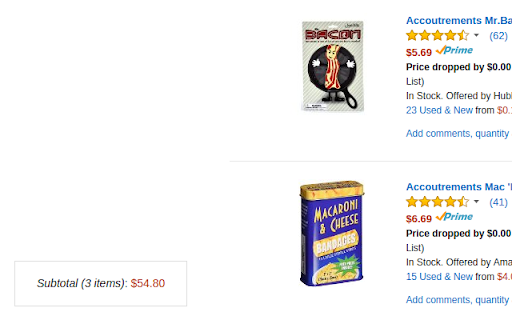
Keeps a running total of all the items it's seen in the current Amazon wish list. This extension makes your life a bit easier by tracking all the items it's seen within any of your Amazon wish lists, then displaying an unobtrusive running total price at the bottom left of your screen. To see the total for your _entire_ list, you'll need to scroll to the very bottom of it so all the items will load! #### 1.11.0 * Add support for amazon.ae (thanks @alike010000!) #### 1.10.1 * Fix the total not being calculated in grid mode #### 1.10.0 * Add support for Turkey and Sweden (thanks @fuzzymannerz!) * Fix `.de` and `.se` English language URLs (thanks @fuzzymannerz!) #### 1.9.2 * Fix bug where un-deleted items weren't being included in the total. Visit https://github.com/jasontbradshaw/amazon-wish-list-total to see the full change log and to report issues and request features!

The Camelizer
Get camelcamelcamel.com functionality in your web browser. Click on the Camel icon in your address bar to see historical pricing data or setup watches and get an email when the price drops. For support, email support@camelcamelcamel.com.

Add to WishList.com Button
WishList.com - A button for saving wishes from any website to your wishlist at WishList.com. Create and share WishLists everyone loves — from any store. WishLists can include things you like, inspirational ideas, or gifts you'd love for a special occasion. Use WishList.com to organize and share stuff you’re into, and to get inspired by other peoples’ WishLists. 1. Collect stuff you like as you visit any website. Organize lists to share your interests, favorite outfits, projects or inspirational ideas. Connect your lists to your Youtube, TikTok, Instagram, or blog profiles. 2. Create a universal gift registry for any occasion, with items from any website. 3. Get inspired by other peoples’ WishLists, interests, and ideas. 4. Find the perfect gift for friends and family. Reserve and buy gifts off their WishList, or help them make new WishLists to see exactly what they like. Let us know what you think of WishList.com. Tell us what new features you’d like to see: https://www.wishlist.com/contactus/ideas This extension does nothing until you click the button. It doesn't gather any information except a Wish title, image, url and price. You can review our privacy policy here: https://www.wishlist.com/privacy

Amazon Order History Reporter
This extension extracts order history from your Amazon account. Amazon used to provide csv reports for US customers only, but it… This extension extracts order history from your Amazon account. Amazon used to provide csv reports for US customers only, but it didn't include digital orders, shipping, total amount, or payment information. Sometime in the middle of 2020, Amazon withdrew the feature even in the USA. This extension aims to fill the gap. How to Use ---------- After you install the extension, you won't see anything until you view your order history on the website (Your Account -> Your Orders). Get to your orders page, then click on the extension icon at the top right of the Chrome window; look for an orange upper case A. Once you do this, you should see buttons with years on the extensions pop-up window. Clicking on one of these buttons causes the extension to sift through all of your order pages and show you a searchable, sortable table with all of the orders in. It can take a few seconds to get all of the pages. A blue button enables you to download a CSV (viewable in Excel and other spreadsheet programs) of the order table the extension has assembled. It's better not to have more than one amazon tab open while the extension is doing stuff. I (Philip) find the Items CSV more useful: https://github.com/philipmulcahy/azad/blob/master/doc/img/items_csv_2023-12.png Here's a slightly more wordy quick-start guide: https://github.com/philipmulcahy/azad/blob/master/README.md#quick-start-instructions For at least some of these sites, I know that the extension is missing some of the native language strings it needs to find your data. Many users, particularly in Germany seem to use the english version of their country's site to get better results, but if you want better results in your language, you can help me by providing order debug information and marked up screenshots showing me where the missing/wrongly scraped data can be found. For other Amazon sites, please submit debug information as described in https://github.com/philipmulcahy/azad/blob/master/README.md Bug reports are gratefully accepted (see github link below), with extra points awarded for: 1) reproducibility - if you describe it well and I can reproduce it then it's normally straightforward to fix. 2) staying in contact - fire and forget bug reports are often impossible to reproduce and are seriously demotivating. 3) using courteous language. 4) using English - you're not paying me and while I can scrape by in French and German, I'm spending more of my spare time on this project than you are, and it's not about learning human languages. 5) having read the (very brief) instructions - and if English is not your favorite language, you have two choices: i) Google translate (don't send it to me!) ii) Sending me a translation (better than Google's) of the instructions. I will figure out how to incorporate it and list you in the credits. Feature requests: if there's a github ticket outstanding for the same thing, please add your thoughts there rather than making a new one. You can signal your sincerity by clear communication and responsiveness to follow-up queries. Changes 1.16.20 --------------- #403 Show popup when a json order debug file is requested from the transactions output table, explaining how to actually get the desired file. #406 Improve json order debug file generation reliability, particularly when users aren't super speedy with requesting them once the output table has rendered (this is a long way of admitting there was a race condition). #408 Faster availabilty of year scraping buttons even more than 48 hours after last use of the extension. Changes 1.16.19 --------------- #390 Show transaction scraping progress in the control pop-up. #391 New, third transactions scraping strategy for when transaction layout is flattened AND has obfuscated html attribute names. Changes 1.16.18 --------------- #366 (Some) card details missing from payments. #375, #386 (Some) gift payments missing. #381 Cache available years: faster start up, particularly for new users. Source Code ------------- https://github.com/philipmulcahy/azad contributors (Thank you!): https://github.com/philipmulcahy/azad/graphs/contributors Donations --------------- If you'd like to thank me financially, please don't! Don't worry: just redirect your gratitude here instead: https://www.justgiving.com/fundraising/azad-pah Donations entitle you to nothing except a warm feeling of righteousness/generosity. Premium Subscriptions --------------- It is necessary to subscribe ONLY if you want to use a small set of features aimed at commercial users. Paying for an annual subscription also entitles you to any new subscription-only features I might add during your subscription period. Please see the blurb in the subscription flow for more details, also: https://github.com/philipmulcahy/azad/blob/master/README.md#subscribe-to-premium-features. I offer no warranty of any kind: this is a personal project that you are welcome to use and contribute to. I am a human being, not a corporation and I don't make my living from this extension. Please bear that in mind before complaining about bugs or making false statements in your reviews of this product - others have been there ahead of you: The most amusing (and demotivating) posts tend to fall into one or more of the following three categories: i) I ordered stuff from you and it hasn't arrived: no stars for you Philip (I am not Amazon, and you haven't given me any of your money). ii) Your extension stole my credit card details (It never sees your card details - only stripe.com gets those - and it carefully avoids seeing your amazon login credentials as well - you are free to inspect the source code to verify this) iii) You have to pay, and it still doesn't work. (You don't, and I'm sorry it's not working for you - would you like some help?) Strangely none of the authors ever follows up with evidence or indeed any reasoned feedback at all. New Commercial Features --------------- If you seek new commercial features, please read https://github.com/philipmulcahy/azad/blob/master/doc/commercial_features.md before even thinking about contacting me directly. I am bored of reading proposals from malware distributors.

Moonsift: Wishlist & Gift List Maker
Save products from any store in the world. Curate and share your own shoppable collections, gift registries, and wish lists. Completely free, easy to use and acclaimed for its clean design. Bring together items from any store in the world to curate beautiful, shoppable boards that you can share with a simple link. No matter the retailer, simply browse their site with the universal save button installed and add items directly to Moonsift with the click of a button. Also available are Moonsift's Android and iOS mobile apps so you can save items from any of your devices. Moonsift is loved by thousands of people, from professional stylists and interior designers to everyday shoppers. It’s perfect for: ★ Personal wishlists ★ Birthday & Christmas gift lists ★ Baby Registries ★ Wedding Registries ★ Gift list tracker ★ Creator Storefronts ★ Virtual Styling boards ★ Personal Shopping ★ Fashion Lookbooks ★ Interior decorating projects Help us re-imagine online shopping alongside a community of Creators, Personal Shoppers, Stylists, Interior Designers and everyday shoppers. Over 10 million items have been saved to Moonsift already. Join the growing community to discover, save and curate your own shoppable boards. It’s like Pinterest, but for shopping! To learn more about our product vision and mission visit www.moonsift.com/about Moonsift’s browser extension does not add cookies to your browser or append affiliate code in the URL. Some links on our website may include affiliate code. By using this add-on, you agree to the Moonsift Privacy Policy and Terms of Use: Privacy Policy: www.moonsift.com/privacy Terms and Conditions: www.moonsift.com/terms We simply want to create the best experience for you, so please get in touch.
