
bnkdkedkdoaniknfocfonneflokdimcm
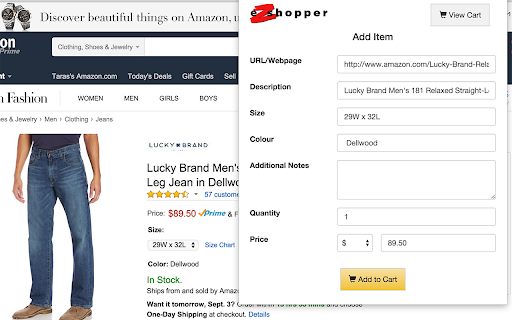
No Credit Card? We Make Online Shopping Easy for you. eZshopper allows you to capture items that you want to buy, and we place the order for you with our credit card. You can pay from your chequing or savings account via your bank's Internet banking or mobile banking services, or over the counter at your bank. eZshopper also allows “Retail Aggregation”, since the eZshopper cart allows products from up to 15 distinct web-merchants in a single “Check-Out”.

VCCGenerator - Credit Card Generator Tool
Generate valid credit card and BIN details including Name, Address, Expiry, and CVV for secure online testing. VCCGenerator is your reliable companion for online safety, especially when dealing with sensitive financial information like credit card numbers. Our Credit Card Generator is a specialized tool designed for developers, educators, and students working in programming, education, and code development fields. The generator creates valid credit card numbers that follow real credit rules, but they're not real cards. They can't be used to make actual purchases, but they're perfect for testing payment systems or for development and educational purposes. Our tool uses the Luhn Algorithm, a standard in the credit card industry, ensuring the numbers generated are realistic for testing environments. Using VCCGenerator is simple. Choose a Bank Identification Number (BIN) and hit "GENERATE." You'll get a valid number for testing. Our BIN Checker tool is also available to give you more insights into the card-issuing details. Apart from Credit Card Generator we have also developed a Credit Card Validator tool. This tool provides you with all the details of the card which you can verify and ensure that your card is valid. It has built-in Luhn algorithm checker, which will check your card number against the Luhn algorithm for validating. ➡️ Why should you use VCCGenerator? ✅ Prototyping: Perfect for developers to test payment systems without the risk of real charges. ✅ Education: A practical tool for students to understand credit card numbers and the Luhn Algorithm. ✅ Code Development: Ideal for coders to test payment processing systems on e-commerce sites. ➡️ Features of the VCCGenerator: ✅ Supports All Major Credit Card Types: Our tool is equipped to handle a wide range of credit card formats, ensuring compatibility with major credit card standards globally. This feature is crucial for diverse testing scenarios, accommodating various types of credit card transactions without being limited to specific brands. ✅ Select or Enter BIN: You have the flexibility to select or enter a specific Bank Identification Number (BIN), allowing the generation of numbers tied to particular card issuers. ✅ Generates Random Valid Numbers: The tool creates random but valid credit card numbers. Ideal for testing payment systems, these numbers can simulate real-world scenarios without any financial risk. ⚠️ DISCLAIMER: VCCGenerator's Credit Card Generator (including BIN Generator) tool does not generate credit card numbers that have real money and doesn't belong to any cardholder. Do not try to use credit card details generated by our tool for any transactions, as the purchase will not be able to go through. This is because the numbers do not have a valid expiration date, cardholder's name, or CVV number.

Test credit cards
Simplifies checkout form testing by auto-filling or copying test credit card numbers for Stripe/Braintree with a click The Test credit card extension makes it easy to test checkout forms that use either Stripe or Braintree as their payment processor. No more manually entering test credit card numbers or struggling to find the right test card to use. With a single click, the Test Credit Card Generator will provide you with a valid test credit card number that you can use in your checkout form. That extension will try to autofill your checkout form or copy the number in your clipboard if we are not able to do the auto-fill.

ChargeDesk for Stripe, PayPal & Braintree
Manage payments inside tickets and emails. Works with all your favourite helpdesks and CRMs. The ChargeDesk extension allows you to view and update your customers no matter where you are on the web. You can refund charges, cancel subscription, create new charges and more. Customers matched based on their email address which allows our extension to work on any web page which contains email addresses. When a customer is found, a tag showing the customer's latest or total payments is added next to their email address. If you do not have a ChargeDesk account, one will be created for you when you connect your payment gateway after installing the extension. This only takes a few seconds. Many helpdesks and web-based email programs will work by default. The ChargeDesk extension will also work with your internal web-based dashboards where you display email addresses. If the system you use does not work with ChargeDesk, please email us at contact@chargedesk.com and we'll take a look. This extension has been optimised to use only the minimum resources required to operate. When not needed it will unload and will not continue running in the background. We've used some clever algorithms to allow us to really quickly scan your pages for customers. We only send the bare minimum information back to our servers and use caching to wherever possible. The ChargeDesk extension has been built with security as a core feature. All communication to our servers is performed using the latest encryption algorithms. When looking up customers on web pages you visit, the data is secured using a one-way hash. This means that no information about your browsing behaviour is ever accessible from our servers. We offer 2 factor authentication as an additional security measure. You can require this for accessing any customer information, or only when performing updates (such as refunding a charge). By using revokable access tokens, even if your personal computer is attacked, your underlying payment gateway will not be compromised. Pricing that scales with your business Your first 14 days of using ChargeDesk are free of charge! This allows you to test the service and in the (incredibly unlikely) case you find it's not for you, you pay nothing. Plans start at $29/mo. Further information can be found at https://chargedesk.com/pricing Release notes: 17 April 2026 - Updated integration with multiple helpdesks including Hubspot and Intercom 21 April 2025 - Updated support for Hubspot 6 February 2025 - Added support for new Intercom design 28 January 2025 - Hubspot bug fixes 24 January 2025 - Updated support for Hubspot 12 December 2024 - Updated support for Intercom 8 July 2024 - Updated support for Hubspot Help Desk workspace 19 June 2024 - Added support for Hubspot Help Desk workspace 13 June 2024 - Bug fixes 12 June 2024 - Upgraded to manifest V3 7 December 2023 - Updated Hubspot integration 30 November 2023 - Updated support for new Help Scout Inbox 8 April 2023 - Updated support for new Intercom Inbox 10 July 2022 - Added support for new Intercom Inbox 12 May 2022 - Fixed issue with Hubspot integration 2 September 2021 - Added support for Shopify, Improved support for Zendesk Workspaces 23 Feb 2021 - Updated several integrations, added support for multiple email & phone matches at once 4 June 2020 - Updated Intercom Integration 14 April 2020 - Bug fixes 28 February 2020 - Big fixes, Upgraded HubSpot support 20 July 2019 - Added HubSpot support 16 March 2019 - Upgraded extension for Chrome 73 site isolation compatibility 18 December 2018 - Added more information to customer tags 13 December 2018 - Even more Freshdesk fixes 11 December 2018 - Further Freshdesk upgrades and other bug fixes 5 December 2018 - Upgraded Freshdesk support 26 November 2018 - Upgraded Help Scout support 29 October 2018 - Bug fixes and performance tweaks 17 October 2018 - Bug fixes and performance tweaks 22 September 2018 - Bug fix for processing email tags with dots in them 15 August 2018 - Compatibility with new Freshdesk Mint apps 6 July 2018 - More Help Scout upgrades 15 June 2018 - Help Scout upgrades 24 April 2018 - Performance upgrades 2 April 2018 - App now matches Intercom's redesign 21 January 2018 - Improved email charge tagging 20 December 2017 - Support for new Help Scout design 15 November 2017 - Added support for Freshdesk Mint UI 13 November 2017 - Intercom & general bug fixes 29 July 2017 - Intercom and Desk fixes 29 May 2017 - Added support for tagging exact charge related to support tickets 26 May 2017 - Zendesk upgrades 5 May 2017 - Even more support for Intercom upgrades! 1 April 2017 - More support for Intercom upgrades 28 March 2017 - More support for Intercom upgrades 25 March 2017 - Support for Intercom upgrades 22 March 2017 - Fixed issue matching Desk.com support emails 4 February 2017 - Fixed customer tag styling and an issue with 3rd party script conflicts 14 December 2016 - Fixed Help Scout rendering issue 7 December 2016 - Support for Intercom domain change 6 November 2016 - Major update! Find out what's new: https://chargedesk.com/docs/whats-new 28 October 2016 - Improved Zendesk support 18 October 2016 - Bug fixes for domain matching 5 October 2016 - Updated Zendesk support & improved agent logging 30 September 2016 - General performance and reliability updates 17 September 2016 - Improved Desk support 2 September 2016 - Improved Help Scout support 1 September 2016 - Improved Freshdesk support 29 August 2016 - Intercom layout improvement 18 August 2016 - Performance improvements, particularly for Intercom 13 August 2016 - Improved Freshdesk compatibility 21 July 2016 - Collapsed/expanded state is now maintained when you return to a page 14 July 2016 - Improved Intercom & Desk.com UI, various bug fixes 16 May 2016 - Fixed a critical bug causing the ChargeDesk panel not to show 14 May 2016 - Added full functionality to Help Scout including searching 16 April 2016 - Fixed Intercom & Gmail rendering issues 26 March 2016 - Limited size for embedded panels 5 March 2016 - Bug fixes, improved Zendesk compatibility 24 February 2016 - Bug fixes, improved Help Scout compatibility 9 February 2016 - Front support, additional settings 22 January 2016 - Bug fixes, improved frontapp.com compatibility 29 December 2015 - Performance updates, improved Intercom compatibility 5 December 2015 - Improved Intercom compatibility 26 November 2015 - Improved Zendesk compatibility 16 November 2015 - Removed some bugs from Help Scout integration 6 October 2015 - Improved customer support pages (added self invoice editing and billing history) 1 September 2015 - Added the ability to send invoices to new customers 23 June 2015 - Bug fixes and added support for Salesforce Desk.com 8 June 2015 - Fixed a problem with the panel not showing in Zendesk in some situations. 7 June 2015 - Added Freshdesk support. 1 June 2015 - Added Help Scout & Intercom support. 25 May 2015 - Added Zendesk support. 24 May 2015 - Added the ability to see billing and shipping addresses for customers. 20 May 2015 - Launched!

Cash Rebate Club
Over 3,000 stores. Earn Cash Rebate PLUS Referral Cash when your friends shop too! Shop online with your favorite stores and earn Cash Rebates through our affiliate partners. When you see the Cash Rebate Club banner appear at the top of any store's web page; just click it and earn the stated Cash Rebate on that transaction. The Cash Rebate Club will also give you access to the hottest specials available as well as provide you that stores Promo Codes. Your Cash Rebate Club also works with most search engines. Just search as normal, and the Cash Rebate Club will post a notice directly above all stores in that search that offer Cash Rebate available. Then just click it and earn! Merchants pay us a commission for referring you to them. We share this commission with you
