
bnjapjcicacmalbgnpnfgclacakagnli
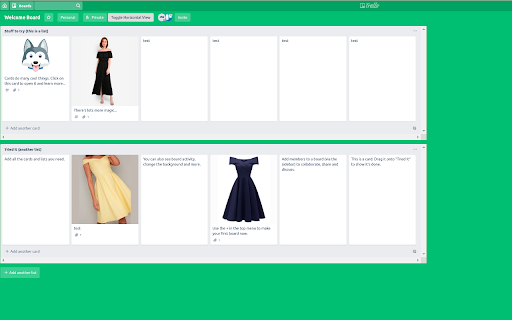
Turns Trello Lists Horizontal so they can be used for vertical comparisons. This has been built to enable vertical comparisons of cards across different lists vertically and introduces horizontal scroll. v1.5 - Updated manifest version to v3 - Fixed a bug where board state wasn't loading correctly - Increased the checking frequency to speed up the extension v1.4 - Fixed bug with moving cards with images. v1.3 - Saves state of board in memory - Remembers the state of a board and loads automatically next time - Fixed bugs - Improved performance

FlexyTrello
Release 1.3 : Make sure to allow access to Trello from extention Options page

Trello Folds (Kanban for Trello)
Turn your Trello board into a Kanban system with WiP limits, combining lists, card count and collapsible lists This extension adds foldable lists and sections to Trello boards, together with per list WiP limits turning your Trello board into a Kanban system. Features ==================== - Combine lists and share WiP limit between lists. E.g. "development.in progress" and "development.done" ⇒ combines to one "development" list with two sub lists - Press ⨯ in the list top right corner to fold it. Press anywhere on the folded list to expand it again. - Turn cards into collapsable sections with a selected character repeated N times (defaults to double hashes, i.e. "##") - Add WiP limits to lists by adding it in brackets to the list title, e.g. "My List [5]" - Remembers view state for boards (can be disabled) - Select how to visualize lists where WiP limit is exceeded - Open the extension popup to configure it FEEDBACK AND SUGGESTIONS APPRECIATED. New in 0.10.3 ==================== - Changed load behavior to work with changes in Trello New in 0.10.2 ==================== - Fixed collapsed board rendering offset issue due to changes in Trello's DOM/styles. - Fixed bug with not remembering board collapsed state - Minor fixes for board button hovering New in 0.10.1 ==================== - Further tweaks with board initialization/loading to make it more reliable. Hopefully it worked :-/ - Changed the default "load timeout" to 100 ms. Try increasing this value if boards do not load properly. New in 0.9 ==================== - Support for combining multiple (more than two) lists(!!) - Better realtime more accurate adjustment of combined list height - Combined list feature on by default when installing - Fix when collapsing combined lists - Fixes related to adding and removing lists in conjunction with combined lists - Fix for "Compact Mode" button in wrong state after filtering - Fixed backgound color for super lists - Fix for having URL in title causing card not to count in WiP limit For the full changelog go to the project's GitHub page.

One-Click Trello
Instantly create a new Trello card with a link to the current page in just one click! If you frequently create Trello cards linking to a website you visit - maybe to visit again later or remember something - One-click Trello is for you! Login once, setup the board and saving a link to the current page is just one click on the extension button away. ⚡ Quick and Snappy Card creation is immediate, no waiting for Trello to load. Click the button and the page is saved! ⭐ Features and Available Options - Quickly open the created task via the notification to add more information - Right-click anywhere on the page to create a task - Include selected text in the created task or use it as a title - Close the current tab at the same time (use it as a "read later" button) This extension works well if you use an "Inbox" or "Read later" type list where you write down new things that you want to remember or re-visit. The "close tab" option can help: it automatically closes the tab if you hit the extension button. The extenstion button is too far away? Right-clicking anywhere on a page also shows a One-click send to Trello button! If you select text before right-clicking, it will be used as the card description. 📋 Changelog 3.0.0 - Updated to manifest v3 (rewrite of ca. 80% of the code) - Fixed login issues for new users - Added option to select card position in list 2.6.0 - Renamed extension to One-Click Trello - Reworked options UI for future expandability and improved usability

Trello plugin all-in-one - Truello
Tired of having too many extensions for Trello? Add missing features in ONE Chrome extension: Card age, number, count and lable name Thanks for using Truello, an all-in-one Trello plugin. ***NEW:*** [20231104] Well, I didn't realize this extension is used by so many people. This release is for you folks! There was a release of Trello website on 20 Oct 2023, which removed hidden card number and the total number of each list/column. I had to re-implement these features. It took me some time because Chrome Web Store no longer accepts Manifest V2 extensions. I had to migrate it to Manifest V3. So there yougo: version 2.0.0 is here. [20170815] Show full label name - fix it to revert the changes Trello did on 7th Aug [20170630] Now adding options to disable features excluding aging 1. True age for the Trello card Trello has a card aging feature, but it does not show the true age of the card in a list. When you add a comment or update the card name, the card will be treated as new. The feature can tell you how long the card has been in the list. No excuse any more! Display the missing Trello card number. 3. Card count for each column Display the card count at top of the columns. Display the label names and still keep the color of them.
