
bnceafpojmnimbnhamaeedgomdcgnbjk
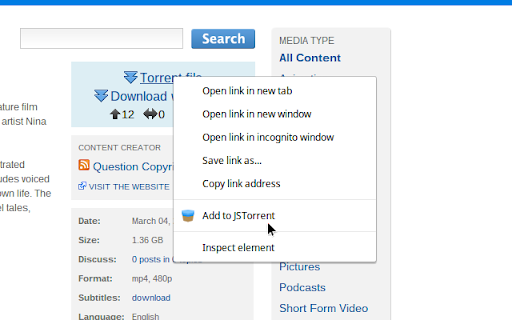
Used alongside the JSTorrent BitTorrent Chrome app, adds context menu Join the waitlist for the new version: https://new.jstorrent.com/comingsoon.html This extension adds "Add to JSTorrent" to your right-click menu for magnet links and .torrent files. Currently ChromeOS only. Windows, Mac, and Linux support coming soon. This is a browser extension that interacts with the JSTorrent BitTorrent Chrome app. Formerly known as "JSTorrent Contextmenu extension", it adds a context menu "Add to JSTorrent" that allows you to right click on any .torrent links or magnet: links you find on the Web and have them load up in JSTorrent. The new version makes using this extension even easier. It will detect if you have the partner application installed and give you a notification to install it or the free trial version. So just give it a try and I guarantee you won't be disappointed! Best used with JSTorrent https://chrome.google.com/webstore/detail/jstorrent/anhdpjpojoipgpmfanmedjghaligalgb JSTorrent is a ChromeOS torrent program that is a breeze to install and can download torrents.

JSTorrent
A Torrent Client for Google Chrome, runs everywhere in pure JavaScript JSTorrent will stop working in a future Chrome update. We're rebuilding it from the ground up—same functionality, modern architecture, works on ChromeOS AND desktop. 👉 Join the waitlist: https://new.jstorrent.com/comingsoon.html JSTorrent is a BitTorrent client for Chrome that downloads torrent files with ease. It downloads directly to your folder of choice and handles large multi-gigabyte files without issue. Runs great on ARM Chromebooks. STATUS BY PLATFORM: - ChromeOS: Still works (for now) - Windows/Mac/Linux: No longer works (Chrome disabled Apps on desktop) WHAT'S NEXT: The new JSTorrent launches early 2026 with: - Cross-platform support (ChromeOS, Windows, Mac, Linux) - Modern extension + companion app architecture - Actively maintained and open source Dec 2025 - 2.4.4 - Migration notice for upcoming transition Update: Apr 23, 2016 - 2.4.3 - Add option for number of active torrents (queue functionality) - Fix bug with downloading too much data when disk is slow - Fix bug with changelog always showing sometimes. Update: Apr 13, 2016 - 2.4.1 - Added the Stream page (play before download completes) - Magnet link support (look in options) - Improved speeds - Refreshed user interface - Many bugfixes. For a full list see http://jstorrent.com/#news Update: Sept 26 - 2.3.2 - Support for being default "magnet:" protocol handler - Fix parsing trackers from .torrent files - API updates for upcoming Chrome 38 - UI fixes Update: Aug 8 - 2.3.0 - Fix for base32 magnet links - Speed improvement using Web Crypto API Update: June 10 - 2.2.9 - Add ETA column - Minimized view - Use new chrome.sockets API - Ability to add custom trackers (right-click) - Better messaging for when out of free disk space - Fix utf-8 encoded text issues - Ability to remove detached storage Update: Mar 9 - 2.2.6 - Minor bugfixes having to do with handling detached storage Update: Mar 7 - 2.2.2 - Identified the cause of the Fatal Disk errors, workaround implemented - New Streaming Media Player (click on "Play" in Files view) - Improved download speeds Update: Feb 22 - 2.1.3 - Improved messaging for unhealthy torrents - Fixed some add by URL bugs - Clicking on "Add" without a URL brings up file selection - Extended trial version in certain markets (Brazil) Update: Feb 3 - 2.1.2 - Fix several issues with trackers - New option (default off) to report as uTorrent - Information in Help page to give to private tracker admins - See detailed tracker error information in "Trackers" tab - Sortable columns (click on column header, note not all columns are sortable) - Improvements to setting file priority (skip file download) - Add "General Information" pane, to see detailed information about a Torrent Update: Jan 17, 2014 - Version 2.1 release. Changes: - Ability to select which files to download - Private tracker support - New works for all public trackers - Improved UX and notifications - Added some options to the Options page - Number of peers per torrent - Prevent standby Update: Dec 21,22,25,27 2013 - Pushing small bugfixes reported by users. Please, if you have any problems with the program, report the issues and I will address them! Version 2.0 is released with direct downloads to your disk. If you encounter any issues, please report them here and I will work my best to fix them as soon as possible. I'm very pleased announce that the new and MUCH improved version is nearly complete. I am making final bug fixes and testing. Expect an update within a few days! I'm currently working full time on getting "Select download directory" support working. You'll also be able to download to external (USB) drives! This should be a huge improvement. Thank you for your continued patience and support. The app is back. The developers have started writing a new and improved version because there seems to be good feedback. Chrome 31 will have extreme improvements to how the files can be saved (you will be able to select a download directory and save directly there) and the future version will support this. Stream videos, download or share files using BitTorrent technology, all inside your browser. Uses chrome socket API and FileSystem API. Can download torrents on ChromeOS now! No uTorrent, no worry, JSTorrent is here! If you're not completely satisfied with your purchase, we'll refund you no questions asked, no exceptions! We stand by our product and hope you can enjoy it too! - An extension which gives a right click context menu making it easy to add to JSTorrent (https://chrome.google.com/webstore/detail/jstorrent-helper-extensio/bnceafpojmnimbnhamaeedgomdcgnbjk)

Keep Awake
This extension makes it easy to temporarily disable power management on Chrome OS. It adds an icon in the upper-right corner of the browser that can be clicked to switch between modes where the screen is kept on (sun icon), the system is prevented from sleeping (sunset), or power-saving settings are left unchanged (moon). * Will this extension prevent a Chromebook from suspending when its lid is closed? No, but if an external display is connected, recent versions of Chrome OS will remain awake when the lid is closed. * What's the difference between the "screen is kept on" and "system is prevented from sleeping" modes? When the system is prevented from sleeping (sunset icon), network connections will remain active; this may be useful if using e.g. the Secure Shell app. The screen will still dim and turn off eventually, though. In the "screen is kept on" mode (sun icon), the system will avoid sleeping and the display will additionally remain on. * What do the icons mean? The sun icon means that the screen will be kept on. The moon icon means that the system will behave the same way that it would if the extension were not installed. The sunset icon is a middle ground: the system will avoid sleeping (as described above) but the screen will still turn off. Release notes for version 1.8 (1.7 was never published): Release notes for version 1.6: Removed scary "tabs" permission. (Technical details: There's a bug where Chrome doesn't notify extensions after the user logs in on Chrome OS. This extension loads its saved state whenever a window is created instead. The chrome.windows API is documented as requiring the "tabs" permission but listening for window creation appears to work without it.) Release notes for version 1.5: This version fixes a bug where the previous mode would not be correctly restored after logging out and back in. Note also that only the "keep the screen on" and "unchanged" modes are available in Chrome 26. In Chrome 27, the "prevent the system from sleeping" mode is also available.

MediaPlayer - Video and Audio Player
A powerful media player built on top of the video.js project with HTTP Live Streaming (HSL), speed control, and playlist support The "Media Player" is a browser extension to play music and video files either locally or from online sources. This project aims to bring a VLC-liked media playing experience using native HTML5 technology. The add-on is built on top of the well-known "video.js" project by applying a few custom plug-ins to enhance the user experience. This player supports media boosting, speed control, playlist media selection, fullwidth-progress bar, HTTP-streaming (M3U8), cast to a remote device, and wave surfer visual for audio files. How to Use (local resources): Open the interface and drop the media link to it How to Use (remote resources): Open a video page like https://www.w3schools.com/html/html5_video.asp Right-click on the player and select "Open in Media Player" You can start watching an offline video file by dragging and dropping the video file into the player or pressing the big play button. To have the player load subtitle make sure to drop both video and subtitle files together (The dropped subtitle should have the same name as the file and needs to be in SRT or VTT format). Also, you can add a subtitle file later using the "+CC" button. This button appears when there is no subtitle found for the current track. Extra Features: 1. Video casting: right-click on the player. If your browser supports this feature, you can transfer the media to a remote device. 2. Take a screenshot: Press the "screenshot" button on the player 3. 2x volume-boosting: Like VLC, you can boost the audio by 200%. Use the boosting feature when the volume is not loud enough. 4. Media Capturing: The player can optionally detect media files in the current tab and transfer them to the media player 5. Play in a separate window or inside a browser tab 6. Supports media keys even if the player is not focused 7. Supports native context menu on Chrome OS. You can right-click on the finder window (explorer) and use this player to open media files. You can use your keyboard to control the following playback options: 1. "F" key: This will toggle the fullscreen mode on and off 2. "Space" key: This will toggle the playing state of the player 3. "Key Up" and "key Down": Increase or decrease volume. 4. "Key Left" and "Key Right": Seek backward and forward for 10 seconds. 5. "U" key: Shuffle playlist 6. "R" key: Toggle repeat, repeat one, and no-repeat 7. "S" key: Take s screenshot 8. "B" key: Boost volume (2x or 200%) 9. "O" key: Open network URLs Change Log: 0.1.2: 1. Media Player now supports history (it will save the current track position and retrieves it after a restart) 2. Media player now supports global keyboard shortcuts for toggle pause and play state, moving to the previous track and moving to the next track 0.1.3: 1. Better playlist! 0.1.4: 1. For audio tracks, a seek-able wave-surfer is replaced with the old poster image 2. playback rate is now adjustable. 0.1.7: 1. Supports live stream (m3u8) 2. Supports folder drop and recursive media file search 0.2.3 1. Partial support for MKV video container 0.2.5 1. Better support for video/mkv format

Shake Torrent
Are you tired of the hassle of downloading separate software to manage your torrents? Say goodbye to the old ways and embrace the future with Shake Torrent, the cutting-edge WebTorrent client designed to revolutionize your file-sharing experience right within your web browser! 1. Seamlessly Seed and Download Files: Shake Torrent allows you to effortlessly seed and download torrents directly from your browser. No more cumbersome installations or resource-heavy applications. Enjoy the simplicity and convenience of accessing your favorite content without leaving your browser window. 2. Lightning-Fast Streaming: Experience lightning-fast streaming of videos and audio files with Shake Torrent's advanced WebTorrent technology. Say goodbye to buffering issues and enjoy uninterrupted entertainment without any delays. 3. User-Friendly Interface: Our intuitive and user-friendly interface makes managing torrents a breeze. Whether you're a seasoned torrent enthusiast or a newcomer, Shake Torrent welcomes users of all levels, offering a smooth and delightful experience. 4. Robust File Management: Shake Torrent empowers you to efficiently organize and manage your downloaded files. Easily categorize, search, and sort your content, making it a breeze to find what you need when you need it. 5. Instant Preview: Preview your files before downloading them with Shake Torrent's instant preview feature. No more wasting time on unwanted downloads - ensure you get exactly what you're looking for! 6. Secure and Private: Your privacy matters to us. Shake Torrent ensures your data remains secure and private during the entire torrenting process. Rest easy knowing your personal information is in safe hands. 7. Cross-Platform Compatibility: Access Shake Torrent from any device with a web browser. Whether you're using a desktop computer, laptop, tablet, or smartphone, enjoy seamless cross-platform compatibility. Install Shake Torrent from the Chrome Web Store. Open the Shake Torrent extension within your Chrome browser. Search for torrents or add magnet links. Enjoy fast and reliable downloads or stream media files on the go. Seamlessly manage your torrents and files with our easy-to-use interface. Embrace the Future of Torrenting: Shake Torrent brings a new era of torrent management, merging the power of WebTorrent technology with the convenience of browser-based access. Embrace the future of file-sharing and take control of your torrenting experience like never before. Note: Shake Torrent is intended for legal and authorized use only. Respect copyright laws and abide by the terms of service of the content you access through the application.
