
bmhaflbnleckffaacepbbbonfookcedm
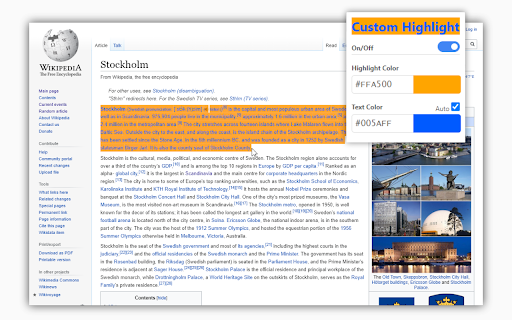

A chrome extension for customizing highlight color. Change Highlight background and text-color. It's easy to set the color with the built-in color picker or by copy and pasting color hex codes. Compatible with Dark Reader. Pages might have to be reloaded after install for the highlight to be set. -- This extension does not read or handle any user data. https://andreto.github.io/Custom-Highlight/

Highlighter
Highlight text on websites with a simple right-click or keyboard shortcut. Saves highlights on your device. Easiest way to highlight text on any webpage! Simply select text, then right click it to select the "Highlight" option. Alternatively, use the default keyboard shortcut 'Alt+H' (^H on Mac). All highlighted texts are saved so that your highlights are not lost when exiting a page! Simply re-opening that page will bring back all the highlights. NOTE: This does not work on very dynamic webpages like Facebook and most email clients. Support for these might be added in the future. ➪ View and copy all highlights on a page ➪ Copy all your highlights to your clipboard easily. ➪ Select existing highlights with a simple click to either delete them or to copy their content. ➪ Customize your highlight colors (and text color). ➪ Change the keyboard shortcut through Chrome settings at 'chrome://extensions/shortcuts'. The code for this project is fully open-source and is available on GitHub: https://github.com/jeromepl/highlighter Help this project by reporting issues and contributing there! Disclaimer: This extension uses Google Analytics to gather non-personal user information and usage information. We DO NOT collect browsing information such as the contents of highlights or accessed URLs. For more information, consult our privacy policy at the link below. The privacy policy for this extension can be found here: https://github.com/jeromepl/highlighter/blob/master/privacy_policy.md

Highlighty: Search, Find, Multi Highlight
Searching and Multi Highlighting made effortless! It's the most efficient way to find and highlight any text on the web. Highlighty is a free PDF highlighter and multi-keyword finder for Chrome — a smarter Ctrl+F replacement that searches, highlights, and navigates dozens of words at once across webpages and PDFs. Press Cmd/Ctrl+F on any page to launch Highlighty's built-in finder — faster and more powerful than the browser's default search, with multi-query support, custom colors, RegExp, and X-Ray navigation built in. Built for researchers, students, lawyers, analysts, journalists, recruiters, and anyone who scans long documents, contracts, academic papers, or technical reports. Works in Chrome, Edge, Brave, Opera, and Arc. Also available on Firefox 109+. ❗ATTENTION — please refresh all currently opened webpages after installing the extension. ⚙️ How it works 1. Open the website or PDF you want to search 2. Type your query into the Highlighty input 3. Watch for instant found / not-found notifications 4. Scroll through the highlighted matches 5. Or press Cmd/Ctrl+F on any page to launch Highlighty's finder instantly More tutorials and videos: https://highlighty.app/how-to-use https://highlighty.app/blog ✔️ PDF highlighter — dedicated PDF viewer for searching, highlighting, and navigating one or many selectable-text PDFs with the same queries, colors, and X-Ray workflow ✔️ OCR for scanned PDFs — on-device English OCR makes scanned and image-only PDFs searchable, with no upload to any server ✔️ Ctrl+F replacement — multi-query in-page finder that beats the browser's default Find on Page ✔️ Multi-keyword search — find and highlight multiple words at once on any webpage ✔️ Highlight inside text inputs and textareas — your saved-query matches also light up inside form fields as you type, without ever modifying the field's real value (copy, paste, undo, form submission all see the literal text) ✔️ Highlight inside rich-text editors — Lexical (Reddit composer), ProseMirror, Tiptap, Monaco, CodeMirror, Quill, Notion, and any contenteditable surface, painted via the browser's native Custom Highlight API so the editor's own behaviour is never disturbed ✔️ Highlight inside modern web-component inputs — Reddit's navbar search and reply controls, Material Web text fields, and other shadow-DOM-based form controls are now in scope ✔️ X-Ray minimap — draggable context panel showing snippets around your matches, including matches hidden inside collapsed sections, tabs, and layered UI ✔️ Scrollbar markers — jump between highlighted matches at a glance ✔️ Custom colors — color picker, palette, and randomizer for every query ✔️ Adaptive text color — auto-contrast based on WCAG 2.0 for accessibility ✔️ Search analytics and visualization ✔️ Bulk import — load query lists from .xlsx (Excel, Google Sheets) ✔️ RegExp toggle for advanced patterns ✔️ Backup & restore — sync your queries between computers ✔️ Found-query counter badge on the extension icon ✔️ Download / upload query lists ✔️ Manual search mode with hotkey trigger ✔️ Compact list view ✔️ Highlight and search on text select ✔️ Large highlighted font option (up to 25px) ✔️ Unlimited saved query lists ✔️ Temporary deactivation of coloring ✔️ Custom keyboard shortcuts for navigation ✔️ Auto-focus on the search input • Free and ad-free — no subscriptions, no upsells, no telemetry • No tracking, no analytics, no remotely injected code • Smarter Ctrl+F — search multiple keywords at once, apply your custom colors, and respect every filter (case, diacritics, whole word, RegExp) — everything the browser's default Find can't do • PDF support — highlight and search inside selectable-text PDFs with the exact same workflow as on webpages • X-Ray context minimap — surfaces matches hidden inside collapsed sections, tabs, accordions, or dynamic UI • Instant found / not-found notifications on any website • Works on dynamic and endless-scroll pages — Facebook, LinkedIn, Reddit, X, YouTube comments, and more • Unlimited queries and unlimited saved query lists • Powerful filtering — diacritic sensitivity, case sensitivity, whole words, RegExp • Quick disable matches with hotkeys • Search by selecting any element on a website • Website whitelist and blacklist for scoping the extension • Fully optional — every feature can be turned off at any time • Keyboard-driven navigation that scrolls to the next match • Clean, friendly interface • Legal — contract review, case law research, due diligence, e-discovery • Academic — literature review, citation hunting, exam prep, thesis research • Research & analysis — financial reports, technical documentation, white papers, 10-Ks • Journalism — fact-checking, source scanning, document leaks • Recruiting — resume and CV keyword screening • SEO & marketing — keyword scanning on competitor sites and SERPs • QA & engineering — log file scanning, API documentation searches • Sales — prospect research, intent signal hunting ▸ Performance note Scanning very large webpages with many queries is CPU-intensive. Older machines may slow down with many tabs open simultaneously. 📨 Info / Contact hey@highlighty.app — feature requests and bug reports welcome

Custom selection
Fully customize text selection: colors, shadows & decorations. Real-time updates with global & domain-specific themes. Introducing Custom Selection, the versatile Chrome Extension designed for total aesthetic control. This tool allows you to bypass browser defaults and fully customize the appearance of your text selection with a few clicks. Unlike standard tools, Custom Selection provides instant, dynamic updates: no tab refresh required. You can independently customize the text color, background, and shadow diffusion. For deeper visual contrast, you can also apply specific text decorations (such as solid, wavy, dotted, or strike-through lines) and set them to a different color than the text itself. With the ability to set individual configurations for specific web domains and a single catch-all global style, you have complete agency over your digital workspace. Core features: • Real-time Updates: Changes apply instantly without refreshing your tabs. • Granular Color Control: Customize text, background, shadow, and decorations separately. • Advanced Decorations: Add solid, wavy, or dotted underlines, overlines, or even strike-through lines with independent color settings • Domain-Specific Logic: Apply different styles to different websites, and set up a catch-all global style for the rest. • Clean Architecture: Lightweight and reliable performance across the modern web. Due to browser security protocols, Custom selection cannot customize your text selection on the following websites: • Chrome Webstore • chrome:// internal URLs

Auto Highlight
Auto Highlight is text highlighter with RegExp support 🟨 Auto Highlight a fully automatic and easy to use text marker / highlighter / eraser / searcher / style fixer with RegExp search support (regular expression). No need to use search anymore to find important information, it will be marked when page loads! ⭐ TOP FEATURES: - highlight keywords (metadata) like: 1080p, HDR, 4K, x265, BluRay, etc. - hide text - by changing font size to zero or by making it transparent - advanced search options using regular expressions (regexp), exact match, ignore diacritics and more - change style - background, text size and color of all marked words - automatic synchronization 🔄 to all your devices (using native Browser Sync.) - highlight "Free shipping", "Out of stock", pricing or discount labels - doing research about specific topic? Use "Temporal highlight" feature to highlight keywords on every page (without using search all the time) ☕ I'm extension developer since 2016 and my goal is to build powerful extensions for your web-browser to make you more productive. If you think I'm doing a good job, please donate :) - Ko-Fi.com: https://ko-fi.com/fastaddons - PayPal.Me: https://paypal.me/fastaddons/ - Patreon.com: https://www.patreon.com/fastaddons 💥 Thank you for supporting my work!
