
bmejphbfclcpmpohkggcjeibfilpamia
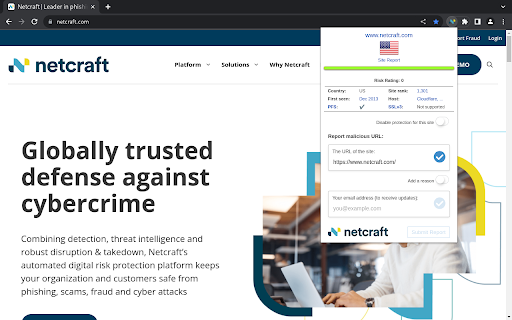


Comprehensive site information and protection from phishing and malicious JavaScript when browsing the web The Netcraft Extension is a tool allowing easy lookup of information relating to the sites you visit and providing protection from phishing and malicious JavaScript. What's new in v2.1.2? • Improved caching of our feed to reduce network traffic. Key Features: • Protection against phishing sites — The Netcraft anti-phishing community is effectively a giant neighbourhood watch scheme, empowering the most alert and most expert members to defend everyone within the community. As soon as the first recipients of a phishing mail report it, we can block it for all users of the extension providing an additional level of protection from Phishing. Netcraft processes reports of fraudulent URLs from a diverse variety of sources and proactively searches for new fraudulent sites. • Protection against malicious JavaScript — Prevent your credit card details from being stolen by shopping site skimmers or your computer's processing power being harvested by web miners. Netcraft has been detecting shopping site skimmers, web miners, and other malicious JavaScript since 2017. The extension blocks sites that we have found to be compromised with malicious JavaScript. Additionally, it detects JavaScript that we have identified as being malicious, blocks pages that use it from loading, and automatically reports them to Netcraft to protect the rest of the community. • Detailed site reports – simply click the Netcraft logo to access a wealth of information about the sites you visit, helping you to make informed choices about their safety. • Conveniently report suspected phishing & fraudulent sites – At the click of the button you can report suspected web forgeries to Netcraft, helping to protect the community. Netcraft operates an incentive scheme for Phishing site submissions, including iPads, backpacks, mugs, and more… https://report.netcraft.com/pages/report-incentives Find out more about the Extension at: https://www.netcraft.com/apps-extensions/browser-extension/ About Netcraft: Netcraft is an Internet services company based in Bath, England. We provide a range of services relating to internet data analysis, defences against fraud and phishing, web application security testing, and automated network scanning. In particular, Netcraft’s anti-phishing services are very widely licensed, ultimately protecting hundreds of millions of people. https://www.netcraft.com Privacy Policy: https://www.netcraft.com/privacy/

Criminal IP: AI-based Phishing Link Checker
Criminal IP: AI-based Phishing Link Checker, Your Ultimate Web Protection and Malicious URL Checker Criminal IP: AI-based Phishing Link Checker is a powerful Chrome extension designed to enhance your online security and protect you from malicious URLs, malware, and phishing attacks. This solution leverages the data collected from Criminal IP, a cyber threat intelligence (CTI) search engine, to respond to threats more accurately and quickly. With its advanced features and real-time scanning capabilities, Criminal IP: AI-based Phishing Link Checker serves as your reliable web protection companion. • Real-time URL Scanner: Criminal IP: AI-based Phishing Link Checker's cutting-edge AI technology scans URLs in real-time, swiftly identifying and flagging any suspicious or malicious links. This proactive urlscan feature keeps you safe from phishing attempts and malware infections, providing you with robust security. • Website Risk Rating: Website Risk Rating: Criminal IP: AI-based Phishing Link Checker provides 5 levels of website risk rating: Safe, Low, Moderate, Dangerous, and Critical. This visual indicator helps you assess the safety level of websites and make informed decisions while browsing, ensuring a secure online experience. Additionally, it also provides detailed IP information such as vulnerabilities, open ports, and WHOIS applications if you want. • Comprehensive Security Tools: With built-in IP checking and OSINT (Open-Source Intelligence) capabilities, Criminal IP: AI-based Phishing Link Checker performs thorough scans to detect any potential threats. Its powerful scanner acts like an antivirus for your browsing experience, ensuring a safe and secure environment. It additionally comes with a “Scam Block” feature, which blocks access to phishing sites even if accidentally accessed. • Blacklist and Phish Detection: Criminal IP: AI-based Phishing Link Checker maintains an up-to-date blacklist of known malicious URLs, preventing you from accessing dangerous websites. Additionally, it employs advanced phishing detection techniques to identify and block phishing attempts in real time, safeguarding your privacy and sensitive information. • Advanced Mode: The Advanced Mode provides detailed data on IP addresses connected to domains. With access to WHOIS applications, vulnerability information, open ports, and more, you can delve deeper into the security aspects of websites, empowering you to make informed decisions and stay vigilant. • Security Issue Updates: Stay ahead of the evolving online threats with Criminal IP: AI-based Phishing Link Checker’s feature that provides and updates you with the latest information on security issues. By staying informed, you can take necessary precautions and keep your browsing experience secure. • Privacy Protection: Criminal IP: AI-based Phishing Link Checker prioritizes your privacy and confidentiality. It ensures that your personal information remains secure while you surf the web, providing a safe browsing experience. • Enhanced Web Safety: As a comprehensive web protection solution, Criminal IP: AI-based Phishing Link Checker acts as a reliable link checker, constantly monitoring the safety of URLs and alerting you to potential threats. It offers peace of mind and a worry-free browsing experience. • User-Friendly Interface: Criminal IP: AI-based Phishing Link Checker's intuitive interface makes it easy to use, allowing you to navigate through its powerful features and customize your security preferences effortlessly. • Stay protected with Criminal IP: AI-based Phishing Link Checker, the ultimate URL scanner and web protection extension, and browse the internet with confidence. This is a free Chrome extension from the cyber threat intelligence search engine Criminal IP, managed by AI SPERA. More information is available at https://www.criminalip.io/en/resource/chrome-extension

Pulsedive Threat Intelligence
Highlight IPs, domains, and URLs on any website to enrich them using Pulsedive's threat intelligence. Streamline real-time threat research and analysis on any website you visit with Pulsedive’s threat intelligence browser add-on. Highlight IPs, domains, URLs, or threat names in any website text to enrich them using Pulsedive's free Community dataset. Get immediate, up-to-date context when reading cybersecurity news and threat advisories, or exploring threat intelligence collections and research. Create a free account at pulsedive.com for increased limits and additional capabilities. – FEATURES: • Indicator Lookup - highlight text around an IP, URL, or domain to enrich with contextual data from Pulsedive, including associated threats, screenshots, ports, protocols, web technologies, HTTP headers, meta tags, WHOIS data, and much more • On-Demand Scans - perform real-time passive or active scans on IPs, domains, and URLs to fetch live data • Bulk Processing - highlight text containing hundreds or thousands of indicators to parse and refang in bulk, download them as a CSV, and submit to Pulsedive Analyze for bulk enrichment • Threat Research - look up threat names and aliases to retrieve threat summaries, associated indicators, TTPs, latest news, and additional context • Website Enrichment - click the add-on button without highlighting text to retrieve domain information for the website you're visiting • Mute Options - reduce noise by easily muting the auto-popup temporarily or on specific sites • Flexible Controls - adjust the add-on settings to control when, where, and how Pulsedive parses threat intelligence information • Quick Pivoting - convenient one-click pivot to the Pulsedive Community platform at pulsedive.com for further analysis – WHAT'S NEW - VERSION 3: The latest update introduces bulk indicator processing, advanced settings & controls, and an improved user experience and interface. • Dark mode • Free-text parsing for IPs, URLs, and domains • Bulk indicator processing • Muting/unmuting and website exclusions • Usage guide in Settings page • Fixed punycode domain support • Fixed various CSS conflicts with injected popup – Pulsedive offers frictionless threat intelligence solutions for growing teams. The Pulsedive Community platform at pulsedive.com aggregates, enriches, and correlates community threat data to support analyst workflows and time to action. With 50M+ searchable indicators and threats collected from user submissions and feeds, the Pulsedive add-on delivers invaluable context wherever you work.

SafeToOpen Browser Security and Privacy
SafeToOpen browser security and privacy extension. Stop phishing attacks before they reach you. SafeToOpen is a real-time browser security and privacy extension that protects you from phishing websites, online scams, malicious downloads, and hidden trackers — automatically, as you browse. No security expertise required. Install it once and stay protected on every site you visit. Most antivirus software reacts after a threat is already on your device. SafeToOpen works earlier: it analyzes the page you're actually looking at, in real time, and warns you the moment something looks like a phishing or scam site — even if that site is brand new and not yet on any blocklist. ━━━━━━━━━━━━━━━━━━━━━━━━━━━━━━━━━━━━━━ WHAT SAFETOOPEN PROTECTS YOU FROM ━━━━━━━━━━━━━━━━━━━━━━━━━━━━━━━━━━━━━━ ✓ Phishing & fake login pages Detects sites built to steal your passwords, banking details, and personal information — including newly created phishing pages that traditional blocklists miss. ✓ Online scams & fraudulent websites Flags deceptive and impersonation sites before you hand over money or data. ✓ Malicious downloads Warns you before you download dangerous files (like disguised .exe installers) that could carry malware or ransomware. ✓ Hidden trackers Blocks third-party trackers that follow you across the web, so you browse faster and more privately. ━━━━━━━━━━━━━━━━━━━━━━━━━━━━━━━━━━━━━━ HOW IT WORKS — TWO LAYERS OF PROTECTION ━━━━━━━━━━━━━━━━━━━━━━━━━━━━━━━━━━━━━━ SafeToOpen doesn't just check a website against a list of known bad URLs. It inspects every page on two levels at once — which is how it catches the newest scams that blocklists haven't seen yet. ❶ Visual element analysis SafeToOpen looks at a page the way you do. It examines the visual elements — logos, branding, layout, and login forms — to recognize when a site is impersonating a bank, brand, or service you trust. If a page is dressed up to look like something it isn't, you're warned BEFORE you enter your password, card number, or any sensitive information. ❷ Deep structural analysis Like an X-ray, SafeToOpen sees beneath the surface. It inspects the underlying layers and structure of the website that your eyes can't. ➤ Together: one fast, accurate verdict By combining what a page LOOKS like with what it's actually MADE of, SafeToOpen identifies the latest phishing and scam websites in real time — including brand-new pages launched minutes ago that no traditional blocklist has caught up to. ✓ Catches brand-new threats — Phishing kits launch and vanish within hours. SafeToOpen analyzes the page itself, so it flags zero-day phishing sites that lists haven't caught up to yet. ✓ Lightweight & fast — Runs quietly in the background and won't slow down your browsing. ✓ Privacy by design — Your browsing is your business. SafeToOpen protects you without harvesting your personal data. ✓ Works everywhere you browse — Protection applies across the sites and pages you visit, automatically. ━━━━━━━━━━━━━━━━━━━━━━━━━━━━━━━━━━━━━━ GETTING STARTED IS EFFORTLESS ━━━━━━━━━━━━━━━━━━━━━━━━━━━━━━━━━━━━━━ ➊ Install SafeToOpen and pin it to your toolbar. ➋ Browse normally. SafeToOpen checks each page in real time. ➌ If a site looks like phishing, a scam, or a malicious download, you get a clear, immediate warning — with a simple way to stay safe. That's it. There's nothing to configure. Protection starts the moment you install. ━━━━━━━━━━━━━━━━━━━━━━━━━━━━━━━━━━━━━━ FREE TO START — UPGRADE FOR COMPLETE PROTECTION ━━━━━━━━━━━━━━━━━━━━━━━━━━━━━━━━━━━━━━ Install SafeToOpen free and get real-time phishing detection right away. The free plan blocks known phishing, scam, and malware sites, warns you before you open known unsafe links, and blocks third-party trackers. Upgrade to SafeToOpen Personal Plus — with a 14-day free trial — to unlock our most advanced protection: ✦ Zero-day phishing detection (VisionAI) — catches brand-new phishing and scam pages the moment they appear, before any blocklist. ✦ Deeper Analysis (X-Ray) — full structural inspection of suspicious pages for a faster, more accurate verdict. ✦ Paste Guard — stops passwords, card numbers, and personal data from being pasted into untrustworthy sites. ✦ Email-attachment scanning — checks risky attachments in your webmail. Protecting the whole household? SafeToOpen Family Plus — covers up to 5 people, with full Personal Plus protection for everyone. ━━━━━━━━━━━━━━━━━━━━━━━━━━━━━━━━━━━━━━ TRUSTED, PRIVATE & COMPLIANT ━━━━━━━━━━━━━━━━━━━━━━━━━━━━━━━━━━━━━━ Security software should be held to the highest standard — so SafeToOpen is. ✓ GDPR compliant — built to respect your privacy and your rights over your data. ✓ ISO/IEC 27001:2022 certified — our information security is independently certified to the leading international standard. ✓ Privacy by design — SafeToOpen protects you without harvesting or selling your personal data. ━━━━━━━━━━━━━━━━━━━━━━━━━━━━━━━━━━━━━━ FOR TEAMS & ORGANIZATIONS ━━━━━━━━━━━━━━━━━━━━━━━━━━━━━━━━━━━━━━ SafeToOpen also protects businesses, schools, and enterprises. It supports centrally managed deployment and policy configuration, so administrators can roll out consistent phishing and download protection across every device. ➤ Learn more and talk to our team: https://safetoopen.com/en/for/business/ ━━━━━━━━━━━━━━━━━━━━━━━━━━━━━━━━━━━━━━ ⚠ PROTECT YOURSELF FROM THE #1 CAUSE OF ONLINE BREACHES ━━━━━━━━━━━━━━━━━━━━━━━━━━━━━━━━━━━━━━ The vast majority of cyberattacks start with phishing. Antivirus alone isn't enough — phishing happens in your browser, in real time, on pages your antivirus never sees. SafeToOpen is built for exactly that moment.

Country Flags & IP Whois
Displays country flag of website's server location, Whois and Geo info A browser extension to display the page's server flag in the toolbar area indicating the current webserver's physical location. This is done by comparing the IP range with an offline database from MaxMind's GeoLite (there is no server interaction to get the info). Knowing the server location adds an extra layer of awareness to your browsing and is useful to indicate the native languages and legal jurisdictions that may apply. Additional information about Geolocation or Whois info can be obtained via the left- and right-click on the action icon. Features: 1. This is an open-source project (https://github.com/andy-portmen/country-flags/issues) 2. Identifies IP4, IP6, and private IP addresses 3. It is now possible to use the native DNS resolver if a user is under a SOCKS proxy (disabled by default; requires native integration) 4. Offline database updates once per 7 days using the window.caches API 5. Supports running a custom command when an IP is resolved; This command accepts [ip], [host], [curl], [enurl] and [url] keywords 6. Open requested service optionally in the background and/or adjacent to the current tab. Available tools in the right-click menu (only six services are visible in the main menu): 1. SSL Checker: Check SSL certificate 2. Traceroute: Display the route and transit delays of packets 3. Ping: Test the reachability of this IP address 4. TinyURL: Shorten the URL using TinyURL.com 5. DNS Lookup: Perform an authoritative DNS lookup 6. Whois Lookup: Find the registration and delegation of a domain name 7. HTTP Headers: List all the response HTTP headers 8. Copy IP: Copy IP address to the clipboard 9. Alexa: Website traffic, statistics, and analytics 10. WOT Scorecard: Website reputation ratings 11. Virustotal: A free virus, malware, and URL scanning service 12. Check Server Status: Helps find whether a website is down or not 13. Google Translate: Free service instantly translates words, phrases, and web pages 14. Google Cache: Google cached pages for any website 15. Wikipedia: Domain search 16. intoDNS: Checks the health and configuration of DNS and mail servers 17. Netcraft: Provides internet security services including anti-fraud and anti-phishing services 18. Wave Report: Provides web accessibility solutions 19. Validate.nu: HTML5 Validator 20. W3C CSS Validator: CSS Validator 21. W3C Validator: HTML5 Validator 22. Internet Archive: Free universal access to archived web pages 23. Google: Search by domain 24. Wolfram|Alpha: Access to the world's facts and data -- Permissions: For a comprehensive description of why these permissions are needed check https://add0n.com/country-flags.html#permissions
