
bmdiaadnpgbbfepggiiajgadlhhcphgk


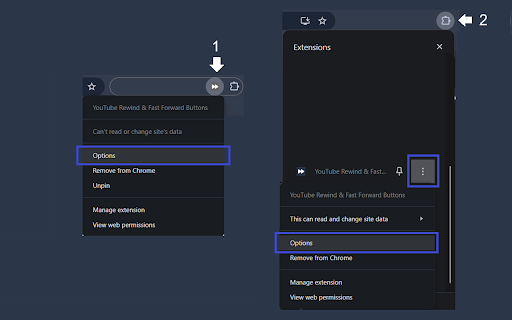

Enhance your YouTube experience with the Rewind & Fast Forward Chrome extension. This tool adds dedicated buttons for rewinding and fast-forwarding videos. 1. Customizable Time Skips — Choose the skip duration for each button individually, with up to four customizable buttons. 2. Arrow Key Override — Choose whether to synchronize the Left and Right arrow keys with your configured skip durations. (Default: No override) 3. Media Key Integration — Map your keyboard's media keys (Previous/Next track) to use the same skip durations as the extension buttons. How to Access the Options Page 1. If you've pinned the extension, click the extension icon and then click "Open the options page". 2. If you haven't pinned it, click the Chrome extensions icon; you'll have two options: - Click the three dots next to "YouTube Rewind & Fast Forward Buttons" and select Options. - Click the extension name, then click "Open the options page". See the screenshots below for guidance.

Youtube Speed Control Hotkeys
Allows you to customize your own speed control hotkeys in Youtube You can customize your own hotkeys to speed up and speed down the playing video on youtube. This extension only works on youtube. ======================================================== Version 1.0.22 - Bug fixes and performance improvements Version 1.0.21 - Add support for Youtube Shorts Version 1.0.18 - Bug fixes and performance improvements Version 1.0.9 - Remove "Seek backward & forward" feature from extension, as Youtube had include this feature in the latest update. Version 1.0.7 - Seek backward & forward works even the focus element is not on video player Version 1.0.6 - New configuration effect immediate change without the needs of refreshing page Version 1.0 - Basic customization that allows you to customize your own hotkeys of changing youtube playback speed rate.

Video Dominator
Hover over any video, hold the right mouse button down, and use mouse wheels or buttons to seek, adjust volume, speed, and more. Hover over different areas of any video, hold the activation key down (right mouse button by default), and use mouse wheels or buttons to perform an unlimited number of custom actions such as: - play/pause the video - seek by, seek to (units available: second, frame, %) - adjust or set playback rate (0x to 16x) - adjust or set volume - toggle mute - toggle picture-in-picture mode - toggle custom player On some websites, you can also: Overlay Element - hover over a video, hold the activation key down and use mouse wheels or buttons - activation key can be the Right Mouse Button, Ctrl, Alt, or Shift - available on almost any website Video Element - hover over a video and use mouse wheels or buttons - works only when the video is a top-most element (on websites such as YouTube, Odysee, Nebula, CuriosityStream) - customizable overlay temporarily shows you info depending on the last action, such as: - volume - playback rate - current time, current time / duration, remaining time - time can be based on the current playback rate - a full window or full screen player with minimalist UI and no popups or any other distractions - you don't need to hold the activation key down while using mouse controls - unlimited number of custom keyboard shortcuts - customizable progress bar - none - the extension will run on all domains - blacklist - the extension will not run on listed domains - whitelist - the extension will run only on listed domains Storage - for storing extension settings Downloads (optional) - for downloading media files This extension does not collect personal data from users, and it does not send any user data to a remote server. The only data it collects are extension settings, and this is stored locally on your PC.

Reverse Youtube
Made to avoid torticollis while using a secondary screen. This extension swaps 'primary video' and 'related contents' layouts. This extension swaps 'primary video' and 'related contents' layouts in youtube.com

Force enable YouTube DVR
Enables the YouTube DVR on all streams. Now you can rewind the video on every live stream! No more FOMO if you need to take breaks. Note: You may need to refresh the page to make the DVR show up.
