
blpgklkdmkggikjmnchdhjjjldeldiba
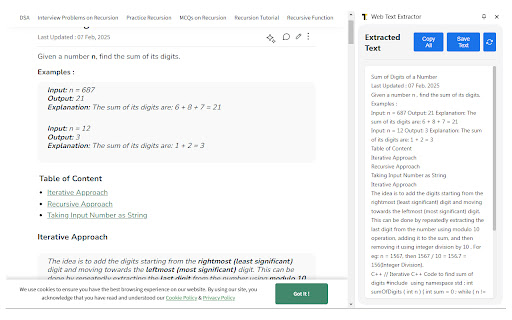

Extract text content from web pages to a sidebar,And provide copy and save functions Web Text Extractor 1.0 Web Text Extractor is a powerful Chrome extension designed to seamlessly extract and process text content from any webpage. With its intelligent content detection algorithm, it identifies and extracts the most relevant text while filtering out unwanted elements. Key Features - Smart Content Detection : Automatically identifies and extracts main content areas from webpages, focusing on articles, blog posts, documentation, and other text-rich content. - Convenient Sidebar Interface : View extracted text in a clean, distraction-free sidebar without leaving your current page. - Text Management Tools : Copy all extracted text to clipboard or save it as a text file with just one click. - Advanced Extraction Capabilities : Handles complex webpage structures including iframes and Shadow DOM content. - Intelligent Filtering : Automatically removes scripts, styles, hidden elements, and other non-content items for cleaner results. - Selection Support : Extract only the text you've selected on a webpage for more targeted content capture. Use Cases - Research & Study : Easily extract article content for offline reading or note-taking. - Content Creation : Gather reference material from multiple sources efficiently. - Data Collection : Extract text data from websites for analysis or processing. - Accessibility : Convert cluttered web content into clean, readable text. - Translation : Extract text for translation services or language learning. Web Text Extractor respects your privacy and operates entirely within your browser. No data is sent to external servers, ensuring your extracted content remains private and secure. Simplify your web reading experience today with Web Text Extractor!

Email Hunter
Email Extractor tool that save time and efforts. Forget copying and pasting. It collects emails as you browse websites. Email Extractor is a time proven email grabber tool which helps collection emails. Email Hunter easily extracts email addresses from pages as you visit them and auto saves them all. This chrome app finds email addresses scraping and searching source code and no matter what you see on the front. The functions: - extract emails from visited pages - auto search - export collected emails to text file and copy to clipboard - safe checker: unsafe pages skipping without extracting emails In addition, subject to your consent through the prominent notice, we will be accessing and collecting your non-personal web browsing data to use the unsafe pages detection feature called 'Safe Checker' for free. The feature can be disabled on the Options page, if not - we will share the collected web browsing data in an aggregated, anonymized format with our affiliated companies and business partners for commercial use. We wish to make it clear, we do not want to know your identity, preferences or any information about you personally, all as detailed in the Privacy Policy. Our extension collects and uses all web browsing activity as it is needed to improve the function of detecting unsafe pages of our Safe Checker feature.

Web Content Copier
Copy headings and paragraphs from the current webpage. Introducing the 'Web Content Copier' Chrome Extension This Chrome extension simplifies the task of copying website content. With just one click, you can extract relevant text from any website (including ChatGPT) without manually selecting and copying each element. Here's what it offers: – One-Click Content Copying: Easily extract all necessary text, including all headings (H1-H6) and paragraphs (P), from any website with a single click. – Intelligent Text Selection: The extension excludes content in the navigation and footer of the website, ensuring you only get the content that matters. – ChatGPT Conversation History Extraction: Perfect for frequent ChatGPT users, it allows you to copy and extract your entire conversation history in one go. – Ideal for Students, Researchers, and Professionals: It simplifies the process of collecting information from various websites quickly and efficiently. – Saves Time and Effort: Avoid manually selecting each element and navigating through a cluttered web page. – Prevents Accidental Copying: Eliminate the risk of accidentally copying unnecessary content, saving precious time. – Effective for Note-Taking and Analysis: It's especially useful for those who wish to save their ChatGPT conversation history for further analysis or note-taking. In essence, the 'Web Content Copier' is an essential Chrome extension for anyone who values speed, efficiency, and accuracy in online research and information gathering. Download now for a hassle-free content copying experience!

Web Page Downloader
Web Page Downloader allows you to download and save entire web pages, including linked resources, for offline viewing. Never lose access to important web content again. Web Page Downloader lets you save complete, pixel-perfect copies of any website for offline viewing—no internet required. Whether a website goes down, changes, or you simply need offline access, this extension ensures you always have a permanent archive at your fingertips. Key Features Complete Website Archiving Save everything that makes a webpage work: - HTML Content - The page structure and text - Images - All photos, graphics, and background images - Stylesheets (CSS) - Preserve the exact visual design - Scripts (JavaScript) - Keep interactive elements functional - Documents - Automatically capture PDFs, DOCs, and other embedded files Granular Download Control Choose exactly what you want to save with our flexible filter system: - Download only images for a photo gallery - Save just the text content without clutter - Grab CSS/JS assets for development reference - Create lightweight archives by excluding heavy resources Enterprise-Grade Performance Built to handle the most demanding archiving tasks: - Streaming Downloads - Process multi-gigabyte websites without memory issues - Incremental Assembly - Handle huge HTML files that crash other tools - Smart Retry Logic - Automatically recover from network interruptions - Queue Management - Download multiple resources efficiently in parallel Privacy & Security You Can Trust - 100% Local Processing - All work happens in your browser, nothing sent to servers - No User Tracking - We don't collect analytics, browsing history, or personal data - No External Dependencies - Your data never leaves your device Truly Global Fully localized in 45 languages including: English, Spanish, French, German, Japanese, Chinese, Arabic, Russian, Portuguese, Italian, Korean, Hindi, and 33+ more. Perfect For... Researchers & Students - Archive academic papers and citations before they disappear - Save research materials for offline study - Create permanent backups of reference materials Travelers & Digital Nomads - Download travel guides for offline access - Save maps, itineraries, and booking confirmations - Read articles on flights without WiFi Web Developers & Designers - Inspect website structures offline - Extract assets and resources for reference - Archive client websites for portfolio or legal purposes Journalists & Content Creators - Preserve evidence and sources permanently - Archive articles before they're edited or removed - Create offline research libraries - Single HTML File Export - Perfect for sharing or emailing complete pages - Text-Only Mode - Extract clean, readable content without formatting - Progress Tracking - Real-time status updates during downloads - Smart Resource Detection - Automatically finds and saves all page dependencies - Customizable Filters - Save your preferences for repeated use 1. Click the extension icon on any webpage you want to save 2. Choose your options - Select what to download (HTML, images, CSS, etc.) 3. Click "Start Download" - Watch the progress in real-time 4. Access your archive - Find the ZIP file or single HTML file in your Downloads folder NB! Some websites go to great lengths to prevent anyone from downloading their content, and therefore for some websites the downloaded html may differ from the original html.

BeeSave Web Clipper
Save, copy, and organize any text from web pages. Quick paste and export to PDF/TXT No more lost links or forgotten quotes! BeeSave Web Clipper helps you easily save, copy, and organize any text from web pages, and even export it to PDF or TXT for your convenience. Do you know that feeling when you find valuable information online, but it quickly gets lost among countless open tabs or simply forgotten after a few hours? BeeSave Web Clipper is your reliable assistant, designed to solve this problem once and for all. It's an intuitive browser extension created for those who value their time and strive for maximum productivity when working with information. How BeeSave Web Clipper Boosts Your Productivity: Instant and Convenient Text Saving: No more manual copying and pasting. Just select any text you're interested in on a web page, and save it with a single click! Use your familiar Ctrl/Cmd+C combination, a convenient hotkey, or the context menu — the choice is yours. Perfect Organization of Your Data by Groups: Every saved clip can easily be assigned a single group. This allows you to create a clear structure for your data and instantly find the information you need, by filtering it by topic, project, or any other criteria you define. You can work with texts sorted by groups, with all of them at once, or only with those saved from the active web page. **Full Control Over Your Text Collection:** Browse all collected text clips or focus only on those related to the currently open tab. Merge multiple text clips into one large, cohesive document. This is ideal for creating notes, compiling information on a specific topic, or preparing reports. Edit your saved entries directly within the extension to adapt them to your current needs. Rearrange clips by changing their position within groups. By default, they are sorted by creation date, but you can always change the order. All Necessary Metadata Always Handy: Every saved text clip is automatically marked with its save date and a direct link to the source web page. You'll always know where the information came from and when it was saved, which is invaluable for citations and source verification. Quick and Smart Text Insertion Anywhere: Forget about searching and copying again! Right-click in any text input field on a website and instantly insert any previously saved clip or even an entire merged group of text. This significantly speeds up filling out forms, writing emails, comments, social media posts, or creating notes. Protection Against Accidental Data Loss: Accidentally deleted an important clip or merged the wrong ones? Don't worry! Recent actions (merges or deletions) can be easily undone, ensuring your peace of mind and confidence in data preservation. Flexible Export of Your Collection: Need your collected text outside the browser? No problem! Export selected or all saved clips into convenient formats — a simple text file (.txt) or a professional PDF document (.pdf). Save your notes, research materials, or quotes for offline work, sharing, or printing. Who Is BeeSave Web Clipper For? Students and Learners: Effectively gather material for term papers, theses, reports, and academic research. Researchers and Analysts: Systematize data, facts, quotes, and sources for your projects. Content Managers and Marketers: Save examples of compelling copy, article ideas, competitor information, and trends. Developers and IT Professionals: Quickly clip useful code snippets, documentation, problem solutions, and links to valuable resources. Journalists and Bloggers: Instantly collect quotes, facts, statistics, and materials for articles and publications. Copywriters and Writers: Accumulate ideas, phrases, and text examples for inspiration and effective writing. Project Managers: Gather requirements, task details, comments, and any other information scattered across web pages. Editors and Proofreaders: Save rules, style guidelines, examples of errors, and successful phrasing. Anyone who actively works with information online: If you frequently read, research, collect, or create data online, BeeSave Web Clipper will become your indispensable tool for boosting productivity. BeeSave Web Clipper is more than just a copying tool. It's your personal, dynamically evolving knowledge base, a powerful text organizer, and an intelligent assistant that will significantly enhance your efficiency and help you always have the necessary information at your fingertips. Install BeeSave Web Clipper today and transform your approach to working with web text!
