
bllniknbdbkeihgebmkicdibmbcfglah
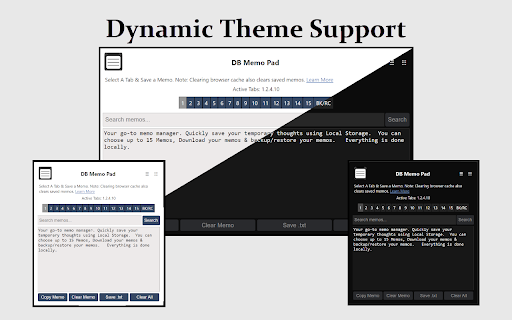
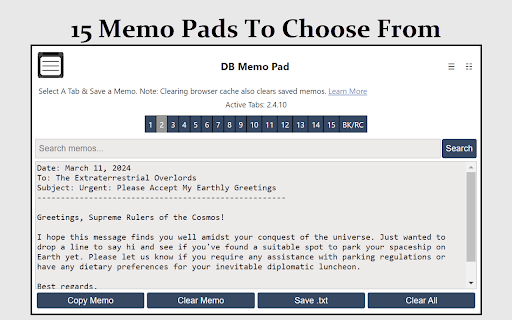
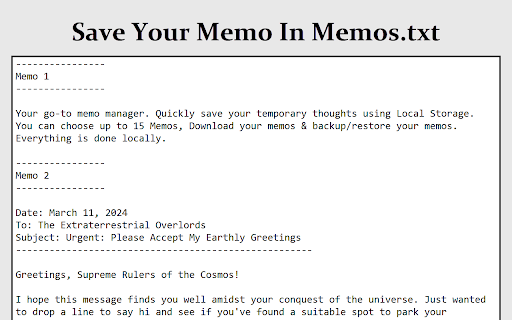

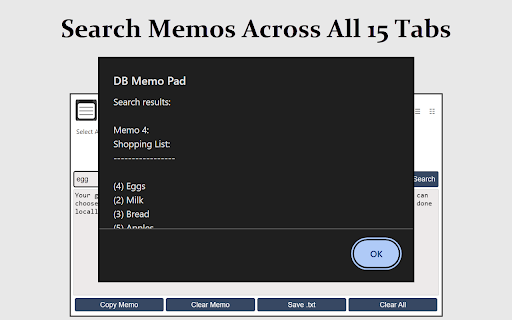
Your go-to memo manager. Quickly save your temporary thoughts using Local Storage. How Does it Work? DB Memo Pad uses local storage to instantly save text entered in textarea inputs on your device. 1. Active Tabs: Displays the tabs in use among the 15 available, helping in managing your memos. 2. Search Memos: Quickly locate specific content across all memos with a search feature, presented in an alert popup. 3. Below the textarea input, find: -- Copy Memo: Copies text from the active memo tab to the clipboard. -- Clear Memo: Clears text from the active memo. -- Save .txt: Saves all memos to a 'Memos.txt' file for local storage. -- Clear All: Deletes all memos across every tab, irreversible action. 4. BK/RC Tab: Offers a backup and restore system for all memos. Additional buttons include: -- Backup?: Fetches and displays all local storage Key/Values for DB Memo Pad in the textarea input. -- Save Backup .txt?: Saves all local storage data to 'Memo-Codes.txt' for local storage. -- Replace?: Restores memos from 'Memo-Codes.txt'. Simply copy text data from the file and paste it into the Backup Recovery Codes input, then press Replace. Privacy - This extension does not gather any personal information or browsing history from users. 0 Tracking, 0 data collection. - Users can rest assured that their browsing activities remain private and are not monitored or shared with any third parties. - The extension does not require any libraries linked outside of the extension aka "remote code". Just requires the browser's local storage to save your settings. More About the Extension here: https://destructiveburn.com/forum/public/d/21-db-memo-pad-browser-extension

Sticky Notes - Super quick, AI powered, & Cloud-based
Capture ideas instantly! With AI-powered stickies: add todos and reminders on any website and sync effortlessly across devices. Meet Stickies, the smart note-taking extension for your browser. Blazing fast and highly flexible. Version 1.0.10 now includes: Chat with AI in the Side Panel with the context of the current website Create your own Notion like canvases in the Side Panel Offline-First, Syncs Later: Create and manage notes on any website, anytime. All stickies are saved locally and sync to the cloud as soon as you're connected. Contextual Notes: Leave reminders and ideas directly on the webpage. They'll be waiting for you when you return. Central Dashboard: View, search, and manage all your notes from every site in one organized, powerful interface. Robust Features: Customize your workflow with a rich text editor, note pinning, themes, opacity controls, and more. Unlimited Stickies: Create as many notes as you need across all your devices. Enhanced AI Features: Get priority access to more powerful AI generation and summarization tools. Expanded Sharing & Collaboration: Unlock advanced options for sharing your notes with colleagues and teams.

Memo Notepad
Boost productivity with Memo Notepad Chrome Extension for easy online note-taking and text editing. 👉 Introducing memo notepad - your ultimate digital companion for all your note-taking needs! 🏆 memo notepad is the perfect Chrome extension for seamlessly jotting down your thoughts, ideas, to-do lists, and more in a simple and intuitive interface. 🏆 Whether you're a student, professional, or simply someone who loves staying organized, memo notepad is here to make note-taking a breeze! 🏆 With this extension, you can access your notations anytime, anywhere, thanks to its online functionality. 🏆 Say goodbye to traditional pen and paper methods and hello to the convenience of digital note-taking! 👍 This innovative text editor allows you to create, edit, and save your notes online, ensuring that your important memos are always just a click away. 👍 No more worrying about losing sticky notes or forgetting important information - memo notepad has got you covered! 👍 memo notepad is more than just a regular online notepad. It's a comprehensive tool that offers a range of features to enhance your note-taking experience. 👍 From organizing your memos with tags and categories to customizing the look and feel of your notations, this extension empowers you to stay productive and efficient. 👉 Key Features of memo notepad: 1️⃣ Create and manage unlimited notes online. 2️⃣ Categorize your memos for easy access. 3️⃣ Customize the appearance of your notations with different fonts and colors. 4️⃣ Easily share your records with friends, colleagues, or classmates. 5️⃣ Sync your notes across all your devices for seamless access on the go. ⭐ memo notepad is not just an online notepad, it's your personal assistant for staying organized and on top of your tasks. ⭐ Whether you're brainstorming ideas, taking meeting notes, or simply jotting down your thoughts, this app has all the tools you need to make note-taking a delightful experience. ⭐ Don't let your notes get lost in the shuffle - with memo notepad, you can trust that your important information is securely stored online for easy retrieval whenever you need it. ⭐ Say goodbye to cluttered desks and messy notebooks, and hello to the simplicity and efficiency of our extension! Experience the convenience of an online note pad with the flexibility to access your records offline as well. memo notepad offers the best of both worlds, ensuring that you can stay productive whether you're connected to the internet or not. Get started with memo notepad today and discover the joy of taking notes in a digital age. 💥 With its user-friendly interface, advanced features, and seamless synchronization capabilities, this app is the only note-taking tool you'll ever need. 💥 Join thousands of users who rely on memo notepad as their go-to notepad app for all their note-taking needs. 💥 Start organizing your thoughts, ideas, and tasks in one place with the power of this extension. 💥 Try it now for free and see the difference it can make in your productivity! 👉 Unleash your creativity with our notes online platform, designed to inspire and empower you in your daily tasks. 🔥 Experience the power of a text editor that caters to your unique needs, whether you're writing a quick memo or drafting a detailed project plan. 🔥 Stay organized and efficient with our online note pad, a go-to tool for capturing your ideas and staying on top of your tasks. 🔥 Let our platform be your digital notebook, guiding you through your daily memos and notes with ease. 👉 Embrace the future of note-taking with our memo notepad, the ultimate solution for managing your memos on the go. 🌞 Our platform offers a blend of functionality and convenience, ensuring that you have everything you need to stay productive and organized. 🌞 With our note pad feature, you can create, edit, and share your notes with ease, making collaboration a breeze. 🌞 Say goodbye to traditional notepads and hello to the future of memo management with our cutting-edge platform. 👉 memo notepad - where notes meet innovation! Start your note-taking journey with this extension today and elevate your productivity to new heights. Say hello to a clutter-free, organized digital workspace with this app by your side. 👍

Simple Quick Note
Simple quick note extension with a character counting feature This extension is designed for quick notes that will be saved and synched across all your desktop devices If you have any questions, please contact me by email

Quick Notes
A simple extension to take quick notes. Quick Notes is a sleek and intuitive Chrome extension designed to enhance your productivity by allowing you to take quick, hassle-free notes while browsing. Developed by Bergeaud Digital Solutions, Quick Notes offers a minimalist design with essential features to ensure you can jot down important information without interrupting your workflow. Whether you need to remember a crucial piece of information, save a link, or jot down an idea, Quick Notes provides a seamless note-taking experience directly within your browser. Download Quick Notes today and streamline your online experience with this handy tool.
