
bldchfkhmnkoimaciljpilanilmbnofo
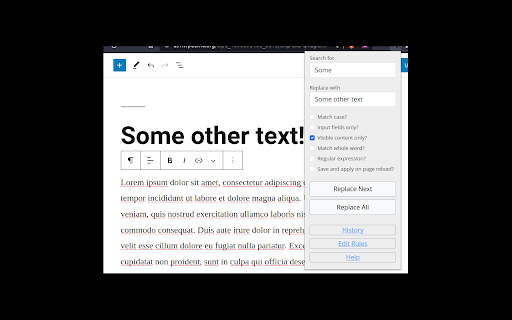


Search for text on a webpage and replace it with different text. Allows you to search for text anywhere on the page and replace it with different text. For example: - edit text in editors in WordPress, Drupal, Notion, Etsy, eBay, Amazon +more! - quickly correct forms in which the wrong information has been entered multiple times - edit the HTML of the page - use regular expressions as a search term - edit hidden fields - apply matches from the regular expressions search term as part of the replacement - save the search and replace instance and apply to all subsequent page visits - match pages by regular expressions to apply one rule to many different web pages Please Note: 1. You must refresh the page or restart chrome before using. 2. The popup will not stay open if you click elsewhere. This is a feature of Chrome.

Regex Replace
Whether you want to consolidate your cloud-to-butt and your xkcd inspired s/keyboard/leopard extensions, or just do a simple regex replace on all pages, this extension is for you. With a quick engine that doesn't interrupt page display and an easy way to add new expressions, Regex Replace is what you need to do fast and easy regex replacements on every page you see.

find+ | Regex Find-in-Page Tool
A find-in-page extension with support for regular expressions. {find+} is a powerful Find-in-Page extension for Google Chrome allowing you to search a web page or document by regular expression. It has been designed to look and behave much like the native CTRL-F tool, but extended with various useful features. With {find+}, you can match any legal JavaScript regular expression against text in the page, use find-and-replace to replace text in the page, copy occurrences of a regex to your clipboard, store frequently used expressions, and configure the extension the way you like. As a software developer, looking through lengthy stack traces, continuous integration build history, or large text files is something we do very regularly. The Chrome Find-in-Page tool works well in most cases, but offers very little when looking for very specific (or very general) keywords. A few notes: - This tool was designed and built for developers. If you're not familiar with using regular expressions, this tool is not for you. - This tool does not support dynamic pages. The purpose of this tool is to search for patterns in structured text, not in pages like Google Sheets or similar sites. - This tool will struggle with significantly large pages. In these cases, using another tool might be more appropriate.

Chromium browser automation
Extension for automating chromium browser, Create project -> Record -> Edit Automation -> Manage -> Play (MV3) 1. CBA gives ability to setup step-by-step code injections from the Extensions popup interface. 2. Record user interactions while navigating web pages (filling forms, clicking buttons, hyperlinks and smart algorithms for DOM element path calculations). 3. Save Projects in your browser's local storage. 4. Step by step code injection. 5. Import, export and share projects with collaborators. 6. Extensions ready functions now available. 7. Implement useful Extension placeholders. 8. Write your own code to access the web page's DOM. 9. And much much more... Github: https://github.com/browser-automation/cba Issues and feature requests: https://github.com/browser-automation/cba/issues Privacy Policy: https://chrome-automation.com/privacy Contact email: saroyanm@gmail.com

Stylebot
Change the appearance of the web instantly You pick an element and choose any changes you want to make from the editor. You can change the font, color, margins, visibility and a lot more. You can also code CSS manually. ★ Easy to use: Pick and style elements using UI actions ★ Simple & Quick: Changes are saved instantly ★ Code editor - Write your own CSS ★ Readability Mode - Make articles on any site readable by hiding non-essential page elements like sidebars, footers and ads. ★ Grayscale Mode - Turn on grayscale to reduce strain from websites Homepage: https://stylebot.dev/ Twitter: http://twitter.com/ahujaankit Bug reports and feature requests: https://github.com/ankit/stylebot/issues Stylebot has never collected and will never collect any personal data, browsing history etc. The permission to access websites is to only let you customize the CSS for any webpage and automatically apply your CSS when you visit the webpage in the future. In the future, Stylebot may collect browser version, platform name, user's settings (except website list or any other data which can help identify user). This information is needed for decision on implementing new features, removing unused features or suggesting default settings for new users. It will happen only with your permission.
