
bkompdalfpocndfcbcdajnfkjklbecjn
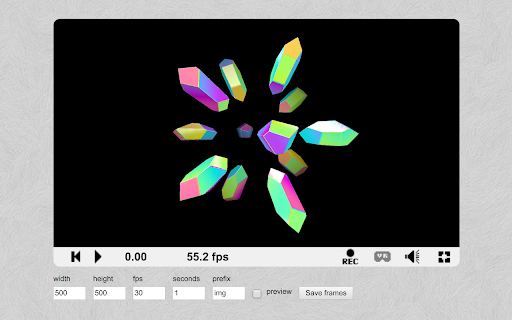
Download PNG frames from your Shadertoy animations. You can set the frame rate, duration, resolution, and file name.

DesModder for Desmos
Supercharge your Desmos graph creation and sharing experience with many convenient features Supercharge your Desmos graph creation and sharing experience with many convenient features: - Core - Adjust settings that can let you hide the keypad, lock the viewport, and more - Render implicit-filled expressions on the GPU - Export videos and GIFs of your graphs based on actions or sliders - View expressions in a text editor (Beta) - Autocomplete variable names, jump to definitions, and create/use your own documentation. - Utility - Paste ASCIIMath (such as the results of Wolfram Alpha queries) into Desmos - Pin expressions to the top - Find and replace expressions - Display graph performance metrics - Adds right-click (instead of long press) on expressions to style them - Duplicate any expression with hotkey Ctrl+Q - Quickly dump a folder's entire contents, and merge expressions into a folder - Tweak equation input settings to make typing equations easier. - Measure the size of expressions for Code Golfing purposes. - Visual - Change the primary color from blue to any color - Toggle display of expression IDs - Display list elements, colors, and undefined values in expression list - View tips including lesser-known features of Desmos - Hide and ignore unwanted slider suggestions - Make the UI more compact to see more on the screen at once. - Split expressions onto multiple lines. - Highlight brackets to make complicated expressions easier to read. - Integration - Integration with WakaTime - More to come! All graphs created using this extension are compatible with vanilla Desmos. This means your graphs are always safe to share with others, regardless of whether or not they have DesModder. - One small exception: expressions rendered using GLesmos may be much slower for people without the feature. Chrome will warn you asking for permission for the declarativeNetRequest API ("Block content on any page you visit"). In this case, the warning is inaccurate because the net request rules apply [only to Desmos](https://github.com/DesModder/DesModder/blob/main/public/chrome/net_request_rules.json) and simply modify response headers to provide permissions that enable in-browser video export. This extension follows Chrome's best practices and is open source (https://github.com/DesModder/DesModder), so you and others can contribute and see what goes on in the background. Keep in mind that many features of this extension rely on unofficial, undocumented, or unstable parts of Desmos. When something stops working, report it on http://github.com/DesModder/DesModder/issues with a description of the issue. Currently only works on the public-facing calculator at https://desmos.com/calculator. Not affiliated with Desmos.

WebGPU Inspector
DevTools debugger and profiler for WebGPU — inspect objects, capture frames, edit shaders live, and analyze GPU performance. WebGPU Inspector is the extension for debugging and profiling WebGPU applications — RenderDoc-style graphics debugging, right inside Chrome DevTools. 🔍 Inspect • Browse every live WebGPU object with full details and the stack trace showing exactly where it was created. • Plot frame times and GPU object counts over time to track performance. • Texture viewer, look at individual pixel values. • Edit shaders live on the page to test and fix changes without reloading. 🖼️ Capture • Capture one or more frames with all of their commands, buffers, textures, and render pass results. • Auto-inject render and compute pass timestamp queries to measure performance and identify bottlenecks. • Debug shaders (experimental, compute only for now). Step through shader execution, watching variable values. • Save and reload captures, open in multiple tabs or windows, useful for A | B analysis. 🔵 Record • Record the commands and data for a set of frames and export a standalone HTML or binary file that reproduces the render anywhere — perfect for bug reports and regression tests. • Play back the recorded frame, with the ability to step through the commands to render up to that point. • Edit and disable commands in the recording to help investigate rendering issues.

Conduit browser add-on
Adds conduit:// protocol links to Pouet and Demozoo This extension acts as the browser-side couple for Conduit, a demo-downloading tool meant to ease the watching of demos from the websites Pouët.net, Demozoo and CSDb. To make use of the extension, first install the native client from https://github.com/Gargaj/Conduit/releases - then, after installing the extension, you may use the conduit:// links that the extension injects on the two aforementioned websites to one-click-download-and-run demos at your own pleasure.

ShaderAmp
Unofficial ShaderToy Chrome Extension to visualize sound of any page. ShaderAmp Audio Visualizer works on any website. It works with Spotify, Soundcloud, YouTube and so on. Unofficial ShaderToy Chrome Extension to visualize sound of any page. ShaderAmp is a free Audio Visualizer with focus on running shaders from shadertoy.com. However, ShaderAmp is not related to shadertoy.com. Just big fan of the page and the creative content of the users. We have currently almost 200 different shaders/audio visualizers packed in. Try it out! Run the extension on your own risk! The full source code of ShaderAmp is available on github: https://github.com/ArthurTent/ShaderAmp This extension contains flashing effects.
