
bjnbopgcndikmhpekgdnmeipflliigdc
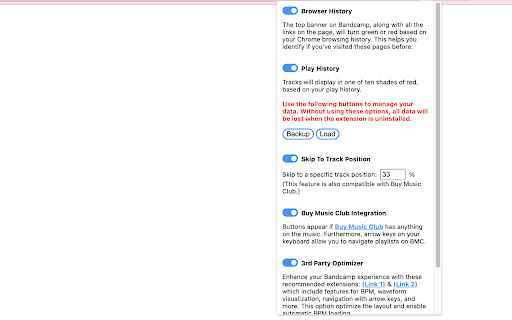


Follow @Ayra_Flashdrive on Instagram and listen to my work. Go hard on your Bandcamp exploration with POWERDIGGER. - Browser History Integration: Immediately see where you have been browsing before, so you can focus on discovering new things. - Play History: Track your Bandcamp plays in 10 different shades of red. - Tracks in Common: See how many tracks you have in common with other users, simply by hovering over their thumbnail. - Track Skipping: Leap into the middle of tracks as you click them, so you immediately catch the vibe. - Buy Music Club Integration: Further advance your music exploration with Buy Music Club integration, making it easier to discover new tunes that relate to the songs you enjoy. Hope it saves you as much time and energy as it does for me. Happy hunting!

BandCamp-Player
a player collection for bandcamp.com it is a music player allowing to read the pieces are interrupted from any collection.

Bandcamp Wishlist Tagger & Organizer
Tag your Bandcamp wishlist by genre, manage your genres, and view your full wishlist in a standalone organizer. Organize your Bandcamp wishlist. Organize your favorites by genre, filter easily, and rediscover your hidden gems — all locally, with full privacy. HOW TO USE: 1. Go to wishlist tab and REFRESH the page 2. Tag dropdowns and buttons will appear. TAG albums from your wishlist! 3. Click OPEN ORGANIZER 4. A new organizer tab will appear. In here, you can filter tagged albums, add new genres, and BACKUP your tagged data. 5. Happy Digging! ** All data is stored locally and does not sync between devices. *** Be sure to back up your data regularly — Chrome may clear local storage unexpectedly. You can import the exported json to restore your tagged data

Plume - Bandcamp Player Enhancer
Bandcamp extension: volume slider, hotkeys, loop modes, fullscreen mode, playback speed, waveform progress bar & beat visualizer. Plume is a free, lightweight browser extension that replaces the default Bandcamp audio player with a modern, feature-rich alternative. Plume makes listening to music on Bandcamp dramatically better. • Volume Slider — Finally, a visible volume control on Bandcamp. A mute button is also present. Your volume preference is saved automatically and restored on every page. • Click-to-Seek Progress Bar — Click or drag anywhere on the progress bar to jump to that point in the track. No more guessing. • Configurable Skip — Rewind or fast-forward by a custom duration (default 10 s). • Playback Speed — Choose from preset speeds (0.5×, 1×, 1.5×, 2×, 3×) or enter a custom value. A live badge shows the active multiplier at a glance. • Looping Modes — Enable smooth track/collection replay. • Tracklist Dropdown — Browse a collection's tracks from the header. A link button next to the title opens the current track's Bandcamp page. • Track Skip & Restart — Navigate between tracks on album pages. The previous track button restarts the current track within a configurable threshold. • Runtime Display — See the total album runtime at a glance. Toggle between elapsed time and remaining time. • Waveform Progress Bar — The progress bar renders the audio waveform for the track, making the song structure visible at a glance (toggleable). • Fullscreen Mode — Press F or click the fullscreen button to enjoy an immersive listening view with album art and track info. • Customizable Hotkeys — Space (play/pause), arrows (seek/volume), 0–9 (seek), L (loop), M (mute), F (fullscreen), PageUp/PageDown (previous/next track). Supports modifier keys (Ctrl, Alt, Shift). • Playback Settings — Fine-tune the seek hotkey step, volume hotkey step, and track restart threshold from the popup panel. • BPM Detection — Detects and displays the live tempo of each track, with per-track badges in the tracklist. • Beat Visualizer — A BPM-driven canvas animation plays in the fullscreen view in sync with the music's tempo (toggleable). • Multi-Language — Available in English, French, Spanish, Italian, Brazilian Portuguese, Romanian, and Russian. • Feature Flags — Toggle individual features on or off from the popup panel. • Accessible Player — Bandcamp is sadly not accessible to impaired users... Plume was designed to pair seamlessly with NVDA. Install Plume, then visit any Bandcamp album or track page. The extension automatically replaces the original player with the enhanced Plume player. Your preferences (volume, time display mode) are saved in your browser and persist across sessions. No more worries about scrolling down too, the player sticks to the top of the window. Works on Chrome, Firefox, Edge, and all Chromium- and Firefox-based browsers. Built with Manifest V3 for modern security and performance standards. Found a bug or have a feature idea? Open an issue on GitHub: https://github.com/QuentindiMeo/BC-Plume/issues Plume is open-source (MIT license) and has zero external dependencies.

Bandcamp Play
Enhanced playback for Bandcamp: autoplay, speed, pitch, hotkeys, history, batch download, and more. 🎵 Bandcamp Play — Enhanced Music Controls for Bandcamp & SoundCloud Power up Bandcamp and SoundCloud with autoplay, precise speed control, pitch preservation, and keyboard-first navigation. Lightweight, private, and open source. ✨ Key features ▪️ Batch Download: Select multiple items on Collection/Wishlist/Purchases and manage the queue ▪️ Highlight Visited: Visually marks albums/tracks you've already opened or listened to ▪️ Autoplay: Seamlessly play collections, wishlists, feeds, and albums ▪️ Speed control: Fine-grained tempo steps (3.03%) with pitch preservation ▪️ Smart hotkeys: Play/Pause, seek, speed, next/prev, open in new tab, wishlist ▪️ Keep Awake: Prevents system sleep during listening sessions ▪️ Feed Player: Clean, focused player UI on feed pages to ▪️ ␣ Space — Play/Pause ▪️ ⬅️ ➡️ Arrow Left/Right — Seek backward/forward ▪️ ⬆️ ⬇️ Arrow Up/Down — Speed up/down (3.03%) ▪️ ⇧ + ⬇️ — Reset speed ▪️ 🇳 / 🇧 — Next / Previous track ▪️ 0–9 — Jump to 0%, 10%, … 90% of track ▪️ 🇴 — Open current track in a new tab; ⇧ + 🇴 — Open and focus ▪️ 🇱 — Add/Remove from wishlist ▪️ 🔗 Full list: https://github.com/borbiuk/band-play/blob/master/README.md#-keyboard-shortcuts 🧾 Permissions (what and why) ▪️ Tabs — Create a new tab for the current track and query the active tab ▪️ Storage — Save your preferences and shortcut configuration locally ▪️ Power — Keep the display awake while listening (optional feature) ▪️ Downloads — Save Bandcamp files and manage batch download queue
