
bjdcoeofphofjcfhckcgfhnbfolmlpmm
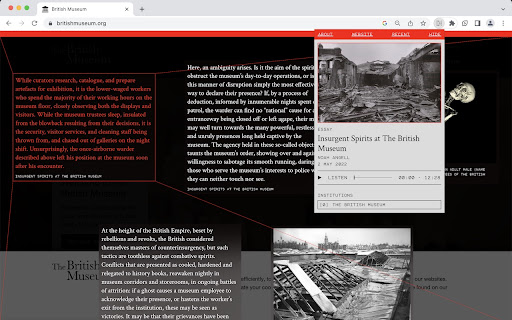


Decolonial Hacker Extension The Decolonial Hacker extension activates when a user logs onto targeted websites, freezing them with fragments of a text, artwork, or combination of the two, that analyses certain problematics of that place informed by decolonial politics at large. The extension overlays commissioned work onto a set of defined websites. It is otherwise inactive. The set of URLs that trigger the extension are updated approximately every 30 minutes in a background script. Decolonial Hacker can be disabled and reactivated by clicking the red banner at the top of the page or selecting “HIDE/REVEAL” on the extension’s pop-down menu.

Unwanted Opinions
Lets you block tweets using various options. Unwanted Opinion saves your eyes by blocking tweets using filters you specify. Still want to see the tweet? Press the Show button!

ScilympiadToLaTeX
An extension that converts a test on scilympiad to LaTeX code and downloads all images in seconds. From the event supervisor dashboard, click on "Create/Update Online Tests", then click on the key icon to access the key. On this page, click on the extension in the toolbar, and click generate, and the program will download a text file with the LaTeX code for the test and all images from the test. Important notes (read before using): - Currently does not support conversion of scilympiad math to LaTeX, but you can either format manually or copy the math from the scilympiad editor. - This extension isn’t perfect and will need modifications such as page breaks or image size adjustments to be added to the files it generates, so you probably need at least a little LaTeX knowledge to use this extension. - Keep all settings as the default unless you really know what you are doing because the defaults are both most tested and adequate for most use cases. Other settings are for edge cases that might appear or personal preference (in the case of the environment for question types) - This extension truncates point values (e.g. 1.5 points turns into 1 point) because the exam class does not support decimal point values like this. Therefore, if your test includes decimal point values, you will have to manually change them in some way. - Please credit me in some way if you use the extension (this request is as of 2025, so if you used it in the past, don't think that you missed this). This extension doesn't add any watermarks or similar, as I tried to make an extension that is as useful to others as possible, so I would appreciate some form of crediting, such as a small note on the test or site. Additionally, please send an email to me or leave a review with any feedback. I read everything I receive and try to fix anything within a few months.

Drift - Scroll While AI Thinks
Opens a scrollable feed while ChatGPT, Claude, and Gemini generate responses. Reclaim your AI wait time. Drift opens a side window while ChatGPT, Claude, or Gemini is generating a response — giving you something to scroll instead of staring at a blinking cursor. When the answer is ready, it snaps you back. No tab juggling. No "wait what was I doing again." You know the loop: you send a prompt, the AI starts thinking, and you open random tabs or fall into reels and forget why you opened the browser. Drift handles that dead time for you. While the AI is generating, it automatically offers you a side window to scroll, watch, or chill. The second the response is ready, it gets out of the way. You set it up once, tweak it to your taste, and forget it exists. It doesn't nag you. It doesn't gamify your attention. It just quietly eats the empty seconds that normally turn into 20 minutes of scrolling. How it works: — Send a message on ChatGPT, Claude, or Gemini — After a configurable delay, a floating button appears — Click it to open a customizable side window (Instagram Reels by default, or any URL) — When the AI finishes, the window minimizes and you're back Features: — Adjustable trigger delay (2–30 seconds) — Choose which AI sites activate Drift — Calibrate window size and position to your screen — Set any custom URL as your drift content — Soft focus or full focus mode — Auto-close timer — Keyboard shortcut (Alt+D) — Guided onboarding walkthrough — Export/import settings — Session stats Drift only runs on LLM sites you choose. Everything stays local. It doesn't read your prompts, your responses, or your browsing. No account, no tracking, no paywalls, no ads. It's not trying to keep you hooked — it's trying to give you your brain back. Built for people who live in AI tabs: students, developers, researchers, writers, and anyone who values flow and accepts reality. Waiting happens. Losing time doesn’t have to. If you like Drift, please help spread the word by giving me a 5 star rating, or share it with your friends! Feel free to contact me at fireheartjerry@gmail.com and I will make sure to help. More info: https://fireheartjerry.github.io/drift-extension/drift.html

Hackers Be Gone
A terrifying amount of online accounts get hacked every year. One of the main reasons is because of weak passwords; this is the reason why even Google suggests users to "Use 8 or more characters with a mix of letters, numbers & symbols" for their passwords! The problem with passwords like these is that they can get a bit hard to memorize. Would you really want to memorize a password like "H3ll0!%0rlD"? This password generator offers a different solution. It generates passwords according to the XKCD 936 comic (https://xkcd.com/936/), where you just use a string of common random words (e.g. "Battery Horse Staple") for your password! Passwords like these are just as secure, and are way more easy to memorize! With this extension, users can easily generate passwords just by using the popup when on pages to create accounts, and they don't have to worry about their passwords being stored!
