
bigjakhahgnccheaompmgebkncglllel

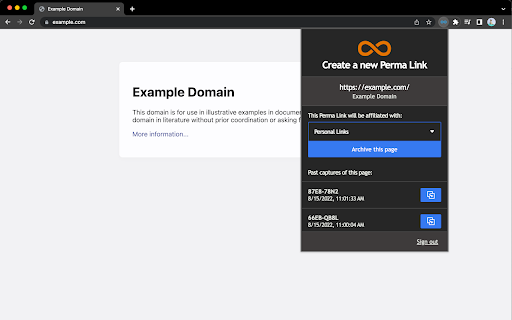
Create and manage Perma.cc links directly from your browser. Easily create a permanent record of the web for your citations. Perma.cc allows you to capture the contents of a public website and preserve it with the Harvard Law School Library. Connect your Perma.cc account to this extension and create Perma Links while browsing without leaving the page you’d like to preserve. This is the latest iteration of the Perma.cc browser extension.

RECAP
RECAP improves the experience of using PACER, the online public access system for the U.S. federal courts. - This extension was created in 2009 at Princeton and is now run by Free Law Project, a non-profit that's working to improve the American legal system. Please join us in our mission of making the legal system more equitable and competitive. - If you use PACER, this free extension will save you money. Every document you purchase will be uploaded to the "RECAP Archive" and every document others have purchased since 2009 will be available to you for free as you use PACER. - You can use this extension to create email alerts for federal dockets. - This extension has already added millions of federal filings to the Internet Archive and to a searchable archive at https://www.courtlistener.com/recap/. - The more people that use this extension, the more money we all save. Help your friends by uploading content and tell them to install RECAP for you too. RECAP has four main features. First, when you purchase an item on PACER, RECAP anonymously uploads that item to our archive hosted at https://www.courtlistener.com/recap/ where it can be searched or downloaded for free by others. Second, before you purchase an item that is in our collection, a link will be provided for you — right inside PACER — to get it for free. Any of the millions of items that have been uploaded so far are already available to you for free. Third, as you're looking at dockets on PACER, you'll see links to get alerts for those dockets via our website, CourtListener.com. Finally, allows you to search our archive from your browser URL bar by using the "recap" shortcut. All of the items that you purchase are also uploaded to the Internet Archive for historical preservation. We are not creating a walled garden. RECAP is compatible with ECF logins and will not upload documents from sealed cases.

Close Others
Add "Close Others" Button into toolbar. All tabs except the current tab will be closed.

Mink - Integrate Live & Archived Web +Memento
Integrating the Live and Archived Web Viewing Experience Using Memento Integrate the live web experience with automatic queries to the web archive to show how well a page has been archived. Utilizes the Memento framework to access the appropriate Memento aggregators, TimeGate, TimeMaps, and mementos. For more information and use cases, see https://github.com/machawk1/mink or watch the video demo (available in the Overview tab). Privacy Policy available at https://github.com/machawk1/Mink/blob/main/PrivacyPolicy.md . Version 3.0.1 Fixes an issue with the Mink DOM UI on select sites Version 3.0 Update Mink to manifest version 3 Version 2.5.5.3 Updates the UI further to use logical properties Version 2.5.5.2 Improves internationalization support. Version 2.5.5.1 Updates the bundled select2 library for security. Version 2.5.5 Fixes UI and accessibility issues as well as preferred aggregator stickiness. Version 2.5.4 Fixes an issue with toggle the UI. Version 2.5.3 Aligns the user's preferred aggregator with that which is queried. Version 2.5.2 Fixes submission to Internet Archive's Wayback Machine from the user interface Version 2.5.1.1 Fixes a syntactic issue inadvertently included in v2.5.1 Version 2.5.1 Fixes UI issues that clashed with existing web sites. Version 2.5 Removes unnecessary permissions and purges necessary dependencies. Version 2.4.1 Fixes an issue for using Mink on Memento-compliant MediaWiki instances. Version 2.4 Adds inter-memento navigation when viewing a memento. Version 2.3.4 Fixes some linguistic display issues and removes some more cruft. Version 2.3.3.4 Removes unused bootstrap cruft from codebase, which is now 50% smaller! Version 2.3.3.3 Updates the interface to use Shadow DOM v1 in anticipation of v0 deprecation. Version 2.3.3.2 Fixed a UI bug. Version 2.3.3.1 Aesthetic and iconography updates. Version 2.3.3 Changes queries to use HTTPS. Version 2.3.2.8 Fixes a literal issue on the options page. Version 2.3.2.7 Updates reference to Memento aggregator, now at a new port. Version 2.3.2.6 Fixes a UI issue that caused certain icons to shift while fetching a TimeMap. Version 2.3.2.5 Fixes an issue with pushing https sites to webcitation Version 2.3.2.4 Fixes UI issue with recent versions of Chrome that cause displaying the count for a large number of mementos causes a text overflow and ellipses. Version 2.3.2.3 Fixes WAIT badge from appearing on blacklisted sites when button is activated. Version 2.3.2.2 Fixes handling of file URIs. Version 2.3.2.1 Adds a Privacy Policy and fixes verbiage. Version 2.3.2 Improves the UI for the interface to submit a URI to each supported archive. Version 2.3.1 Standardize code, fix false positive memento id, add support for orphaned mementos. Version 2.3 Adds better handling of TimeMap indirection, UI tweaks, and caching smartness. Version 2.2.1 Fixes an issue with TimeMap caching for faster re-access. Version 2.2 Fixed processing for some sites that specify their own TimeMaps using HTTP 3XX codes. Version 2.1.1.1 Aesthetic adjustments Version 2.1.1 Fixes an issue with HTTP sites that specify their own Memento TimeMaps. Version 2.1 Added support for submission to WebCitation and a UI fix for sites with many mementos. Version 2.0.1 fixes an issue with sites that supply non-Memento-related HTTP Link headers. Version 2.0 received an interface overhaul among many other fixes.

Webrecorder ArchiveWeb.page
Create high-fidelity web archives directly in your browser When enabled, ArchiveWeb.page will record the network traffic on a given tab and stores the data in the browser for later viewing. Archives created with ArchiveWeb.page can be viewed from right within the app, or using Webrecorder's free ReplayWeb.page viewer. Files can be exported in standard WARC and WACZ formats.
