
bighlaeddmbcfgoiimcoebcncmjmgpil


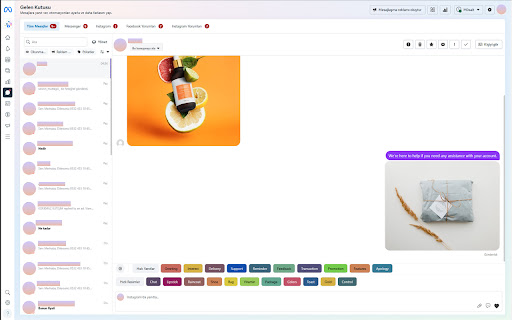

Quick Reply Extension for Social Media Platforms Streamline Your Communication Across WhatsApp, Instagram, and Facebook Business! This powerful extension now works seamlessly with WhatsApp Web, Instagram DM, and Facebook Business DM. Whether you're managing customer support, marketing campaigns, or personal conversations, this tool allows you to save and send frequently used messages and media across these platforms. 📌 Note: Messenger is not supported. However, your saved messages are synchronized across WhatsApp, Instagram DM, and Facebook Business DM for a unified experience. Key Features: 💬 Quick Message Recording: Save frequently sent messages, images, and names, and send them with a single click. Manage your communication more efficiently on all supported platforms. 🖼 Media Management: Store images and media files you frequently use. Send them instantly across WhatsApp, Instagram, and Facebook Business without re-uploading. 🔗 Multi-Platform Integration: Seamlessly switch between WhatsApp Web, Instagram DM, and Facebook Business DM while accessing the same saved messages. ⚡ Simple and Fast Usage: A user-friendly interface that makes it easy to find and send your saved messages or media files. Why Choose This Extension? ⏱ Efficiency: Quickly send frequently used messages or media across multiple platforms without repetition. ⏳ Time Savings: Eliminate the need to retype or search for content repeatedly by synchronizing your saved messages across platforms. 🔒 Privacy and Security: All messages and media work entirely within your browser. Nothing is stored externally, ensuring your data remains secure. Use Cases: 💁♂️ Customer Support: Handle inquiries across WhatsApp, Instagram DM, and Facebook Business DM with pre-saved answers. 📢 Marketing Campaigns: Send promotional messages effortlessly across supported platforms. 👨👩👧👦 Personal Use: Easily send your favorite messages and media to friends and family, no matter the platform. 📌 Streamline your communication and save time with this versatile extension!

Weka: Best WhatsApp CRM for work
Best productivity tool for Business Development and Sales Teams which use WhatsApp Web for work. Weka is a CRM to organize your WhatsApp web. Create labels to organize chats, quick replies, schedule messages, add chat notes and reminders, import contacts to labels, export contacts from labels, and start a chat without saving a number as a contact. Weka is available in 6 languages English, Português, Español, Bahasa, Arabic, and Chinese. Weka is easy to use, anyone can install and start using Weka in one minute. You don't need difficult CRMs and software anymore. Weka offers a top-notch product and great customer service, earning an impressive 4.8 out of 5 rating in the Google Chrome Store. FEATURES: 🌟 ─────────────────────────────────── - Default tabs: Unread, Needs reply, Groups - Inbox zero: Achieve Inbox Zero using Inbox and Closed tabs - Create Custom tabs to organize your chats - Add Chat notes to any chat to store your comments, summaries, or observations. - Quick Replies with attachments - Schedule Messages with attachments, and see the delivery status - Set Reminders for followups - Use in your native language (English, Portuguese, Spanish, Arabic, Bahasa Indonesia) - Start a chat with unsaved numbers - Broadcast to custom tabs, and see success/failure summary - Import contacts into your WhatsApp and add them to labels - Export contacts from your labels - Use in multiple devices and save money Best suited for teams that use WhatsApp Web for work. That includes but is not limited to: ─────────────────────────────────── -Sales -Consulting -Online Sellers -Retail Stores -D2C Brands -Real Estate -Insurance -Automotive -Restaurants -Pharmacies -Travel Agencies -Education Services -Financial Services -Delivery Businesses -Marketing Agencies -Design Agencies -Career Guidance -Jewellery Designers -And many others YOUR PRIVACY, OUR PROMISE 🤝🔒 ─────────────────────────────────── At Weka, we are deeply committed to protecting your privacy. Your chat data remains strictly confined to your computer. WE DO NOT COLLECT ANY CHAT DATA. You can trust that your data is secure and will never be shared or sold to third parties. We value your privacy as much as you do and will only contact you if you grant us explicit permission. With our 100% privacy-safe extension, you can enjoy peace of mind, knowing your information is in good hands. 🛡️ The permission requested on Google Chrome during the installation of Weka is misleading, and far from the needs of the extension. Explanation: Read your browsing history: Required to detect whether an active WhatsApp session exists among the tabs you are browsing for one click to open chat in the reminder window. This is the "tab" permission from the Chrome Developer Guide, which DOES NOT allow the extension to read your browsing history. It only allows the extension to know what tabs are open right now. LEGAL ──────────────────────────────────── WhatsApp is a trademark of WhatsApp Inc., registered in the U.S. and other countries. Weka is an independent product and has no relationship to WhatsApp, WhatsApp Inc, or Facebook Inc. It is not an official WhatsApp or Facebook product. 🚀 GET IN TOUCH! ──────────────────────────────────── Got questions, suggestions, or feedback? Don't hesitate to reach out to us at wekaofficial@weka.app or WhatsApp at +91 9686288857. You can also WhatsApp us via the feedback button within the app. Our fantastic team is eager to assist and ensure your experience is nothing short of spectacular! 💫

Quick Reply Meet
The Quick Reply Meet extension allows you to send pre-made messages in Google Meet™ chat with just one click, keyboard shortcuts or automatic replies, saving time during meetings, classes, and online sessions. 🖱️ One-Click Messages Create and save ready-to-send messages that appear as buttons directly in the Google Meet™ chat interface. Perfect for common responses like "Yes", "No", "Thank you", "Can you repeat?", and any custom message you need. ⌨️ Keyboard Shortcuts Assign keyboard shortcuts to your saved messages. Send long (or short) messages without taking your hands off the keyboard. 🤖 Auto-Reply Set up automatic triggers using REGEX patterns to respond to specific messages in the chat. Enables bot-like behavior, which is great for FAQs, common questions, or automated responses during presentations. == CUSTOMIZATION AND CONTROL == - Manage all your messages through the popup, which has a clean and modern interface based on Google's Material Design 3 Expressive; - Choose whether messages are sent immediately or fill the text field first; - Customize button position (above or below the message field); - Adjust button roundness to match your personal taste; - Import and export your messages for backup or sharing. - Quick Reply Meet respects your privacy. All messages are stored locally in your browser; - Quick Reply Meet is and will always be free. Please consider leaving a review or making a donation to support continued development; - Do not use the extension for flooding or spam, the developer holds no responsibility for misuse and its consequences; - Found a bug or have a suggestion? Open an issue in the extension's GitHub repository. Quick Reply Meet is not affiliated with, endorsed by, or sponsored by Google Inc. Google Meet™ is a trademark of Google Inc. Use of this trademark is subject to Google Permissions.

Quickie Reply
Quickie Reply – AI-Powered Smart Replies for WhatsApp Web Take your WhatsApp conversations to the next level with Quickie Reply —… Quickie Reply – AI-Powered Smart Replies for WhatsApp Web Take your WhatsApp conversations to the next level with Quickie Reply — a powerful Chrome extension designed to help you respond smarter, faster, and better. Whether you're unsure how to reply or simply want to craft a more thoughtful response, Quickie Reply is here to assist. With just one click on the AI button, you'll receive an instant, context-aware reply tailored to your selected response style and message history depth. One-click AI-generated replies directly in WhatsApp Web Customizable response tone and message history depth Save time, reduce stress, and keep conversations flowing Ideal for both personal and professional messaging Complete privacy protection — your messages are never stored or recorded Your conversations remain completely private. Quickie Reply only analyzes your messages in real-time to generate responses, without storing any data. Once your AI-generated reply is created, no traces remain in the software. Your privacy is our priority. Simply review the AI-suggested message and hit send — it's that easy. No more message anxiety, no more overthinking. This extension supports both dark and light mode. Users can manually switch between themes.

QuickReply
Simplify your copy/paste experience • Annoyed by copying and pasting the same text from time to time? • Tired of storing notes in files and sticky notes? • Want to personalize your messages quickly? ✔️ Let us help you to solve these issues once and for all.
