
bifmfjgpgndemajpeeoiopbeilbaifdo
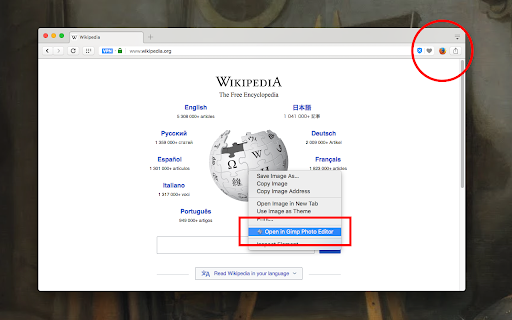
Run any external application with custom arguments from the browser toolbar or context menu to send links, text and more The "External Application Launcher" extension enables you to define a toolbar button or several context menu items to execute external executables right from your browser. It extracts arguments from the current web page and passes them as command-line arguments of your choice to the external application. Use Cases: - You can send the current page to another browser - You can send selected text to a text editor - You can open your external email client and send selected text to it - You send download links to an external download manager! - You can directly send image URLs to a photo editor of your choice - You can browse links with specified patterns with an external application Notes: 1. A minimal native client is required for this extension to execute native commands. The native client uses the official NodeJS executable. 2. The native client is only available for Windows, Mac, and Linux operating systems. Installtion Video tutorial: Windows: https://www.youtube.com/watch?v=18jAqTXBiZA Linux and Mac: https://www.youtube.com/watch?v=bB4Bj_APg4g

Awesome Button Bar
Button bar, combining downloads, bookmarks, extensions, history, view source, print, and more from a single button. Awesome! Extensions, history, downloads, bookmarks, view source, options, new window, and print are all here. Recently added buttons are duplicate tab, second home, and refresh all tabs. Showing each button on the bar is optional so you don’t have to have them all if you don’t want them all. Also, each button can be configured to open either in the current window or in a new window. Note: print to a new window now works too!

Awesome Window & Tab Manager
Displays a list of all windows and tabs open in Google Chrome. Allows filtering, sorting, refreshing, bookmarking, and saving. Awesome Window & Tab Manager does the following: (1) - Tells you how many Chrome windows and tabs are open. (2) - Displays all the windows and tabs. (3) - Allows text filtering (searching) on the windows and tabs. (4) - Allows alphabetic sorting of tabs. (5) - Categorizes tabs by window, domain, or category. (6) - Categories are determined by your own bookmark structure. (7) - Window, domain, or category groups can be refreshed or closed. (8) - All windows and tabs can be saved and restored later. (9) - Window, domain, or category groups can be saved and restored later. (10) - Unbookmarked tabs can be bookmarked. Note: Google Chrome version 16 or higher is required for tab refreshing functionality.

MyMenu
Your personal menu ! Former name: Customize Menu. A collection of chrome pages with additional functions v1.3.0 customize font size fix edit item and delete item button v1.1.1 new feature: Cloud sync It is disabled for old user. (Because you may have different setting in different computer) To enable it, just go to Backup tab and check "Synchronous Setting". new feature: a lot of panels related functions Unless you use dev or canary channels, you should go to "chrome://flags/#enable-panels" and Enable Panels to make them work. v1.0.0 Chrome Style option page Remove Task Manager Remove script and custom item support(because of new chrome extension rule)

Right Click Tab Navigation
Adds these useful tab navigation options to the right click context menu:
