
biailfjhlmalakjackgpekkbmljelldc
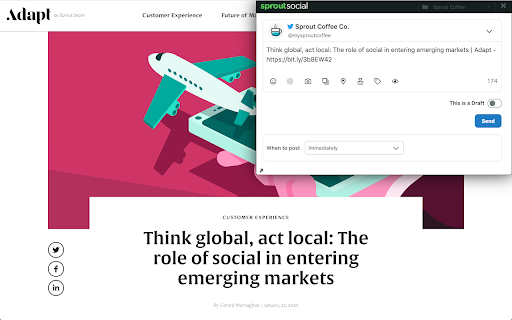
Sprout Social powers social communication with world-class engagement, publishing, analytics and team collaboration tools. Easily share content you find while browsing the web. Create and schedule social posts directly from Chrome with Sprout’s browser extension. Sprout Social offers deep social media listening and analytics, social management, customer care, commerce, and advocacy solutions for brands and agencies worldwide. The Chrome extension requires a Sprout Social account and is included with all plans. Learn more at sproutsocial.com.

CoSchedule
CoSchedule helps you to create, publish, and share awesome content to social media. Share and curate content from the web, sync and manage your social messages within your CoSchedule Calendar, and get full visibility of all your marketing projects. CoSchedule helps more than 30,000 customers organize all their marketing in one place. As recognized with accolades from Inc. 5000, Gartner’s Magic Quadrant, and G2Crowd, CoSchedule is one of the fastest-growing solutions for mid-market and enterprise companies seeking a unified marketing platform. Marketing Calendar A forever-free marketing calendar that helps you see, schedule, & share all your marketing in one place. Click here to get started with your free Marketing Calendar. https://coschedule.com/marketing-calendar Marketing Suite A family of agile marketing products that helps you coordinate your process, projects, and teams. Calendar Organizer Cross-functional calendar that brings global visibility to all of your projects. Create a unified workflow for every project inside the calendar for content, social, email, events, and more. Content Organizer Ideate, plan, create, and publish all your content in one place. Generate quality headlines that draw in more traffic, every time. Organize your entire editorial calendar while integrating with your blog, email, and social platforms. Work Organizer Speed up project timelines, help your team reach their full potential by consistently meeting deadlines, and confidently plan production schedules. Asset Organizer Store, index, and share your files with digital asset management software for marketing teams. Customer Testimonial “Before CoSchedule, everything was scattered between emails & spreadsheets. With Marketing Calendar, I can easily organize all of my marketing and keep everyone on the same page.” - Beverly Cook, Director of Communications at NYC Leadership Center

Sendible
Schedule, share, and manage social media posts without switching tabs with Sendible Chrome extension. Sendible Chrome extension makes social media management easier, helping you stay on top of your content strategy. Share links to articles and ideas directly from your browser while you explore the web. Why You’ll Love It: ✅ Post to multiple platforms – Share links effortlessly to Instagram, Facebook, X (Twitter), LinkedIn, TikTok, YouTube, and Google Business. Threads and Bluesky coming soon! ✅ Instant sharing – Quickly post the page you’re on without switching tabs. ✅ Save for later – Curate and store content in your Content Library for future campaigns. ✅ Seamless integration – Works with your Sendible account to keep everything organised in one place. Designed for social media managers, agencies, and teams, this extension helps you stay productive and maintain a consistent social presence. Simply log in to your Sendible account after installation and start scheduling posts with ease. Click the extension icon while browsing to post links instantly. Take control of your social media strategy — download the Sendible Chrome extension today!

Semrush Social Poster
Share content on social media with just one click while you browse the web Found something share-worthy while surfing the web? Schedule a post to Facebook, Twitter or LinkedIn from anywhere on the internet in just one click using the Social Media Poster extension, and the tool will make it live the moment you need it. Social Media Poster is an automation tool designed to help you easily reach your audience and manage your content in all major social networks from one tab; it lets you plan, schedule and publish posts, and analyze your social media performance. + Post across multiple social channels with just one click via Semrush Social Media Poster + Retweet any post in Twitter or schedule it for later by clicking on the extension’s icon below a tweet + Schedule and publish posts to LinkedIn, Facebook personal and business pages and Twitter + Schedule posts to Instagram and use smart reminders to publish them at a given time + Share an image by hovering over and clicking it + Use hotkey ‘Alt+S’ to share any webpage To use the extension, you need to be registered with Semrush and have at least one active project for which you’ve set up Social Media Poster. Can I use it for free? Yes, you can. You can schedule 10 posts for one social profile with the free Semrush account, and 1000 posts in all paid plans. Semrush is a leading digital marketing toolkit for SEO, PPC, SMM and content marketing professionals worldwide. With over 25 tools within the software, search data for 140 countries and seamless integration with Google services, Semrush provides solutions for in-house marketing teams and agencies working with clients in any industry.

SocialPilot
Expand the reach of quality content—whether your own or from others—by sharing it on social media in just a few clicks! With SocialPilot’s browser extension, you can share any content from a webpage, including blogs, product listings, videos, and more, across multiple social media platforms effortlessly. You can create custom posts, use Craft with AI to generate publish-ready content, or share an image post in one click. Save posts, publish instantly, or schedule them for the best engagement. All you need is a SocialPilot account to use the browser extension seamlessly! 2) Craft with AI: Get ready-made posts with captions and visuals perfectly aligned with the content in one click. 3) Generate AI-powered captions: Manually add captions to your posts or let SocialPilot’s AI do the work. 4) Customize posts for maximum impact: Add hashtags, mentions, geotags, emojis, and image tags to get maximum reach on your posts. 5) Upload, edit, and perfect your visuals: Upload images or videos from your own repository or use media fetched along with the content, editing as you go. 6) Keep all brands organized in one place: Schedule or share the post to all the accounts under one group or belonging to a client. 7) Reshare with automation: For evergreen content, set up schedules for it to be repeatedly posted, drawing eyes and engagement to your profile. 8) Stay consistent with scheduling: Simply select the best date and time for maximum engagement while scheduling. Your content will be published automatically—no extra steps required.
