
bhiggokekdkoccfgojnbponjehipbmng

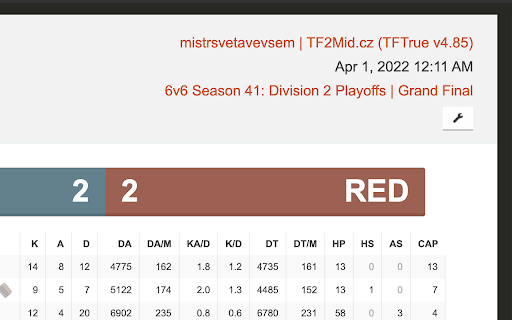
tf2 competitive QoL extension Extension for missing features on etf2l.org and logs.tf website. Features: - Links to logs and demos on match pages - Links to ETF2L match pages and demos at logs.tf - Replaces names in logs to ETF2L names - Adds recruitment status on player and team profiles on ETF2L - Adds bans on ETF2L player profiles - Adds links to logs.tf and ETF2L profiles on steam profile pages

Cloudmark - Collaborative Bookmark Manager
Cloudmark is a collaborative bookmark manager that allows you to save and organize your bookmarks in the cloud. Introducing Cloudmark Chrome Extension: Your Collaborative Bookmark Manager in the Cloud Cloudmark is the ultimate collaborative bookmark manager designed to revolutionize the way you save, organize, and access your favorite online resources. With the Cloudmark Chrome Extension, keeping track of your bookmarks has never been more effortless and efficient. Gone are the days of worrying about losing your bookmarks due to browser crashes or device changes. Cloudmark empowers you to store your bookmarks securely in the cloud, ensuring that they are accessible from any device with an internet connection. Also, it allow you to create folder to share links with your team. 1. Cloud-Based Bookmark Storage: Cloudmark takes your bookmark management to the next level by providing a secure cloud-based storage solution. Say goodbye to the limitations of local bookmark folders, as now all your bookmarks are backed up and readily available whenever you need them. 2. Collaborate and Share: Sharing bookmarks / links with friends, family, or colleagues has never been easier. With Cloudmark's collaborative features, you can effortlessly share collections of bookmarks, fostering seamless collaboration and knowledge-sharing. 3. Intuitive Organization: Cloudmark lets you create custom folders enabling you to efficiently organize your bookmarks. 4. Sync Across Devices: Seamlessly sync your bookmarks across multiple devices, ensuring you have access to your favorite webpages, articles, and resources, no matter where you are. 5. User-Friendly Interface: Cloudmark's intuitive interface makes bookmark management a joy. Our user-centric design ensures that both beginners and seasoned users can maximize the full potential of the extension effortlessly. Get started with Cloudmark Chrome Extension today and embrace a smarter, more collaborative approach to bookmark management. Streamline your web browsing experience and never lose another valuable resource again. Discover the freedom of cloud-based bookmarking, and stay connected to your favorite links, wherever you go.

PasteSecure: Redact Sensitive Data for ChatGPT, Gemini, Claude, Email & etc
Auto-detect and redact sensitive info when pasting into ChatGPT, Claude, Gemini, Email, Crypto and other AI tools. PasteSecure is the ultimate privacy tool that automatically detects and redacts sensitive data (PII, API Keys, Passwords) before you paste into ChatGPT, Gemini, Claude, email and etc. PasteSecure helps safeguards your sensitive data by detecting, alerting, and redacting content in real time. Why You Need PasteSecure: Whether you're a developer sharing code, handling client data, utilizing AI like ChatGPT, Gemini, or Claude, PasteSecure is your first line of defense. Prevent costly mistakes, protect your identity, and maintain compliance by ensuring sensitive content never leaves your clipboard. • Real-Time Monitoring & Redaction: PasteSecure automatically scans text from your clipboard during paste events and even as you type, instantly redacting any recognized sensitive data. • Private File Scanning: Securely scan local files (.docx, .xlsx, .csv, .txt, etc.) for sensitive information directly in your browser. Your files are never uploaded, guaranteeing complete privacy and security. • Credentials: Username & Password combinations. • Personal Identifiable Information (PII): SSNs, Driver's Licenses, Passports, Phone Numbers, • • Physical Addresses, and International IDs. • API Keys & Secrets: An extensive library covering keys for AWS, GitHub, & and etc. • Financial Data: Credit Card Numbers, Bank Accounts, and Routing Numbers. • Crypto Assets: Wallet Addresses, Private Keys, and 12/18/24-word Seed Phrases. • And more, including Medical (PHI), Network, and System-level data. • Site-Specific Policies: Define custom rules for trusted domains. Effortlessly disable redaction on your internal company portal while keeping it active everywhere else. • Granular Category Toggles: Easily enable or disable specific categories of data detection to fit your workflow. • Global Allowlist: Prevent specific strings, like your work ID or phone number, from ever being redacted. • Mute Function: Temporarily pause all monitoring for 3 minutes with a single click. • Activity Log: Review a complete history of all redaction events, including what was found and on which site or file. • Exportable Reports: Download your activity log as a CSV file for compliance or auditing purposes. • Undo Function: Instantly copy the last piece of original, un-redacted text to your clipboard if you need to reverse an action. Take control of your data privacy today. Install PasteSecure and browse with the confidence that your sensitive information is always protected. User Responsibility: PasteSecure is a powerful tool to help you prevent accidental data exposure, but it is not a substitute for your own diligence. The ultimate responsibility for the information you share online always remains with you. ***Policies Tab: Create site-specific rules to enable or disable monitoring and redaction, or fine-tune protection categories for individual domains. Manage multiple site policies with simple edit and delete options. ***Allowlist Tab: Add trusted items like phone numbers, IDs, or custom text you never want redacted — ensuring flexibility without compromising safety. ***Activity Log: Review a clear history of redactions, with options to undo the last action, export reports (CSV), or clear the log entirely. ***Right-Click Redact & Mute: Instantly copy and redact text using the browser’s context menu — perfect for secure sharing without exposing sensitive details. ***File Scanning: Securely check spreadsheets, and text files for sensitive data before you share.

Fast Track for Jira
Quick search and access to your Jira tickets with enhanced board experience Accelerated Jira workflow. Search, open, and modify tickets at the speed of your mind. Connect with OAuth or an API Key — whatever your team prefers. Fast Track works seamlessly with your existing Jira setup. See your most recently viewed tickets at a glance, ready to open or act on immediately. Search across your Jira workspace from anywhere — type a few letters and get exactly what you need. Quickly copy issue links, titles, or auto-formatted branch names for your development workflow. Make common Jira updates directly from the extension — no need to open new tabs. Keep things minimal. Configure only what you need without overwhelming menus. ⌨️ Built for Keyboard Efficiency Navigate, search, and take action without lifting your hands off the keyboard. Smart local caching keeps searches and recent issues feeling instant. 🙏 If you found this extension useful, then please support it by rating ★★★★★.

Steam ID Finder
Features: 1. Visit a Steam profile to see & copy the user's IDs 2. Right-click a profile URL to copy an associated ID 3. Visit the Friends Manager to copy multiple user IDs at once 4. Generate a line for SourceMod admin configuration when copying an ID
