
bhcafamaagaonkhnbnnjjfekddfllpgc

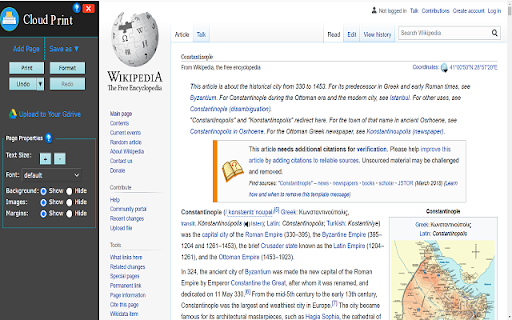
Cloud Print lets you print the good parts of any web page while skipping ads and other junk.! Our FREE Cloud Print will enable you to modify any web page to make it print exactly the way you want. ★ Modify Before Printing Click to delete any content before printing. Remove all images or individual images to save on printer ink. Change the text size from larger to smaller. ★ Print or Save as PDF or HTML Generate PDFs or HTMLs for archiving, sharing, or saving. PDFs and HTMLs will include clickable links, and source URL so you can continue to interact. ★★★ Main Features ★★★ ★ Save Paper and Ink When You Print ★ Remove, Isolate, or resize any part of a web page ★ Change font size and type ★ Remove margins, images, and backgrounds ★ Save as PDF or HTML Modify the web page exactly the way you wish/want before you print it out/save as a PDF file.

HP Secure Print For Chrome
Chrome Extension for HP Secure Print This extension provides users with the ability to print from a Chromebook and/or Chrome browser with the HP Secure Print solution.

OpenText iPrint
Provides secure enterprise print services for Chrome users. What’s New: - Branding changes to OpenText - Chrome Extension Manifest V3 - Bug Fixes

Pharos Chrome Print
Chrome Extension for Pharos Print Management Systems The Pharos Chrome Print extension makes it easy to print from your Chromebook into any Pharos print management system. This is especially useful for K-12 schools, colleges, and companies who manage their Chromebooks. Site administrators can distribute the extension pre-configured via their Google Administration console.

Printix
Print from Chromebook by using your Printix account. Printing from Chrome and Chromebook is made easy to any network printer managed by Printix. If you are at an organization that already has Printix installed just add the extension and deploy to start printing. FEATURES: • Gives users Single Sign-On (SSO) to Printix with their Google Workspace account. • Use Google groups to deploy and control access to printers based on users' group membership. REQUIREMENTS: The Printix extension requires Tungsten Printix Cloud Print Management which enables an IT admin to easily deploy and manage printing with Printix. See the Printix website for details.
