
bhaaofjcbafngjjneehlganleamobkke

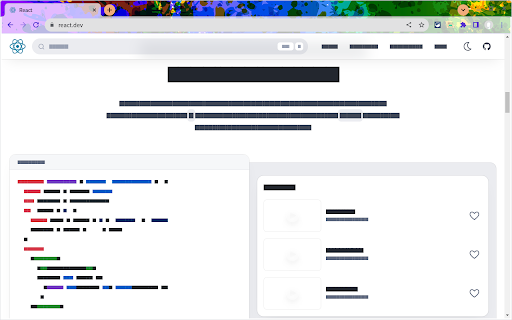
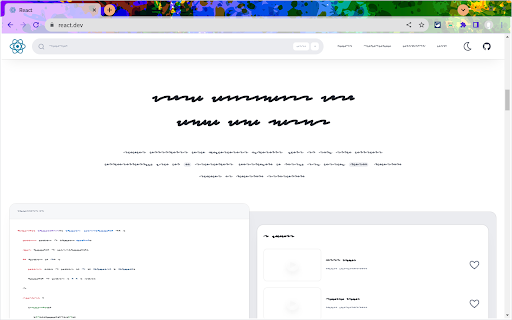
Click extension icon and turn the page you're on into a wireframe. Support two mode, wave wireframe and block wireframe. Useful for demos, streaming, hide personal information, visual regression, and more.

HTML to Figma: Convert Websites into Designs & Wireframes by Wireframeit
Transform live websites and HTML into fully editable designs or low-fidelity wireframes. Wireframeit accurately captures the layout, typography, and structure of any site and converts it into editable design files ready to export directly to Figma or download as SVG, PNG, or JPG. ⚙️ Choose Your Output • Full Design Retain the exact look and feel of the original webpage, including fonts, styles, and layout. Images are replaced with placeholders to streamline editing and design handoff. • Wireframe Reduce complexity by stripping colors, images, and detailed styles to create clean, low-fidelity wireframes, perfect for rapid prototyping and layout planning. 🛠️ Features • One-Click Webpage Conversion Instantly convert any live webpage into an editable design, with customization options to control fidelity and detail. • Figma Export Send designs directly to Figma, eliminating manual imports. • Responsive Preview & Export View and export designs optimized for desktop, tablet, or mobile screens. • Media Inspector Download all images and media assets embedded on a webpage. • Color Inspector Extract and export every color used on the page. • Multiple Export Formats Export your designs as editable SVG files or high-quality PNG and JPG images. 🚀 Quick Start • Add Wireframeit to your browser. • Open the webpage you want to convert. • Click the Wireframeit icon to open the editor and customize your design. • Export your design as a Figma file, SVG, PNG, or JPG. 🔗 Support For assistance please visit our official website or contact support@wireframeit.com.

Refore HTML to Figma (Pixel-Perfect Web to Figma Design)
Transform any web into Figma with Pixel-Perfect. AI-Generated Pages Also Supported ✨ AI-Generated Pages Also Supported (e.g., from Cursor, Cline, Claude, v0, and so on) ✅ The Unique Highlights of Refore HTML to Figma 1. Pixel-Perfect: What you see on the webpage is what you get in Figma 2. 100% original high-definition image: from the source site. No more blurry images on your retina screen. 3.✨ Bulk import multiple consecutive pages and interactions: Great for making quick adjustments to existing product processes, especially suitable for dashboard-type products. 4.✨ Supports: Rename Layer With AI After Import 5.✨ Supports: Use Specified Font for All Imported Text 6.✨ Supports: Updating the fonts used after import. 7. A large number of creators like you are using this plugin worldwide right now. View real-time user distribution statistics map here: https://refore.ai/html-to-figma#user-map 1. Inspiration from Excellence : Seamlessly integrate great designs into your product to draw inspiration and elevate your design capabilities. 2. Enhance Your Design Iteration: Easily import your existing web products into Figma to refine and redesign your products. This enhances efficiency, allowing you to focus on creativity and optimization without starting from scratch. 💬 Support Try in Figma: https://s.tofigma.com/figma-chrome-store Chat to us on discord: https://s.tofigma.com/discord-chrome-store Suggestion & Feedback: https://s.tofigma.com/feedback-chrome-store Also, Feel free to leave a comment below on this page

Kaptr.me - Web Dashboards with Live Snapshots
Kaptr.me - #1 Chrome Extension for Live Screenshot Dashboards 2025 Eliminate tab chaos: Kaptr.me consolidates all your data into intelligent dashboards with auto-refreshing snapshots. Instant access to key info, no dispersion. Outperform FireShot, GoFullPage, Awesome Screenshot with personalized dynamic dashboards. 1. Visit any app/site 2. Activate Kaptr.me 3. Capture snapshots of sites/apps/dashboards to track 4. Select your target dashboard 5. Refresh everything via "Refresh All" or auto-refresh 6. Share with team/clients or keep private. Dashboards dynamically customized: Freely place snapshots for a command center reflecting your priorities. Always fresh info: Live auto-refreshed captures for immediate data-driven decisions. Secure collaborative sharing: Dashboards shared without sensitive logins; real-time view for all. No-code centralization: Drag & drop varied sources into responsive layouts, no tech skills needed. - Create snapshot - Auto-refresh & manual refresh data - Snapshot duplication + moving - Snapshot history - Edit snapshot - Draw & annotate directly on snapshots - Quick annotation and editing tools - Multiple dashboard - Fully responsive dashboards - Customizable themes + custom folder icons - Custom URL slugs - Public or private dashboard sharing - Embed snapshots & dashboards anywhere - PDF export (captures + dashboards) Personal Dashboard: Google Calendar, Stripe payments, analytics, HubSpot marketing, Gmail, weather/news in auto-update. Weekly Meeting Dashboard: Microsoft Teams/Slack agendas/notes + Asana/Trello live, no login sharing. Team Data Library: Auto snapshots of Salesforce forecasts, marketing analytics for total transparency. Client Reports: Google Analytics/social/finance/project metrics in secure environment. Kaptr.me stores ZERO logins/sensitive credentials; reopens URLs via existing browser session for seamless access. Data confidential, authorized views only. Responsive support team for quick assistance.

HTML to Figma — Import Webpages to Figma
Convert any Webpage into fully editable figma design. Requires the figma plugin with the same name. Import websites into Figma to iterate, redesign, benchmark and more, without building each element from scratch. 2000+ components Pixel-perfect capture Light and Dark themes multiple viewport sizes This Chrome extension is a companion to the figma plugin with the same name, and you’ll need to install the Figma plugin first. Install the Webpages to Figma Chrome Extension from Chrome Web Store Go to any website in your Chrome Browser Invoke the extension, and then choose if you want to capture the entire page or a single component Once the extension captures the page, save and download the page/component data Go to Figma and run the plugin Upload the data you just downloaded The plugin automatically converts the data into a figma design.
