
bgodafddolmpklnlhcialnpoapmloohd

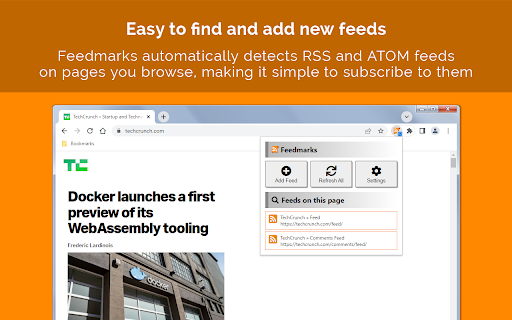

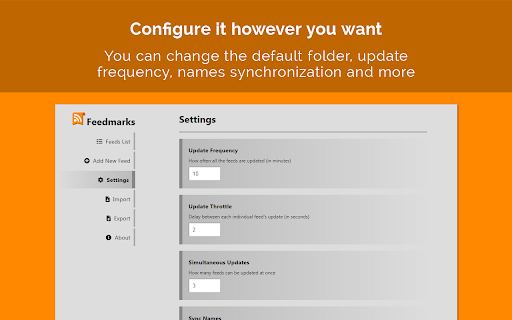
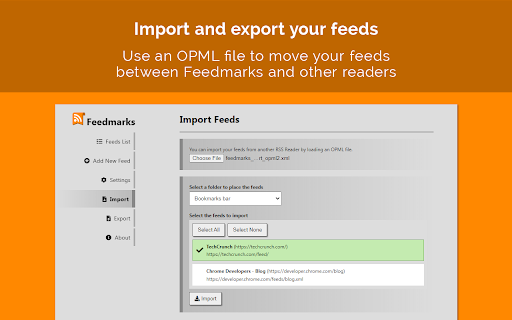
Follow RSS/ATOM feeds directly from your bookmarks. With this extension, you can subscribe to news feeds and have their headlines delivered to you as bookmark folders that are regularly updated. Start by navigating to a page that contains an RSS or ATOM feed, then click the extension icon to add the feed to your follow list. The extension will then create a bookmarks folder that will be constantly updated with links to the latest news from the tracked feed. Features: - Track feeds and keep them updated within your bookmark folders - Automatically detect pages with RSS or ATOM feeds as you browse them - Customize the source URL, entries order and limit and more for each feed - Import and Export feeds to and from other readers by using an OPML file - Configure how often you want the feeds to be updated, the default folder for new feeds and more Changelog: v1.2.0: - Added option to change the badge color - Added a field with the last time the feeds have been refreshed v1.1.0: - Set Update Frequency to 0 to disable automatic feed updates (feeds can still be manually updated through the extension button)

Feed Fabrik RSS Feed Reader
Discover, collect, and read RSS feeds directly in your browser Transform your browser into a powerful RSS feed reader with Feed Fabrik, the sleek and privacy-focused RSS reader that puts you back in control of your content consumption. Feed Fabrik automatically discovers RSS feeds on any website you visit. The number of discovered feeds is displayed on the extension icon which allows instant subscription. You can also manually add feeds by pasting their URLs, or import multiple feeds at once using OPML or text files. Once subscribed, all your feeds appear in a beautiful dashboard where you can read everything in one organized interface. Feed Fabrik has a dual-axis theme system, allowing you to choose both your preferred mode (light, dark, or system) and color palette from four stunning options: Default Blue, Ocean Teal, Forest Green, and Sunset Orange. This creates twelve unique combinations to personalize your reading experience perfectly. Feed Fabrik stores unlimited feeds locally on your device, limited only by your available storage space. The extension processes everything locally in your browser, ensuring your feed subscriptions and reading habits stay private. Your settings and reading states sync across your Chrome browsers when you're signed in. We collect only anonymous usage statistics to improve the extension, and you can disable this entirely in settings if you prefer. ✅ Automatic RSS/Atom feed discovery on websites ✅ Manual feed addition with URL validation ✅ Beautiful dashboard for reading all your feeds ✅ Collections to organize feeds into groups ✅ OPML import/export for feed subscriptions ✅ Mark items as read/unread, star favorites, archive items ✅ Filter feeds by all/unread/read/archived ✅ Dual-axis theme system (mode + color palette) ✅ Settings sync across Chrome browsers (via Chrome Sync) ✅ Responsive design for all screen sizes ✅ Local storage with unlimited feed capacity ✅ Privacy-focused: no accounts, no tracking without consent ✅ Manifest V3 compliance for security Enhanced Bookmark Experience: • Bookmark counts now update instantly when you star or unstar items • Fixed bookmark counter accuracy - always shows the correct total and unread counts • Improved reliability when marking multiple items as read/unread - Take control of your information diet with Feed Fabrik -

PageTrail
This Extension tracks your daily surfing activity PageTrails is designed to enhance productivity by tracking time spent on various websites. It records active browsing time, aggregates it at the domain level, and provides a concise summary of web activity. This extension is ideal for users seeking to monitor their web usage patterns and optimize their online time.

RSS Reader - Swipe my feed now
Discover the RSS feeds available on the current page with just a click on the toolbar and read live articles as swipe and flip cards. How it works? Swipe my feed NOW © will check if the current page itself is an RSS feed and open the swipe reader in that case, otherwise it will start a bot to lookup for RSS on the current website and bring a list. Once the list of RSS feed links is returned, you can open the swipe reader of the feed of your choice. Why is Swipe my feed NOW © different from other RSS feed readers? -SWING WITH SWIPE AND FLIP Forget old interfaces and swipe items into cards with your finger or you mouse. Instantly throw away what you don't like. Tap or click the card to flip it over and read the details and then access the author's website only if you like it. -REAL TIME READING Don’t let other decide what’s good to read for you. While traditional RSS readers notify upon arrival of a new item, Swipe my feed NOW © rely on "agility". The reader get you read faster thanks to the swipe so you can read more frequently. It's You who make the news! -A REAL "FREE" There are a plethora of RSS readers that pretend to be "Free". But you often register or install an extension to discover that interesting features are actually paid! The Swipe my feed NOW © RSS feed reader is completely free. -NO ADVERTISING Some RSS readers do not hesitate to blackmail: either you pay or you have advertising! The Swipe my feed NOW © RSS feed reader is ad-free. Note: the reading of the complete articles is done on the authors' website; the latter can impose advertising on their site. -NO REGISTRATION, NO SPYING Access to RSS feeds is anonymous and immediate, it does not require any registration. Note: the reading of the complete articles is done on the authors' website and depending upon their Terms and Conditions, they can impose a registration and paid services. Note: Swipe my feed NOW © uses an external website as a viewer: News on the Web © (https://news-on-the-web.com), by the same author, another RSS reader without ads, free and without spying (anonymous). -OPTIMIZED FOR TOUCH SCREEN DEVICES The News on the Web © RSS feed reader works fine on a desktop computer with a mouse but is optimized to provide the best user experience on touch screen devices. -BONUS Share your favorite feeds! Share on social networks or mail, or with yourself to read your favorite feed on your phone. If you have any feedback, bugs or issues, please use the QUASTER SASU contact page: https://quaster.fr/#contact . Do not hesitate to share if a RSS feed is not recognize as such, this may happen sometime. This extension was developed and is maintained with ♥.

RSS Wrangler
Bring all your favourite RSS and Atom feeds together in a highly customisable, minimalist interface RSS Wrangler is a modern RSS feed reader built to bring simplicity and focus back to your online reading. It consolidates content from your favourite blogs and news sites into a single, clean and chronological fee, free from the clutter and algorithms of other platforms. Whether you are a heavy information consumer, a researcher or simply want to follow your favourite creators without distraction, RSS Wrangler helps you take back control of your information stream. ### Key Features: + RSS Feed Aggregation: Subscribe to any RSS or Atom feed to bring all your content into one manageable list. The extension uses a powerful built-in parser to handle the feeds. + Local-First Storage: All your feed subscriptions and cached articles are stored locally on your device using the browser's "storage" API. Nothing is ever sent to an external server. + Background Updates: Utilizes the browser's "alarms" API to periodically fetch new articles in the background, ensuring your feed list is always up to date when you open it. + Full Site Access: Can fetch feeds from any website you subscribe to, giving you unrestricted access to the content you want to follow. + Focused Interface: All functionality is contained within the extension's popup, providing a streamlined and focused reading experience without leaving your current tab. + Privacy by Design: Built with privacy as a priority. The extension only requests permissions necessary for its core function and does not collect or transmit any personal data. ### How It Works: 1. Install RSS Wrangler and pin it to your Chrome toolbar for easy access. 2. Click the extension icon to open the main popup interface. 3. Type or paste the URL of an RSS or Atom feed into the omni-bar to subscribe. 4. The extension will fetch the latest articles and display them in a list. 5. New articles are fetched automatically in the background to keep your feed current. RSS Wrangler is designed with your privacy in mind and only requests the permissions it needs to function. Here is what it uses and why: + "storage": Used to save your list of subscribed feeds and cached articles directly on your computer. All your data is stored locally and is not sent to any external server. + "alarms": Used to schedule periodic background checks for new articles from your subscribed feeds, so you always have the latest content. + "notifications": Used to display native alerts for feed articles with specific keywords. + "Host Permissions": - "all_urls": Used to access all the URLs that the user adds to the feed. ### USING A CORS PROXY FOR BLOCKED FEEDS Some feeds, particularly those that require API keys or are hosted on private servers, may be blocked by the browser's built-in security policy i.e. CORS. This is a standard security feature of all web browsers. To work around this, RSS Wrangler fetches feeds through a proxy service. While the extension comes with a default proxy, some special feeds may require a different one. If you are a premium user, you can configure a custom proxy to handle these cases. How to set a custom proxy: 1. Navigate to the Settings tab within the extension. 2. Find the Network Proxy section. 3. Enter the full URL of the proxy service you wish to use. Proxy services act as a middleman. They typically expect you to append the feed URL to their own URL. For example, if your feed is "https://my-special-feed.com/rss" and your proxy is "https://my-proxy.com/fetch?url=", the proxy would effectively visit "https://my-proxy.com/fetch?url=https://my-special-feed.com/rss". You only need to enter the base proxy URL e.g. "https://my-proxy.com/fetch?url=" into the settings field. RSS Wrangler will handle appending the feed URL to it. +++ Note: The reliability and security of third-party proxy services vary. Please ensure you trust any custom proxy you choose to use. ### Privacy Policy: We respect your privacy. All feed data and settings are stored locally in your browser. Read our full Privacy Policy at https://getflookup.github.io/rsswrangler/privacy-policy ### Support and Feedback: Got questions or suggestions? Reach out to us on Twitter @getflookup or leave a review on the Chrome Web Store. #### What's New v1.0.9 + Minor bug fixes and performance improvements. #### What's New v1.0.8 + All premium features have been unlocked. + Performance: Improved the speed of adding new feeds by eliminating a redundant processing step and making the add-on lighter. #### What's New v1.0.7 + Bug Fix: Corrected a critical issue where the unread article count would not update correctly after clicking on an article. The logic for identifying articles is now more robust. + Performance: Improved the speed of adding new feeds by eliminating a redundant processing step. + Enhanced Feed Support: The custom Network Proxy setting now applies correctly to all feed requests, improving compatibility with special feeds e.g. those requiring API keys. #### What's New v1.0.6 + Improved feed discovery logic and fixed minor bugs. #### What's New v1.0.5 + Minor bug and performance improvements. #### What's New v1.0.4 +++ Favourites Tab: You can now star your favourite articles and access them anytime in the new "Favourites" tab, complete with its own search functionality. +++ Comprehensive Settings: The "Settings" section has been added, giving you better control over: - Data Management: Export your feed list to a JSON file for backup and import feeds from a file. - Background Features: Toggle background refresh and new article count badges. - Danger Zone: Easily clear all feeds or just your favourites. +++ Enhanced Feed Management: - Edit Feed Titles: You can now rename your feeds for better organization. - Feed Refresh Control: Enable or disable background refresh for individual feeds directly from the main list. +++ Improved User Experience: - Undo Delete: When you delete a feed, you'll have a few seconds to undo the action. - Confirmation Dialogs: Destructive actions now require confirmation to prevent mistakes. - Dynamic Permissions: The extension now requests permissions for websites only when you add a feed, improving privacy. +++ Premium Features Introduced: - Unlock advanced capabilities like custom refresh intervals, proxy support, and keyword-based notifications. #### What's New v1.0.2 +++ Initial public release of RSS Wrangler. +++ Core features include adding/managing feeds and background fetching. +++ The user interface is contained within the browser action popup.
