
bgdcnhpilfaooloolmedfjbndcmobged


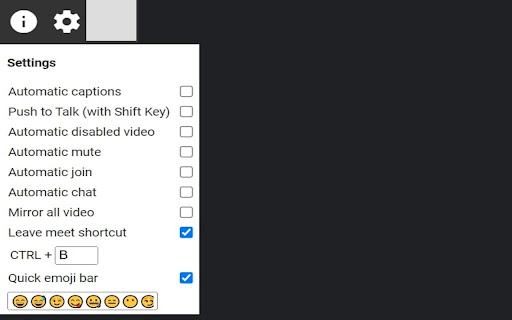
A collection of features to put a little extra Meat into your Google Meets. Google Meet Meat is a collection of features and enhancements aimed at Google Meet. Features: - Clicking extension icon prompts user to create new Meet. - Enable captions automatically upon joining the Meet. - Disable video automatically upon loading the Meet page. - Disable audio automatically upon loading the Meet page. - Automatically join the Meet. - Automatically open the chat once the Meet has joined. - Quick emoji bar, allowing the user to insert emojis into their chat. - Option to mirror all video inside the Meet. - Keyboard shortcut (CTRL + key) to leave the Meet. -Push to Talk (using the Shift key) If you have feedback (issues, feature requests), please email gmeetmeat@gmail.com. This extension is provided free of charge, however we do use an addon called Arc in order to monetize our content. Arc loads content from people's devices running the addon instead of from slower servers, creating a faster Internet. People running the extension contribute a little bandwidth to the Arc network, allowing us to earn money and continue providing and developing this extension for free. Arc does not impact your user experience, and you can opt out by going to arc.io/optOut.

Google Meet Party Button
Send your celebrate effects during the Google Meet Celebrate during your Google Meet meetings. Use this extension to have a party effect on the Google Meet screen when you wish to celebrate a major win such as closing a contract/closing a new client etc. Instead of having happy hour at the pub to celebrate, use our Party button instead to celebrate major wins. To begin using the extension, please install our extension. 2) Go to the Google Meet meeting 3) CLICK on the extension icon to activate our extension code. The party button will only appear when you click on the extension icon at the top right corner. The main reason for this => it helps protect user privacy as our code only runs when you press on the Google Meet Party extension icon. Disclaimer: Please note this extension is NOT made by Google and is made by an independent development team. All copyrights belong to their respective owners. Google doesn’t endorse or sponsor this Chrome extension. This is not owned by,it is not licensed by and is not a subsidiary of Google Inc.

Meet Chat Transcribe
Transcribe Google Meet Chats to a Google Doc. When engaged, chats will be saved to a Google doc in the Meet Chat Transcripts folder of your Google Drive.

Easy Mute for Google Meet
A simple extension for mute/unmute Google Meet calls from browser icon. Including options to by default turn microphone/camera off. Easy Mute for Google Meet One of the best extensions to work with Google Meet. ✨ FEATURES: ✅ Simply Mute/Unmute (🔇) Google Meet calls directly from the browser icon ✅ Shows how many calls are mute ✅ Shows how many calls are unmute ✅ Mute Microphone by default ✅ Off Camera by default ✅ Toggle mute/unmute Microphone using Spacebar ✅ Toggle on/off Camera using Spacebar 🛠️ TROUBLESHOOTING: - In case the extension doesn't work, try again after refreshing the page ➡ If you have just 1 tab with Google Meet Call (either the join screen or you have already joined the call): - Pressing the mute button from any tab will toggle mute ➡ If you have more than 1 tab with Google Meet Call and you haven’t joined any of them: - Pressing the mute button from a tab with the call will only toggle mute for that tab - Pressing the mute button from any other tab will toggle all of your calls (you haven’t joined any of them so doesn’t matter) ➡ If you have more than 1 tab with Google Meet Call and you have joined only 1 of them - Pressing the mute button from a tab with the call (joined or not joined yet) will only toggle mute for that tab - Pressing the mute button from any other tab will ONLY mute that one tab where you have joined the call ➡ If you have more than 1 tab with Google Meet Call and you have joined the call in more than 1 tab - Pressing the mute button from a tab with the call (joined or not joined yet) will only toggle mute for that tab - Pressing the mute button from any other tab will make my extension confused coz which active call it should toggle. So it will show you a Red Cross sign and ask you to mute the right one yourself. 🔴 WHAT IF I SEE A RED CROSS BADGE? - It means you are having multiple calls going on and so the system is confused about which call to toggle mute. 📝 PRIVACY POLICY: This extension does not track any user data, and therefore does not require a detailed privacy policy. If this is insufficient please email browserextension@010pixel.com If you click on a third party link, you will be directed to that third party's site. We strongly advise you to review the Privacy Policy of every site you visit. We have no control over and assume no responsibility for the content, privacy policies or practices of any third party sites or services. Support this extension: https://coffee.010pixel.com

Mute All for Google Meet™
Customise the settings and save your preferences for Google Meet. Use this software extension to save all your user settings for Google Meet. Here is a list of user settings you can customise using our extension - Auto Mute your microphone when you join a Google Meet call - Set Video to be off automatically when you join a Google Meet call - Auto Unmute, ensure other individuals in a call are not able to mute your microphone - Mute all participants, this is useful when you are in a presentation and want to be the only one speaking - Hide Mute popup, hides the "Are you speaking?" popup when you are muted. - Add in Emojis in the chat box as well - Use hotkeys for Google Meet Please note the mute all function only works if you are the host of the Google Meet call. Try using this extension today and upgrade the experience you have using Google Meet. Enjoy the power of customising your Google Meet experience.
