
lgdalbjhcglejepghfomkmngebhaelga
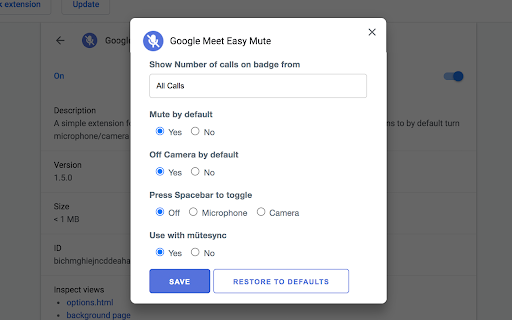


A simple extension for mute/unmute Google Meet calls from browser icon. Including options to by default turn microphone/camera off. Easy Mute for Google Meet One of the best extensions to work with Google Meet. ✨ FEATURES: ✅ Simply Mute/Unmute (🔇) Google Meet calls directly from the browser icon ✅ Shows how many calls are mute ✅ Shows how many calls are unmute ✅ Mute Microphone by default ✅ Off Camera by default ✅ Toggle mute/unmute Microphone using Spacebar ✅ Toggle on/off Camera using Spacebar 🛠️ TROUBLESHOOTING: - In case the extension doesn't work, try again after refreshing the page ➡ If you have just 1 tab with Google Meet Call (either the join screen or you have already joined the call): - Pressing the mute button from any tab will toggle mute ➡ If you have more than 1 tab with Google Meet Call and you haven’t joined any of them: - Pressing the mute button from a tab with the call will only toggle mute for that tab - Pressing the mute button from any other tab will toggle all of your calls (you haven’t joined any of them so doesn’t matter) ➡ If you have more than 1 tab with Google Meet Call and you have joined only 1 of them - Pressing the mute button from a tab with the call (joined or not joined yet) will only toggle mute for that tab - Pressing the mute button from any other tab will ONLY mute that one tab where you have joined the call ➡ If you have more than 1 tab with Google Meet Call and you have joined the call in more than 1 tab - Pressing the mute button from a tab with the call (joined or not joined yet) will only toggle mute for that tab - Pressing the mute button from any other tab will make my extension confused coz which active call it should toggle. So it will show you a Red Cross sign and ask you to mute the right one yourself. 🔴 WHAT IF I SEE A RED CROSS BADGE? - It means you are having multiple calls going on and so the system is confused about which call to toggle mute. 📝 PRIVACY POLICY: This extension does not track any user data, and therefore does not require a detailed privacy policy. If this is insufficient please email browserextension@010pixel.com If you click on a third party link, you will be directed to that third party's site. We strongly advise you to review the Privacy Policy of every site you visit. We have no control over and assume no responsibility for the content, privacy policies or practices of any third party sites or services. Support this extension: https://coffee.010pixel.com

Call Timer for Meet
This extension adds a timer to your Google Meet calls with customizable time limits and alerts. ═══════════════════════════════════════════════════════ CALL TIMER FOR MEET ═══════════════════════════════════════════════════════ Track your Google Meet call duration with a sleek timer. Set time limits, get alerts, and view total call time automatically. Call Timer for Meet helps you stay on track during your Google Meet calls with a clean, unobtrusive timer that integrates seamlessly into the Meet interface. ⏱️ Real-Time Timer • Automatically starts when you join a meeting • Displays elapsed time in an elegant floating button • Shows total call duration when you leave the meeting 🎯 Smart Time Management • Set custom time limits for your meetings • Visual red alert when time limit is reached • Optional sound notification to stay on schedule • Configure everything with a simple hover panel 🎨 Seamless Integration • Positioned next to Google Meet's native controls • Matches Google Meet's design language • Hover to access all settings and controls • No intrusive popups or distractions 🌍 Multi-Language Support • Available in 17 languages • Automatic language detection based on your browser • Supported: English, Spanish, French, German, Italian, Portuguese, Polish, Russian, Ukrainian, Chinese, Japanese, Dutch, Swedish, Danish, Catalan, and more ♿ Accessible Design • Full ARIA support for screen readers • Keyboard navigation friendly • High contrast colors for readability • Enhanced Performance: Uses modern browser APIs for better efficiency and lower CPU usage • Improved UI: Cleaner design with smooth animations and transitions • End Screen Display: Beautiful time summary on the "You left the meeting" screen • Sound Notifications: Optional audio alert when reaching your time limit • Better Integration: Timer positioned alongside Meet's native buttons for a cohesive experience • Bug Fixes: Resolved timer reset issues and improved state management This extension does NOT collect, store, or transmit any personal data. Everything runs locally in your browser. Your privacy is fully respected. If you notice any translation errors or would like to contribute a translation for a new language, please contact us through the support section. v4.0.1 • Fixed Windows compatibility issues with improved element detection • Enhanced Mac reliability and initialization timing • Increased wait time to 60 seconds for better compatibility • Implemented MutationObserver with fallback strategies • Added race condition protection and improved error handling • Code cleanup and improvements v4.0.0 • Major UI/UX redesign with native Google Meet integration • Added sound notification feature with user control • Implemented MutationObserver for better performance • Enhanced end-call screen with total time display • Fixed timer reset and state management bugs • Improved accessibility with ARIA attributes • Updated all translations and added Ukrainian support • Migrated from JavaScript-injected CSS to native CSS loading • Removed unnecessary permissions for better security v3.0.1 • Added timer position validation on screen resize v3.0.0 • Updated styles for new Google Meet interface • Added draggable timer functionality • Added reset timer and reset position buttons v1.0.4 - v1.0.0 • Initial release with basic timer functionality • Turn on/off timer feature • Red alert when exceeding 45 minutes • Display total call time on call end Enjoying the extension? Please leave a review - it helps other users discover it!

Mute Tab
Restores the 'Mute Tab' functionality of versions prior to Chrome 71. Chrome 71 removed the flag that enables per-tab audio muting. This extension allows you to mute individual tabs by a new context menu option or interacting with the extension icon.

Google Meet Auto Admit
Automatically click the "Admit" button when a join request comes in from external guests. Please disable the extension in chrome://extensions when you want to disable the behavior.

Auto Admit for Google Meet
This extension allows you to automatically approve join requests from external guests for Google Meet and hangouts meet. By installing this extension in Google Chrome, when you are inside the Google meet rooms, it will automatically allow external guests to join the Google Meet call by clicking the admit button on the popup. This software extension is very useful when you need to have a call with users on google hangouts meet who are not part of your company. It helps save you from having to accept every external guest manually as this is done automatically by the software extension. To begin using our software extension for google meet app, here are the steps you need to follow. 1) Install our software Auto Admit for Google Meet 2) Go to the Google Meet website and click on the software extension icon 3) Our software will begin working and will automatically accept external guests once you click on our extension icon If you have any questions about our software which works for google video conference, please contact us with your query. Updated so there is a button on the bottom right corner of your Google Meet call, so you can activate/switch off the auto admission feature. Fixed a bug where the extension was not working if your default language was not english. Feature was not working due to an upgrade inside Google Meet, updated the extension so the auto admit feature works once more. Disclaimer: Please note this extension is NOT made by Google and is made by an independent development team. All copyrights belong to their respective owners. Google doesn’t endorse or sponsor this Chrome extension. Auto Admit for Google Meet is not owned by,it is not licensed by and is not a subsidiary of Google Inc.
