
bfnkoiobloacajlibohhniedpcjibnmm
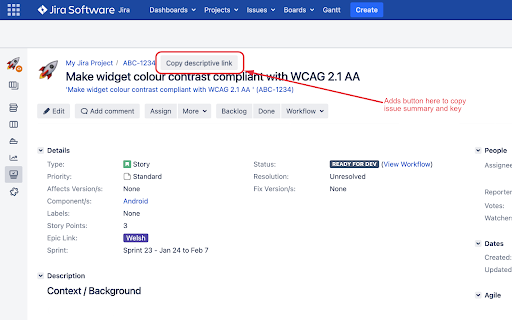
Easily copy an issue's name & key. Paste as a link into Slack, Teams, email... Easy to find later. Not an official Jira extension. For Jira Server (self-hosted, not Jira Cloud). Adds a button to the issue (story) details view to copy a link to that issue. Ideal for pasting into Slack, Teams, or email etc. The link includes the issue name (summary) and key, so you can see at a glance which issue it is. Also means that you can easily search through your messages by issue key to find all references to that issue, even if the issue name has changed since the link was pasted. Works with Jira, but is not made, endorsed, or supported by Jira or Atlassian.

Ticket Summary for Jira
This extension grabs the ticket key, title, and link from Jira and formats it into a one-line summary - ready to copy and paste anywhere. Works on Jira pages with this URL format: org_name.atlassian.net/browse/TICKET-KEY That’s it. No setup, just click and copy.

Add Copy Button to Jira Software
This is an extension that adds a copy button to each screen for "Issue Title", "URL", "Issue ID", etc. in Jira Software. This is an extension that adds a copy button to each screen for "Issue Title", "URL", "Issue ID", etc. in Jira Software. ・Issue Details Screen ・Board's "Active Sprint" screen ・Board's "Backlog" screen

Better Issue Link for Jira - Smart Copy with Templates
Enhance Jira's copy link functionality with customizable HTML and Markdown templates, perfect for Slack and documentation. 🔗 Transform Your Jira Links into Smart, Readable References! Tired of manually formatting Jira issue links for different platforms? Better Issue Link for Jira is your solution! With just one click, get perfectly formatted links that include both the issue key and summary. ✨ Key Features: • One-Click Wonder: Copy both issue ID and summary instantly • Dual Format Support: Get HTML (perfect for Slack!) and Markdown formats simultaneously • Custom Templates: Make your links look exactly how you want them • Live Preview: See how your customized links will look before saving • Works Everywhere: Compatible with all Atlassian Cloud instances 🎯 Perfect for: • Development teams using Slack • Technical writers maintaining documentation • Project managers sharing updates • Anyone who wants to share Jira issues more effectively 💡 Pro tip: Customize your templates in the options page to match your team's style! No more copying and pasting multiple times or manually formatting links. Better Issue Link for Jira makes sharing Jira references a breeze! 🛡️ Privacy First: No data collection, no external services, works entirely in your browser. Made with ❤️ for the Jira community

Jira Snippet
Jira Snippet: Quick copy add-on for customizable issue data. Integrates with Jira Cloud on Chrome, Firefox, Edge. Makes it possible to copy the jira issue id + title with one button Jira Snippet is a browser extension that streamlines your Jira experience by allowing you to quickly copy issue information in a customizable format. It's easy to configure and enables you to choose what data you want to include when copying, such as issue title, ID, status, and more. The add-on integrates seamlessly with Jira Cloud and is compatible with Chrome, Firefox, and Edge browsers.
