
bfbebkpfgcidgpidfcbpihdlineclmck
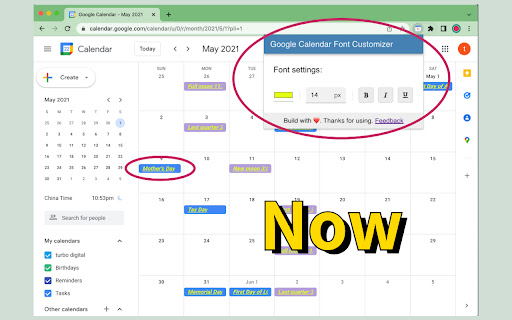

Font settings for Google Calendar. Let you set font style with ease. It modifies the font style of the Event / Task in Google Calendar grid view. You can set font color, font size, font bold, font italic and font underline styles, the setting would be rendered in real time. Once you set up your preferred styles, there is no need to set up repeatedly. The extension will remember your settings locally.

Custom Calendar Background
Modify the Google Calendar UI to include full-page background images or colors. Use your own images, or purchase from sets of provided themes. For support, see: https://github.com/padster/CalendarThemeExtension/issues **Note** Calendar recently added a dark mode. Support is coming, but for now if wanting to use the extension, it is recommended you use light mode, and instead set a 'dark overlay' in the extension's settings page.

G-calize
On Google Calendar... Sunday, Saturday, Today, and other weekdays, You can select the text color and background color. 1. Click the extension icon or select "G-calize" from the context menu to open the settings screen. 2. Set your preferred colors for each day of the week. 3. Optional: Select a holiday calendar and set holiday colors. * You must reload the calendar page once after installation. * Works with the URL calendar.google.com/calendar. Does not work if you use a Google Workspace custom address. ### 🆕 2024.12.05 Version 2.3.0 - Supports schedule display. - Added a function to display the settings screen in a smaller size only in month view. - Other fine-tuning. ### 2023.11.27 Version 2.1.0 - Added background color and border color to today's color. - Fixed an issue where colors were misaligned in week view. ### 2023.08.20 Version 2.0.0 - Changed the way to open the settings screen. - Renewed the settings screen. - Removed today's text color and background color, changed to accent color selection. - Fixed an issue where the holiday calendar could not be selected. ### 2018.02.02 Version 1.4.0 - Supports the new Google Calendar design.

Hue: More Colors for Google Calendar
A Chrome extension designed to enhance and personalize your Google Calendar experience. Currently allows you to have full control of your Google Calendar events with custom colors. Add new colors to your palette in the extensions popup menu to see more color options in your calendar! More features to come. Patch Notes: ========== Version 1.0.5 (1/19/2025) - Custom color now applies onto all repeated events - Storage usage now shown in settings - Fixed issue where user couldn't set custom colour when creating event - Fixed issue where color selection menu would all change to the same color Version 1.0.3 (3/10/2024) - Updated color overlay code to replace all found HTML colors of an event rather then query for specific class names: should reduce instances of event colors not changing.

Meeting Dolphin Google Calendar Tags
The best Google Calendar companion. Enables you to add tags to events, drive insights, search & filter and much more. Meeting Dolphin helps you maximise your Google Calendar experience and optimize it for work purposes. Use it to tag calendar events, organise your week, set Active Hours, and Remove timestamps, ... all in one extension. Learn more @ https://meetingdolphin.com/extension Our blog @ https://meetingdolphin.com/blog FEATURES 🏷️ Tagging for Google Calendar Drag and drop tags to categorize an event. This makes it easy to visualize your week. 📊 Time Analytics See your weekly or monthly time allocation by tag as you shift views. Export your tag data to CSV on the web app. 🔍 Search & Filter Search and filter either by Tags or by Text using the search bar. The matches are highlighted directly in your current calendar view. Set Work/Active Hours You never need to scroll up and down because Meeting Dolphin fixes your view to only your work/active hours. Hide timestamps: Clean up your events by removing the time stamps. At Meeting Dolphin, we believe that great software shouldn't come at a cost to privacy. Our extension securely stores your tags in the cloud so you can keep them backed up and accessible from anywhere you need them. Your data belongs to you, and we store it to provide value to you. Our extension uses read-only permissions for your calendar events. We do not store this data; its purpose is to programmatically link your tags to events. If you ever have questions about Meeting Dolphin's security practices or your data, reach out to us at security@meetingdolphin.com. Feel free to contact support at support@meetingdolphin.com and we'll reply as soon as possible.
