
bfanalaldfhlcadlkmjpbiaieophgpgn
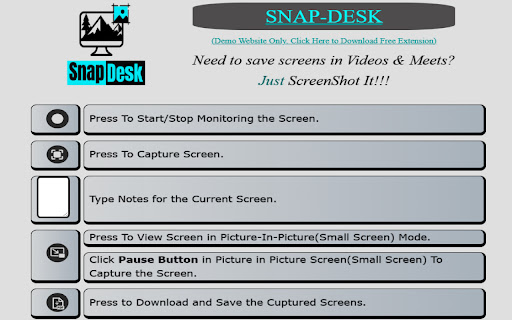


A powerful extension to capture screenshots of any desktop window or browser tab, Add text notes, and Save them as PDF files. Effortlessly capture screenshots and save them as PDF files with our simple yet powerful extension. Experience unparalleled convenience and productivity as you take control of your screen. 🤹 Enhanced Multitasking with Picture-in-Picture Mode. Boost your productivity with our extension's rich multitasking capabilities. Utilize the Picture-in-Picture mode to effortlessly view and capture your screen from any other open window. 🙋♂ Dedicated Help and Demo Site To ensure you make the most of our extension's capabilities, we provide a dedicated walkthrough cum demo-site so you can learn to use it in a snap. 📝 Clean, Minimal, and Focused Design Our extension occupies less than 5% of your screen space, presenting only the essential buttons and functionality without hiding or disturbing your content. Enjoy a clutter-free interface designed for optimal user experience. Rest assured, we prioritize your privacy. Our extension only requires the necessary Desktop Capture Permission to take screenshots. We do not monitor your tabs or browsing history. Don't just take our word for it – open your extension settings now, to see for yourself. 🚫 No Ads, No Redirects We've streamlined the entire process within the original page where the extension is used, eliminating any redirects to new pages or the need for additional applications. Enjoy a seamless and uninterrupted experience. About Developer: I am Tejas Jain, a passionate developer and a final year student at Delhi Technological University, New Delhi, India. I have developed this project with great enthusiasm and dedication to solve the problem of taking notes during meetings and online lectures, addressing the problem faced by myself and fellow students. Connect with me to explore more such exciting projects. Opportunities: I am actively looking for Work and Collaboration opportunities to further enhance my skills and contribute to exciting projects.

Take Webpage Screenshots Entirely - FireShot
Take FULL webpage screenshots. Capture, edit and save them to PDF/JPEG/GIF/PNG, upload, print, send to OneNote, clipboard or email. FireShot helps you: • Save receipts, tickets, and order confirmations • Capture long articles, ChatGPT, research, and documentation • Share design reviews, bug reports, and product ideas • Keep permanent records of web pages that may change or disappear 🔒 Screenshot is done instantly and stored locally. It never leaves your computer, so it's 100% safe for storing a sensitive information. FireShot can work offline. 🏆 Awarded as "The Best Free Google Chrome Extension (Full Page Screenshot Tool)" by PCMAG.COM 🛑 No spyware and unnecessary permissions - you're just in a couple of clicks away from an ideal screenshot. 1️⃣ Save screenshot to disk as PDF (with links), PNG, and JPEG 2️⃣ Capture entire page, visible part of the web page or just a selection 3️⃣ Automatically capture all tabs to PDF or image 🔥 (https://getfireshot.com/demos/capture-all-tabs.php) 4️⃣ Provide a list of URLs for an automatic batch capturing process 🔥 (https://getfireshot.com/demos/capture-website-urls.php) 5️⃣ Attach screenshot to Gmail 6️⃣ Copy screenshot to clipboard 7️⃣ Print ### An upgrade is available. Activate it directly from the menu and: ✓ PDF with direct links and text, can be saved as a single page or split to pages ✓ Capture specific elements, such as scrolling areas on web pages (https://getfireshot.com/selection.php) ✓ Capture all tabs in one click and save to single PDF (https://getfireshot.com/demos/capture-all-tabs.php) ✓ Edit: crop, resize, add text and arrow annotations, blur areas and apply other effects ✓ Send to OneNote (Pro version) ✓ Save captures to disk as PNG, GIF, JPEG, BMP ✓ Upload to Twitter, ImageShack, Flickr, EasyCaptures, custom FTP or HTTP servers ✓ Copy to clipboard ✓ Print ✓ E-Mail ✓ Export captures to external editor ✓ Add page information to screenshot (URL, title, time, domain, etc)

Screen Capture as PDF
Smart screen capture as pdf, save screenshot as pdf and convert screenshot to pdf for work, study and business in one click. 🖨️ Screen capture as pdf — efficient tool for saving digital documents Screen capture as pdf is a powerful Chrome extension helping you instantly save any webpage. It turns web content into professional documents without external converters. Perfect for browsing news or saving receipts. If you struggle with messy image files, this pdf screen capture utility streamlines your workflow. Create pdf from screen capture in a single click. No more pasting images—simply grab and store. Unlike image tools, this focuses on documents, maintaining high quality. It is the most convenient method to convert screenshot to pdf immediately. We handle conversion in the background, delivering a ready-to-use file. ➤ Instant screen capture as pdf: Record visible parts into documents. ➤ One-click functionality: Save screenshot as pdf without menus. ➤ Automatic conversion: Lets you convert files automatically. ➤ High-quality output: Ensures your screen capture pdf files are clear. ➤ Lightweight: No slowdown during the operation. ➤ Offline capability: Works without internet to create pdf from screen capture. ➤ Smart formatting: Preserves layout when you process pages. It is the global standard. Using this tool ensures compatibility. When you use it, you get a file easy to share or archive. Images lose quality, but a pdf screenshot remains consistent. Sending a file looks formal. When you save pages, you create a digital paper trail easier to organize. 1. Education: Save notes for lectures and study materials. 2. Business: Use the extension for saving invoices. 3. Design: Quickly grab layouts to share for feedback. 4. Archiving: Save interesting articles using screen capture as pdf. 5. Legal: Collect evidence or screenshot of pdf documents. 6. Shopping: Keep records of purchases by doing a quick snapshot. 1️⃣ Navigate to the page you want to save. 2️⃣ Click the icon to activate screen capture to pdf mode. 3️⃣ Select the specific area or full screen. 4️⃣ The tool will create pdf from screen capture. 5️⃣ Download your file instantly. This eliminates third-party software. It is the definitive answer to "how to save a screenshot as a pdf" without hassle. The engine behind the extension creates optimized files retaining detail. It is the ideal screenshot pdf tool for daily use. Whether you need to screen shot pdf of a dashboard or text, the result is perfect. The extension supports dynamic pages, ensuring the generated file looks like the web page. 🔒 Privacy and Security The extension operates locally. We do not upload your data. When you convert files, it happens entirely on your device. This privacy-focused approach ensures safety when you save documents. We do not track browsing history. ❓ How to save a screenshot as a pdf quickly? 💡 Click the icon. The function triggers immediately. ❓ Can I use this for full-page saving? 💡 Yes, the tool supports various modes for exact output. ❓ Does it work on all websites? 💡 Compatible with most sites to create pdf from screen capture anywhere. ❓ Is quality good for printing? 💡 Yes, when you save screenshot as pdf, resolution is optimized. ❓ How do I share files? 💡 Once you generate a document, it is ready to email. ❓ Do I need internet? 💡 No, the core functionality works offline. • Students: Organizing materials with digital tools. • Managers: Archiving data using efficient tools. • Designers: Keeping references with clear image files. • General Users: Anyone wanting to save screen as pdf. Switching tools is time-consuming. This extension integrates conversion into the process. You no longer need external converters. With our tool, the capability is always there. The ability to digitize content changes web interaction. From saving receipts to archiving, the save a screenshot as a pdf feature is useful. We update the software to support new standards. If you need to print screen to pdf, this extension is your reliable partner. Install the extension today. Experience the convenience of a dedicated utility. Transform how you save information with modern technology. Join users who trust our tool to convert screenshot to pdf.

Handy Screenshot - Full Page Screen Capture
Take screenshots of web pages with ease. Capture, edit, annotate and save them as PNG / JPG / WEBP formats. An easy, free and full-featured screenshot tool that lets you screen capture, annotate and edit screenshot. Full page screen capture supported, as well as capturing entire display. We try to make it super easy for you to capture viewport, capture entire page, crop, annotate, save as PNG / JPG / WEBP / PDF, copy to clipboard. 🤩 You will love: ◉ Easy and user-friendly interface ◉ Custom keyboard Shortcuts: separate shortcuts for 1. capture full page 2. capture visible area 3. select area ◉ Capture screenshot for selected area / visible area / whole page ◉ Annotate your screenshot with our powerful yet the most easy-to-use built-in image editor ◉ Name your screenshot before saving as best quality, high-resolution screenshots, PDF, PNG, JPG, and WEBP formats ◉ Upload your screenshots to Google Drive, and it remembers the folders you've used ✨ Features of our built-in screenshot editor: ◉ Cropping ◉ Texts ◉ Shapes: arrows, rectangles, circles ◉ Free draw: pencil or highligher ◉ Blur: to hide sensitive info on screen ◉ Counters: for steps / order ◉ Magnifier: highlight details with zoomed-in callouts ◉ Beautiful gradient background: to take your screenshots to next level 🚀 PRO Features (New) PRO license is a one-time purchase - no subscription. It unlocks more control and a faster editing workflow: ◉ Annotation presets: save and reuse your favorite styles (colors, shapes, crop, background) ◉ Layer manager: easily organize, reorder, and manage elements on your screenshot ◉ History (undo & redo): go back and forth through your edits with confidence ◉ Fixed-size capture: capture screenshots with precise, consistent dimensions One more thing: * The other products made by ohhandy.com are also listed in a dropdown in screenshot editor page (editor.html)

Annotation, Full Page Capture & Snipping Tool
Instacap is a screenshot editor & annotation tool for full page screen capture, pdf annotation & more—for instant visual feedback Screenshot editor & annotation tool for fast & simple visual feedback. Use Instacap’s annotation & snipping tool for full page screen captures, pdf annotation and visual comments for clear in-context discussions. ⚡️ Annotation Tool & Screenshot Editor—annotate and edit screenshots by adding text, circle, arrow, drawing and more via a simple UI ⚡️ Full Page Screen Capture & Snipping Tool—Capture a scrolling full page screenshot or crop the image to any size ⚡️ Screenshot Blur Tool— Add image blur to block out parts of the screen capture don't want to share securely and easily ⚡️ Instant Visual Feedback—Instantly share a link to your screen capture for quick visual feedback and annotations ⚡️ Instant Loom Video/Audio —Instantly share a screen recording or video for quick visual feedback and annotations ⚡️ PDF Annotation—Upload and annotate PDF's, images and other files for clear in-context discussions
